Ghostty 1.4 introduces major enhancements to cross-platform terminal emulation and system integration

The release of Ghostty 1.4 marks a significant milestone in the development of the terminal emulator project founded by HashiCorp co-founder Mitchell Hashimoto. With a massive collaborative effort involving over 170 contributors and more than 2,800 commits, this version elevates the terminal’s performance, security, and integration capabilities across Linux, macOS, and beyond. As a high-performance terminal emulator that utilizes GPU acceleration while maintaining a native look and feel on each operating system, Ghostty has quickly gained traction, reporting millions of daily users. The project’s success is further cemented by the widespread adoption of libghostty-vt, its C-based virtual terminal emulator library, which is increasingly utilized by other terminal projects seeking robust, reliable terminal emulation.
Chronology and Development Trajectory
The journey of Ghostty began as a personal project aimed at solving the fragmented experience of using terminals across different operating systems. Unlike many emulators that force a uniform aesthetic, Ghostty was designed to feel native—using GTK for Linux and Swift for macOS. Over the past year, the project has matured from an experimental build into a production-ready tool.
The transition from version 1.3 to 1.4 represents one of the most substantial updates in the project’s history. During this cycle, developers prioritized refining the rendering pipeline, improving Wayland compositor support, and addressing a backlog of security vulnerabilities. The release cycle was heavily focused on stabilizing the GTK implementation, ensuring that the terminal could handle the complexities of modern Linux desktop environments.
Technical Deep Dive: Advancements in Linux
For Linux users, the v1.4 release introduces several critical improvements aimed at display quality and window management. A primary point of focus was the resolution of blurry text issues when using fractional scaling (such as 125% or 150%). These issues, often stemming from upstream changes in display server protocols, were rectified to ensure sharp, legible text across high-DPI displays. Additionally, the integration of a rebuilt, triple-buffered renderer is a technical win for users, significantly reducing screen tearing during high-frequency terminal activity.
Window management has also seen a functional upgrade. The ability to drag and drop split windows—a feature previously exclusive to the macOS version—is now available on Linux. This allows users to move a terminal pane into any other tab or window while preserving its working directory and active process, a workflow optimization that brings parity to the cross-platform experience.
For those running Wayland, Ghostty 1.4 introduces a more standardized approach to global keybindings. By utilizing the vicinae-hotkey-v1 protocol on modern compositors like Hyprland (version 0.56 and newer), the terminal offers a more consistent experience. For compositors not yet supporting the protocol, the application relies on the desktop portal, ensuring that hotkey registration remains reliable across a wider range of Linux distributions. Furthermore, Niri window manager users now benefit from native background blur support, adding to the visual polish of the terminal.
Memory Optimization and Performance
One of the most impressive feats in the 1.4 release is the optimization of scrollback memory usage. As terminals often handle massive logs, memory bloat is a common concern. The developers implemented a compression algorithm for off-screen scrollback that activates while the terminal is idle. This change results in a 70% to 90% reduction in memory consumption for the scrollback buffer.
Leveraging this efficiency, the team increased the default scrollback limit from 10MB to 50MB. This allows users to retain significantly more terminal history without incurring the performance penalties traditionally associated with large buffers. This balance of higher functionality and lower resource overhead is a hallmark of the project’s recent engineering direction.
Broader Ecosystem Implications
Ghostty’s commitment to the Kitty graphics protocol is a major development for terminal standards. By implementing the full protocol, Ghostty enables high-performance image rendering and complex terminal UI elements that were previously limited to the Kitty terminal. The project asserts that no other terminal emulator besides Kitty has achieved this level of compliance, positioning Ghostty as a primary alternative for users who require advanced graphics capabilities within their CLI environment.

The introduction of the ghostty +ssh command is another strategic move. By automating the installation of necessary terminfo files on remote hosts, the project removes a persistent headache for sysadmins who frequently connect to servers where terminal capabilities might not match their local environment. This "batteries-included" approach to SSH connectivity demonstrates an understanding of the day-to-day friction points faced by developers.
Security and Platform-Specific Adjustments
The 1.4 release addresses ten distinct security issues, a testament to the rigorous auditing processes the project has undergone as it nears broader adoption. Four of these vulnerabilities were specific to macOS, while others were cross-platform, including a critical patch for a paste protection vulnerability and a fix for a directory-naming exploit that could trigger unwanted escape sequences, potentially allowing a malicious actor to manipulate a user’s clipboard via Zsh integration.
Platform support remains a nuanced area for the project. While macOS users receive full official binary support, the Linux landscape remains decentralized. Ghostty relies on distributions—including Arch Linux, NixOS, Alpine, Gentoo, and openSUSE—to manage their own packages. Ubuntu 24.04 LTS users may face compatibility hurdles, as the new release mandates GTK 4.18 and libadwaita 1.7. Users on older base systems are encouraged to utilize older builds or build from source to bypass these dependency requirements.
Perhaps the most significant strategic shift is the decision to abandon GUI development for Windows. While the underlying libghostty and libghostty-vt libraries will continue to be maintained for Windows, the project is officially offloading the responsibility of creating a full terminal GUI to the community or downstream developers. This allows the core team to focus their limited resources on the Linux and macOS platforms, where the majority of their user base resides.
Future Outlook and Technical Analysis
The trajectory of Ghostty suggests a move toward becoming the "standard" high-performance terminal for power users. Its reliance on the Zig programming language for its build system and its architectural choice to modularize the virtual terminal logic into libghostty-vt provide a solid foundation for long-term maintainability.
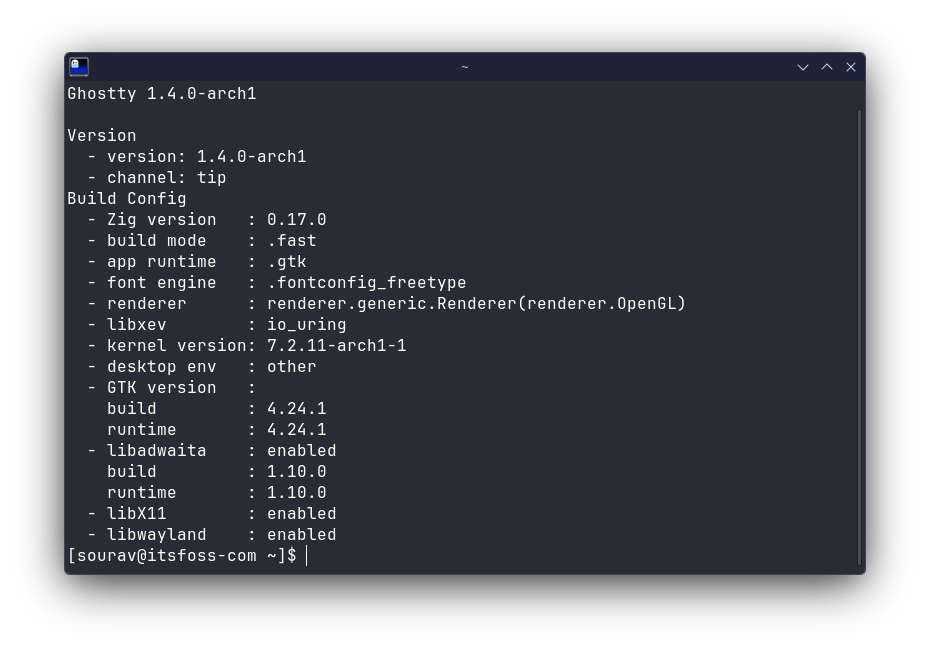
The project’s refusal to sacrifice native performance for the sake of a "one size fits all" code base—evidenced by the use of Swift on macOS and GTK on Linux—is a design philosophy that resonates with users who value both speed and system integration. However, the requirement for very recent versions of GNOME libraries (GTK 4.18) signals a shift toward a "bleeding edge" model for Linux support. This may pose challenges for enterprise environments or users on older LTS distributions, effectively creating a divide between those who can leverage the latest features and those who must remain on legacy, stable versions.
As the project continues to evolve, the focus on the Kitty graphics protocol and cross-platform terminal standardization positions Ghostty as a significant player in the open-source software ecosystem. With over 170 contributors, the community-driven nature of the project provides it with a level of resilience that few commercial emulators can claim. Whether it can maintain this momentum while navigating the complexities of different Linux desktop environments and the evolving requirements of macOS will be the next major test for the project. For now, v1.4 stands as a comprehensive update that rewards users with a faster, more secure, and highly efficient terminal experience.