Setting up a new computer is traditionally a moment of unadulterated technological bliss, characterized by the absence of accumulated digital clutter, unused applications, and the sluggish performance that plagues older hardware. However, transitioning to a fresh machine—particularly within the macOS ecosystem—frequently introduces compatibility hurdles stemming from missing software components or unfamiliar default security configurations. Among the most frustrating impediments reported by users migrating to modern Apple Silicon MacBooks is an abrupt playback failure on streaming platforms, most notably marked by the error message: This video format is not supported when attempting to access YouTube TV.
For cord-cutters and live television enthusiasts, encountering this barrier immediately disrupts access to scheduled broadcasts, news, and sports. While the error implies a fundamental incompatibility between the operating system, browser, and the video stream, the root cause is typically far simpler: a disabled Digital Rights Management (DRM) module required by premium content providers to protect copyrighted material. Fortunately, resolving this issue does not require manually installing legacy codecs or altering system-level audio-video frameworks. Instead, the solution lies entirely within the configuration settings of the user’s web browser, specifically concerning Google’s Widevine Content Decryption Module (CDM).
Understanding the DRM Landscape in Modern Web Browsers
To comprehend why a brand-new MacBook fails to stream subscription television services out of the box, one must examine the mechanisms governing modern web video delivery. Premium streaming services such as Netflix, Amazon Prime Video, Disney+, and YouTube TV rely heavily on encrypted media extensions (EME) and proprietary Content Decryption Modules to prevent unauthorized copying, distribution, and piracy of copyrighted broadcasts.
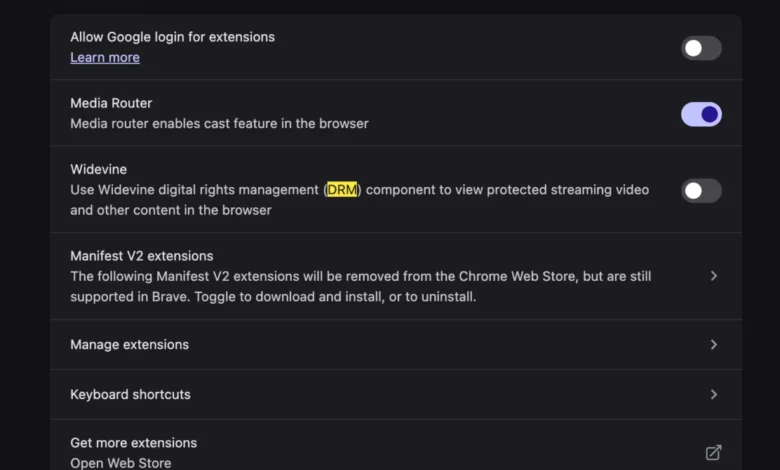
Google Widevine is one of the industry’s most widely adopted DRM technologies. It is deployed across major browsers—including Google Chrome, Microsoft Edge, Brave, and Vivaldi—to securely decrypt and render protected video streams directly within the HTML5 video player. When a user launches a fresh browser installation on a new computer, certain security protocols or privacy enhancements may default to disabling plugin modules like Widevine to minimize background processes or attack surfaces.
Consequently, when YouTube TV attempts to handshake with the browser to stream live television, the platform checks for an active, authorized CDM. If the Widevine module is disabled, missing, or blocked from executing automatically, the browser cannot decrypt the incoming media stream. Rather than detailing the complex DRM handshake failure, the streaming interface defaults to a generic and often misleading notification: This video format is not supported. This messaging frequently leads users to mistakenly believe their new hardware lacks the necessary video decoding chips, whereas the hardware is fully capable, and the limitation is purely software-based.

Chronology of the Transition and Initial User Friction
The friction associated with browser-based DRM enforcement has evolved alongside the transition from legacy Adobe Flash Player plugins to native HTML5 streaming. In the early days of web video, users were regularly forced to download and install third-party codecs, audio wrappers, and binary plugins to view specific media formats. While modern web standards largely eliminated the need for manual codec installations, the introduction of robust DRM frameworks reintroduced a layer of configuration dependency.
When consumers unbox a new MacBook powered by Apple’s M-series processors (M1, M2, M3, or M4), they typically install their preferred browser from scratch. During this initial setup phase, automated configuration scripts or privacy-centric browser forks may prompt users to restrict background components. In other instances, enterprise deployment policies or strict default security settings in browsers like Chromium-based alternatives automatically toggle off Widevine CDM updates.
When users immediately navigate to high-demand streaming portals like YouTube TV—often to watch live events, sports championships, or nightly news—the absence of an active decryption module triggers the playback error. Industry support forums and customer service channels regularly experience spikes in inquiries regarding unsupported video formats following major consumer electronics purchasing cycles, such as the back-to-school season and year-end holidays.
Step-by-Step Resolution: Enabling Widevine for Seamless Playback
Eliminating the restriction and restoring full functionality to YouTube TV requires locating the relevant security or plugin setting within the browser preferences. While user interfaces vary slightly depending on whether the consumer is utilizing Google Chrome, Microsoft Edge, or another Chromium-based browser, the underlying mechanism remains consistent.
To re-enable the necessary decryption capabilities, users must navigate to the browser’s settings menu, locate the privacy and security section, and access the submenu dedicated to site settings or additional content permissions. Within these parameters, users will typically find an option labeled Protected Content or Component Settings. Ensuring that the browser is permitted to run protected content and automatically download and execute the Widevine Content Decryption Module resolves the handshake failure.

Once the setting is toggled to active, the browser may require a brief restart to initialize the newly permitted module. Upon relaunching the browser and navigating back to YouTube TV, the platform successfully verifies the decryption environment, allowing the live video feed to load without further interruption. This streamlined approach bypasses the cumbersome troubleshooting steps of the past, proving that modern browser architecture can resolve complex media delivery barriers through simple configuration adjustments.
Industry Implications and the Future of Browser-Based Media Delivery
The prevalence of errors such as the YouTube TV format notification highlights the ongoing tension between rigorous digital content protection and user experience friction. As media consumption shifts overwhelmingly away from traditional cable television and dedicated desktop applications toward browser-agnostic streaming portals, the reliance on standardized DRM systems becomes absolute.
Content providers face mounting pressure to deliver high-definition and 4K live streams across a fractured ecosystem of operating systems, hardware architectures, and web browsers. For platform developers at Google, Apple, and independent browser projects, the challenge lies in balancing stringent security mandates with seamless, out-of-the-box usability. When default settings overly prioritize aggressive sandboxing at the expense of standard media decryption modules, everyday consumers experience unnecessary frustration during device migrations.
Furthermore, as privacy advocates scrutinize the presence of proprietary tracking and DRM modules embedded within open-source browser projects, the debate over content protection transparency continues to grow. Widevine, being a closed-source component controlled by Google, occasionally draws criticism from privacy purists who prefer to keep such modules disabled by default. However, for mainstream consumers seeking unhindered access to subscription entertainment, understanding the function of these modules remains an essential component of modern digital literacy.
Ultimately, while encountering error messages on a newly purchased, high-performance machine can feel counterintuitive, the underlying causes are increasingly transparent. By recognizing that modern video playback relies as heavily on secure decryption permissions as it does on raw hardware processing power, users can swiftly diagnose and resolve playback failures, ensuring their digital migration remains a smooth and productive experience.
Related posts: