Unlocking the Terminal: How Open Source Project Spiel Brings Presentations to the Command Line

The intersection of software development tools and presentation mediums has long been defined by heavy graphical user interfaces, ranging from corporate slide decks to complex web-based presentation frameworks. However, a niche yet highly innovative open-source project named Spiel has introduced an unconventional paradigm shift by allowing developers and system administrators to design, format, and deliver fully interactive slide presentations entirely within the computer terminal. Built upon the robust styling architecture of the popular Python Rich package, Spiel represents a fascinating exploration of command-line user interfaces (CLI), proving that engaging presentations do not inherently require traditional window managers or browser-based rendering engines.
Although the project’s official GitHub repository is currently archived—largely due to underlying dependencies tied to older iterations of the Textual framework that prevent straightforward upgrades—Spiel continues to serve as an inspiring reference point for terminal-based multimedia tooling. By leveraging modern Python libraries, developer JoshKarpel crafted a framework that bridges the gap between text-based console operations and visual storytelling. This retrospective examination explores the mechanics of Spiel, installation protocols, programmatic slide creation, and the broader implications of terminal-centric applications within the modern software development ecosystem.
The Genesis and Technical Architecture of Terminal Presentations
Command-line interfaces have historically been utilitarian environments reserved for text input, log monitoring, file management, and code compilation. While tools like tmux, vim, and various system monitoring dashboards have transformed the terminal into a visually rich workspace, delivering linear presentations has remained an outlier use case. Traditional slide generation tools rely on heavy assets, WYSIWYG editors, or Markdown-to-HTML engines compiled into browser slides.
Spiel disrupts this workflow by anchoring its rendering engine to the Python ecosystem, specifically utilizing the Rich package. Rich is widely celebrated within the Python community for its ability to render rich text, syntax-highlighted code blocks, tables, progress bars, and markdown directly into ANSI-supported terminal windows. By utilizing Rich as its foundational layer, Spiel abstracts away the complexities of coordinate positioning and color mapping, enabling developers to construct aesthetic slides using native Python functions and objects.
Despite its utility, the project’s archival status highlights the fragile nature of dependency chains in open-source software development. According to repository notes and community observations, Spiel was built around an older iteration of the Textual ecosystem. Because substantial architectural changes in subsequent versions of Textual rendered direct upgrades incompatible without a comprehensive rewrite, the author opted to archive the repository. Nevertheless, the existing codebase remains entirely functional, providing developers with a unique playground for terminal-based creativity.
Getting Started: Installation and Containerized Execution
For developers interested in exploring Spiel without modifying their local Python environments, the project offers a containerized execution path. By leveraging Docker, users can instantiate and run the application instantly without installing local dependencies or managing Python virtual environments. This approach aligns with modern containerization best practices, ensuring software isolation and cross-platform consistency.
To run Spiel instantly via Docker, users can execute the following command in their terminal interface:
docker run -it --rm ghcr.io/joshkarpel/spiel
This command pulls the pre-built container image from GitHub Container Registry and launches the interactive environment directly within the command shell.
However, for developers intending to author custom presentations, a local installation via the Python package manager (pip) is necessary. While packages can be installed globally, standard Python development protocols strongly recommend establishing an isolated virtual environment to prevent dependency conflicts with other system packages. The setup sequence can be executed through the following terminal instructions:
python -m venv spiel-env
source spiel-env/bin/activate
pip install spiel
Once the installation phase completes successfully, users can verify the integrity of the setup and test the rendering capabilities by invoking the built-in demonstration deck provided by the package:
spiel demo present
Successful execution of this command launches an interactive slide deck directly inside the terminal window, confirming that color schemes, key bindings, and rendering routines are operating correctly.
Programmatic Slide Creation and Workflow Mechanics
Unlike traditional graphical applications where slides are built via visual drag-and-drop interfaces, Spiel requires presentations to be authored programmatically using Python scripts. This code-first approach resonates deeply with developers, data scientists, and technical educators who prefer writing documentation and slides using familiar programming paradigms.
The core abstraction of Spiel revolves around the Deck object, which manages the collection of slides, and the Slide object, which encapsulates the content rendered during a presentation. Slides can be defined in two primary ways: utilizing Python decorators or constructing explicit slide instances programmatically.
Consider the following minimalist example of a single-slide presentation outlined in the official documentation:
from rich.console import RenderableType
from spiel import Deck, present

deck = Deck(name="Your Deck Name")

@deck.slide(title="Slide 1 Title")
def slide_1() -> RenderableType:
    return "Your content here!"

if __name__ == "__main__":
    present(__file__)
In this architecture, the @deck.slide decorator registers the Python function as an individual presentation slide, automatically pulling the specified title and executing the function body to retrieve the renderable content. When the script is executed directly via Python, the present() function intercepts the script execution and opens the interactive terminal viewer.
For more complex presentations requiring dynamic content generation, custom layouts, or specialized styling, developers can instantiate slides programmatically using helper functions. The following complete example demonstrates how to build a multi-slide deck with customized text alignment, styling parameters, and color palettes:
from rich.align import Align
from rich.console import RenderableType
from rich.style import Style
from rich.text import Text
from spiel import Deck, Slide, present

def make_slide(
    title_prefix: str,
    text: Text,
) -> Slide:
    def content() -> RenderableType:
        return Align(text, align="center", vertical="middle")
    return Slide(title=f"title_prefix Slide", content=content)

deck = Deck("Test Deck")

title_slide = make_slide(
    title_prefix="First",
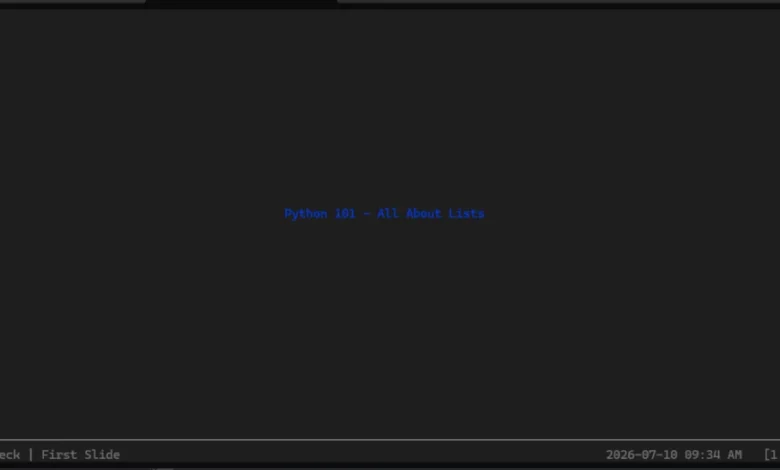
    text=Text("Python 101 - All About Lists", style=Style(color="blue"))
)

intro_slide = make_slide(
    title_prefix="Second",
    text=Text("A Python list is mutable and ordered", style=Style(color="red"))
)

deck.add_slides(title_slide, intro_slide)

if __name__ == "__main__":
    present(__file__)
When this script is executed in an ANSI-compatible terminal, Spiel generates a centered layout featuring styled text strings. Navigation through the presentation deck is handled intuitively via standard keyboard input—specifically utilizing the left and right arrow keys to step backward and forward through the slide sequence. To terminate the presentation session and return to the standard command prompt, users simply input the standard interrupt signal (CTRL+C).
Broader Implications and the Evolution of Terminal Tools
While Spiel occupies a specialized, niche corner of the software tooling landscape, its existence highlights a broader cultural and technical movement within the developer community: the renaissance of command-line utilities. In recent years, tools like htop, btop, lazygit, and various terminal-based text editors have experienced surging popularity. Developers increasingly favor keyboard-driven workflows that eliminate the cognitive friction of context-switching between graphical web browsers, slide applications, and code editors.
The ability to write presentations directly inside a code editor—version-controlling slide text alongside source code, running syntax checks, and rendering output directly within a development container—offers distinct advantages for technical speakers and educators. Rather than exporting slides to PDF formats or managing proprietary file extensions, technical presentations become code artifacts themselves, subject to peer review, automated testing, and continuous integration pipelines.
The archival of Spiel underscores the precarious nature of maintaining open-source software, particularly when projects rely on fast-moving graphical framework dependencies like Textual. However, open-source projects rarely vanish entirely. The underlying design patterns, coupled with the robust capabilities of the Rich ecosystem, serve as an educational blueprint for developers seeking to build custom CLI applications. Whether future maintainers choose to fork the repository and update its underlying dependencies or developers build alternative presentation frameworks from scratch, Spiel remains a testament to the creativity and versatility inherent in modern software engineering.