Expanding Textual-Cogs: New Directory and Open File Dialogs Enhance Python Terminal User Interface Development

The landscape of Python Terminal User Interface (TUI) development has received a notable boost with the recent updates to textual-cogs, an open-source helper package designed to streamline the creation of command-line applications. Developed out of the author’s practical experiences while writing the comprehensive guidebook Creating TUI Applications with Textual and Python, textual-cogs aims to bridge a critical gap in the Textual ecosystem by providing a suite of pre-built, reusable dialogs and widgets. With the consecutive rollouts of versions 0.0.4 and 0.0.5, the package has introduced two fundamental components—an Open File Dialog and a Directory Dialog—significantly expanding the capabilities available to developers building modern, interactive terminal applications.
The evolution of textual-cogs reflects a broader trend within the Python software development community, where developers increasingly look to terminal-based interfaces as lightweight, highly efficient alternatives to traditional desktop GUI frameworks. As command-line applications grow in complexity, handling routine user interactions such as file selection and directory navigation becomes essential. Historically, developers using Textual—a rapid application development framework for Python that enables the creation of sophisticated user interfaces in the terminal—had to build custom file and directory pickers from scratch. The introduction of textual-cogs alleviates this developmental bottleneck, offering standardized UI elements that mimic the familiar functionality of long-standing desktop frameworks like wxPython.
Chronology of Recent Releases
The development trajectory of textual-cogs has accelerated following the foundational work on its parent book project. The recent release cycle highlights a focused effort to deliver essential file-system dialogs to the TUI developer community.
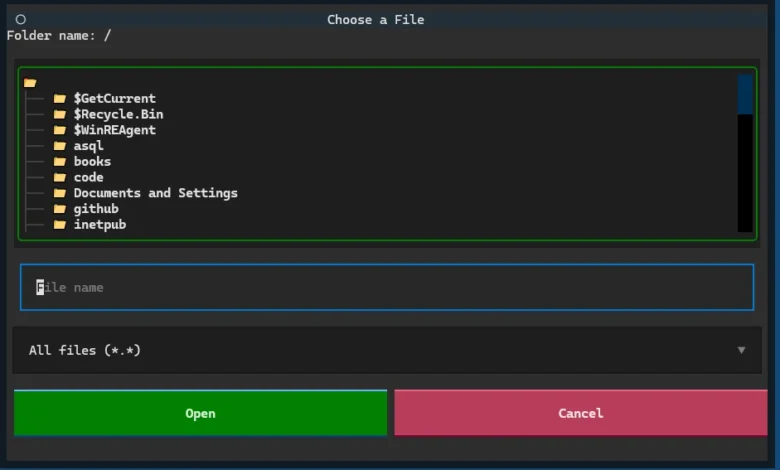
In version 0.0.4, released earlier in the month, the package introduced the long-awaited Open File Dialog. While textual-cogs already featured a save file dialog, the absence of its counterpart limited developers who needed to prompt users for existing files. The inclusion of the Open File Dialog in v0.0.4 resolved this parity issue, establishing a more complete file-management utility set within the library.
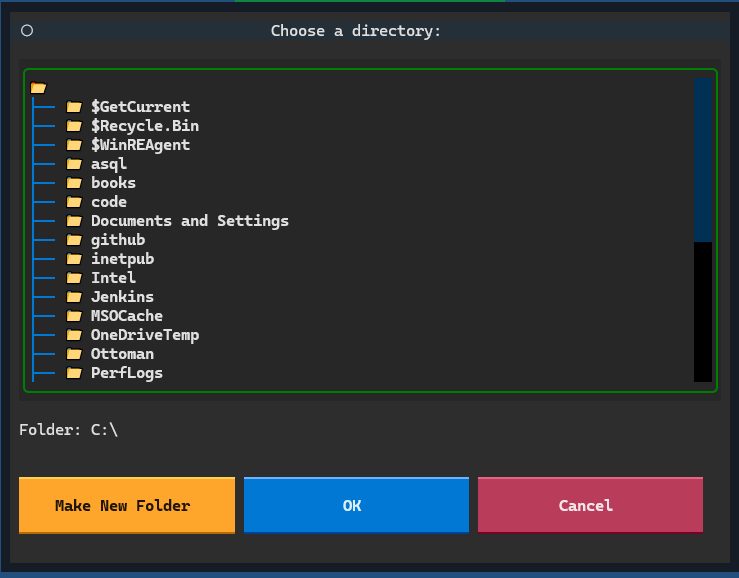
Shortly thereafter, version 0.0.5 brought the introduction of the Textual Directory Dialog. Drawing conceptual inspiration from desktop equivalents such as the wx.DirDialog found in wxPython, this new component presents users with a structured view of their directory hierarchy. Beyond simple navigation and selection, the directory dialog empowers users to create new folders directly from the terminal interface. This capability is vital for applications that require users to designate specific output directories or workspace folders without leaving the TUI environment.
Technical Overview of the New Dialogs
The architecture of textual-cogs is built on top of Textual, leveraging its reactive UI model and robust layout engines to render components seamlessly inside terminal windows.
The Directory Dialog (v0.0.5) provides a comprehensive interface for file-system traversal. When invoked, it queries the underlying operating system’s directory structure, rendering nodes in a clean, navigable format. Users can traverse nested folders using standard keyboard commands or mouse inputs, depending on terminal capabilities. Crucially, the inclusion of folder-creation functionality within the dialog interface ensures that workflows requiring dynamic directory generation—such as project initialization tools or backup utilities—can be executed smoothly within a purely text-based environment.
The Open File Dialog (v0.0.4) complements the existing save utilities by establishing a secure and intuitive mechanism for locating and selecting existing files. Designed to handle various file formats and filtering criteria, the dialog reduces the boilerplate code required by developers. Rather than implementing custom path-validation logic and tree views for every new project, developers can integrate the pre-built Open File Dialog with minimal configuration.
Installation and Accessibility
To foster widespread adoption and ease of integration into existing Python pipelines, textual-cogs is distributed as an open-source package compatible with standard Python package management tools. Developers can install the latest versions directly from the Python Package Index (PyPI) using either pip or the modern uv package manager.
The standard installation command is executed as follows:
python -m pip install textual-cogs
By ensuring compatibility with standard packaging ecosystems, the maintainers have minimized friction for developers looking to test or deploy the library in production environments. The source code, documentation, and issue tracking are maintained on public code-sharing platforms, inviting community contributions, bug reports, and feature requests.
Broader Impact and Implications for TUI Development
The growth of packages like textual-cogs points to a maturation of the Python terminal application ecosystem. For many years, graphical user interface (GUI) frameworks dominated desktop application development, while command-line tools were largely relegated to simple scripts, automation tasks, or administrative utilities. However, the rise of advanced TUI frameworks has redefined what is possible inside a terminal emulator.
Modern developers frequently operate in cloud-based development environments, Docker containers, and SSH sessions where graphical displays are either unavailable, impractical, or sluggish. In these contexts, TUI applications offer a compelling combination of speed, remote accessibility, and rich interactivity. Frameworks like Textual have proven that terminal applications can look and feel as polished as traditional desktop software.
Despite these advancements, the TUI ecosystem has historically lacked the rich component libraries that have supported GUI development for decades. In traditional desktop environments, developers take for granted the availability of standard dialog boxes for opening files, selecting colors, picking dates, and managing directories. The absence of these standardized components in early TUI frameworks often meant that developers spent excessive time reinventing basic UI patterns.
Libraries such as textual-cogs directly address this ecosystem gap. By codifying common UI patterns—such as directory pickers and file dialogs—into reusable packages, the project reduces development time and lowers the barrier to entry for engineers building terminal-based tools. Furthermore, standardization improves the end-user experience. When multiple CLI and TUI applications adopt similar design patterns and dialog layouts, users experience a consistent interface across different tools, reducing cognitive load and improving workflow efficiency.
Future Outlook
While textual-cogs currently focuses heavily on dialog components—including file saving, file opening, and directory selection—the roadmap for the project extends further. The maintainer has outlined plans to expand the package beyond dialogs to include a broader collection of general-purpose widgets tailored for Textual applications.
As the Textual framework itself continues to evolve with performance enhancements, improved styling capabilities, and expanded cross-platform support, companion libraries like textual-cogs will play a critical role in the community. By providing the building blocks necessary for complex application design, these helper packages enable developers to focus on core business logic rather than low-level UI plumbing.
The release of versions 0.0.4 and 0.0.5 marks an important incremental step for textual-cogs. As the library matures and accumulates a wider array of widgets and dialogs, it is poised to become an indispensable resource for Python developers seeking to harness the full potential of terminal user interfaces.