Accelerating CI/CD Recovery: Automating Root Cause Analysis with AWS DevOps Agent and GitHub Integration


Modern software engineering teams face an increasingly complex operational landscape where the velocity of continuous integration and continuous delivery (CI/CD) pipelines often outpaces the ability of human operators to diagnose failures. When a deployment fails, the traditional response involves a fragmented, time-intensive process: engineers must manually toggle between GitHub commit histories, AWS CodePipeline execution logs, and Amazon CloudWatch telemetry to isolate the point of failure. This context-switching is more than a minor annoyance; it is a significant bottleneck that inflates the Mean Time to Resolution (MTTR), directly impacting the organization’s ability to deliver value to end-users.
The introduction of the AWS DevOps Agent offers a transformative approach to this challenge. By providing an automated mechanism to correlate deployment failures with specific code commits and providing actionable remediation guidance, the agent shifts the operational paradigm from manual firefighting to automated, intelligent incident investigation.
The Anatomy of a Modern Pipeline Failure
In a typical cloud-native architecture, a deployment failure is rarely isolated to a single component. A failure in an AWS CodePipeline execution might be triggered by a misconfigured environmental variable, a breaking dependency change, or an infrastructure-as-code (IaC) drift. When these events occur, they often trigger a cascade of 5XX errors, latency spikes, or failed unit tests.
Historically, SRE teams have been burdened with "triage fatigue." Studies in DevOps performance metrics suggest that engineers spend, on average, 30% to 40% of their time troubleshooting environment-specific issues rather than building features. In a multi-service architecture, where a single repository might influence dozens of microservices, tracing a specific commit to a downstream failure can take hours. This latency is exacerbated when logs are siloed across different AWS services and GitHub repositories.
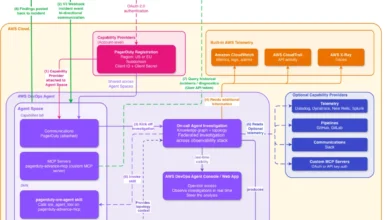
The AWS DevOps Agent effectively bridges these silos. By integrating directly with the CI/CD ecosystem, it acts as a central nervous system for pipeline health. When a CloudWatch alarm triggers due to a detected anomaly—such as a deployment rollback or a threshold breach—the agent intercepts the metadata, correlates it with the latest GitHub pull request or commit, and presents a diagnostic report to the engineer.
Chronology of an Automated Investigation
To understand the operational impact, one must look at the lifecycle of an incident handled by the agent. Under the previous manual model, the timeline for resolution followed a reactive path:
- Detection: A user or monitoring system flags an error.
- Identification: An engineer identifies the failed pipeline stage.
- Correlation: The engineer manually searches GitHub for the most recent commits.
- Validation: The engineer verifies if the code change caused the specific error found in the logs.
- Remediation: The engineer pushes a hotfix.
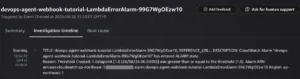
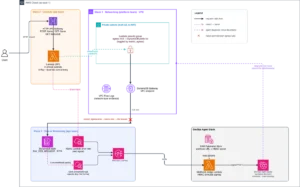
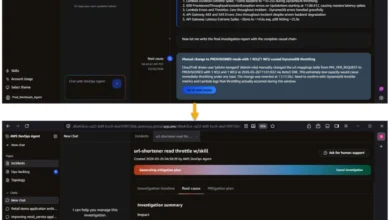
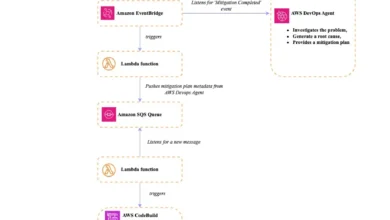
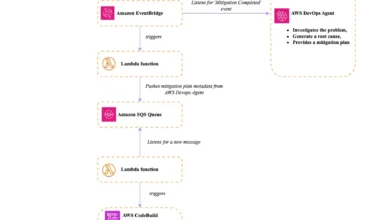
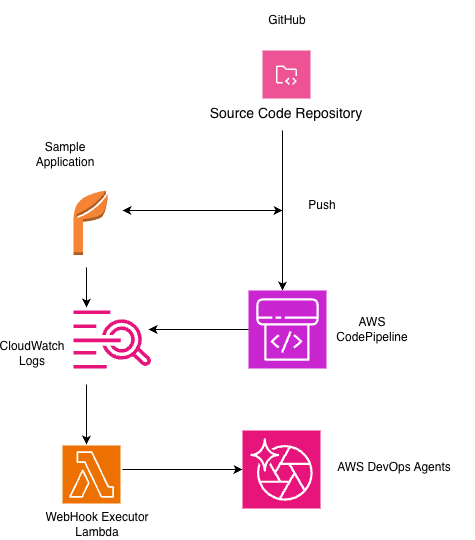
With the AWS DevOps Agent, the chronology is compressed into an automated workflow. The moment an Amazon CloudWatch alarm enters the "ALARM" state, it transmits an event to an AWS Lambda function, which acts as a webhook executor. This executor parses the payload, extracts relevant context—such as the pipeline execution ID and the affected service—and sends a structured investigation request to the DevOps Agent. The agent then maps this failure to the specific commit in the GitHub repository. By the time the engineer logs into the dashboard, the root cause has already been identified, and a mitigation plan is prepared.
Strengthening Operational Excellence
The integration of these tools aligns closely with the AWS Well-Architected Framework, particularly the Operational Excellence pillar. By automating the diagnostic process, organizations minimize the risk of human error during high-pressure outages. Furthermore, the agent maintains a comprehensive audit trail of all findings, which is vital for post-incident reviews and compliance reporting.
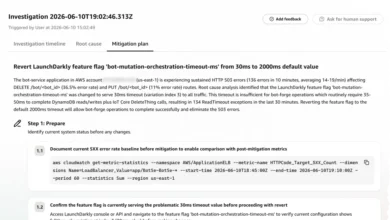
Industry analysts have frequently highlighted that the primary driver of high-performing DevOps teams is not just the speed of deployment, but the speed of recovery. According to DORA (DevOps Research and Assessment) metrics, elite-performing teams maintain an MTTR of less than one hour for incidents. The AWS DevOps Agent is designed to facilitate this level of performance by providing a "mitigation-first" interface. Instead of simply stating that a build failed, the agent provides actionable steps, such as identifying the exact line of code in package.json that caused a dependency resolution failure or highlighting a mismatched environment variable in a CloudFormation template.
Implementation and Technical Integration
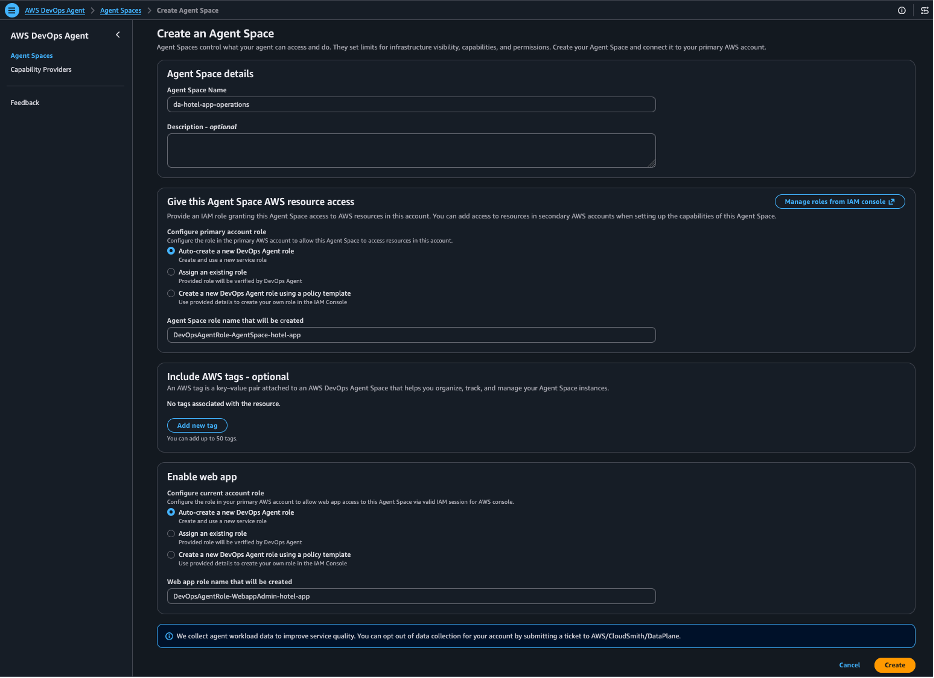
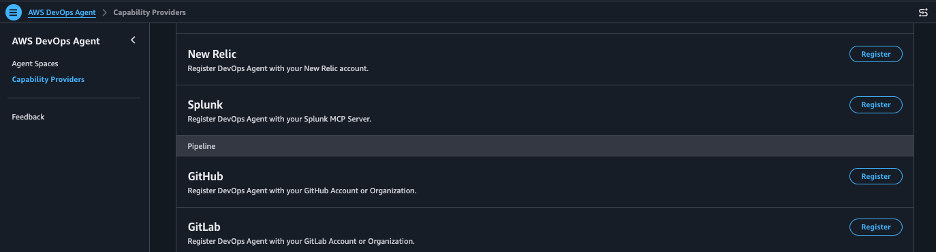
The deployment of the AWS DevOps Agent begins with the configuration of an "Agent Space," a secure logical boundary where investigation data is processed. Integrating this with GitHub is a straightforward yet critical process. Once the Agent Space is established, the DevOps Agent is registered as an authorized entity to access the repository metadata.
In a practical scenario, such as a dependency resolution failure caused by a misspelled package name in package.json, the pipeline failure is near-instantaneous. The CI/CD stage executes an npm install, which fails; an EventBridge rule detects this state change and invokes the Lambda function. The agent then performs a deep-dive analysis of the CodeBuild logs, identifying the specific "module not found" error, and links it to the commit hash pushed to the main branch.
This level of granular visibility is a significant departure from standard logging, which often requires a developer to possess deep familiarity with both the application code and the infrastructure configuration to make sense of the output. The agent’s ability to synthesize these two disparate data sets—source code and infrastructure telemetry—is its most powerful feature.
Broader Implications for Enterprise Software Delivery
The implications for enterprise-scale software delivery are profound. As organizations scale their microservices, the complexity of the deployment chain increases exponentially. Relying on manual triage is no longer sustainable. By automating the investigation phase of the incident response lifecycle, companies can reduce the "cognitive load" on their engineering teams.
Furthermore, this solution fosters a culture of accountability and precision. When the system provides clear, evidence-based feedback on why a deployment failed, developers are more likely to learn from their mistakes in real-time, leading to higher-quality code being pushed in subsequent iterations. This creates a virtuous cycle: improved diagnostic speed leads to faster recovery, which leads to higher confidence in the deployment process, ultimately allowing teams to increase their deployment frequency.

Strategic Considerations and Cost Management
While the AWS DevOps Agent offers significant operational gains, it is essential for organizations to consider the resource footprint of the integration. The solution involves multiple AWS components, including CloudWatch alarms, Lambda functions, and Secrets Manager, each of which has associated costs and management requirements.
For large-scale deployments, maintaining clean-up scripts and lifecycle policies for these resources is necessary to prevent "cloud sprawl." Organizations should treat their monitoring infrastructure with the same rigor they apply to their production application code. The provided cleanup steps—deleting secrets, removing IAM roles, and decommissioning Agent Spaces—are not merely administrative tasks; they are best practices for maintaining a secure and cost-efficient AWS environment.
Conclusion: The Future of Proactive Incident Management
The transition from reactive troubleshooting to proactive incident management is the next frontier in DevOps maturity. By integrating the AWS DevOps Agent with GitHub and the AWS CI/CD suite, engineering organizations can effectively dismantle the barriers that have historically slowed down recovery.
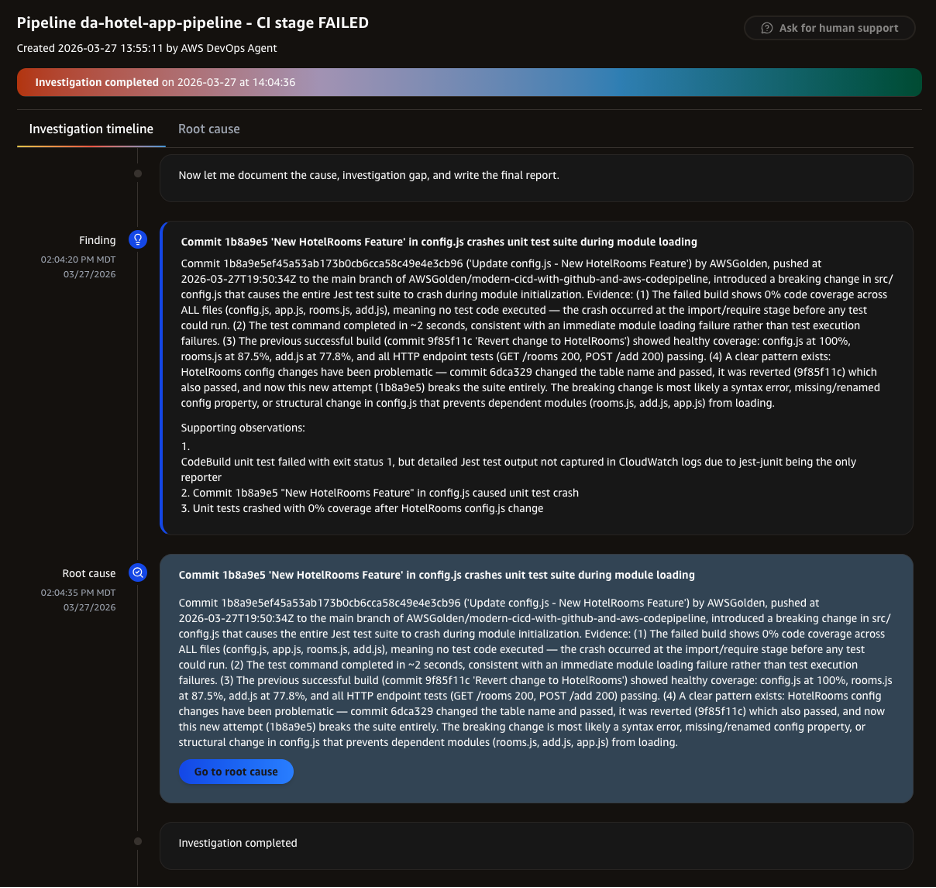
This technological integration provides a robust, scalable framework that allows teams to maintain high deployment velocity without sacrificing system reliability. As software systems continue to grow in complexity, the ability to autonomously correlate code changes with operational outcomes will become a baseline expectation for high-performing technical organizations. By leveraging the power of automated diagnostics, companies are not just fixing bugs faster—they are ensuring that their engineers remain focused on the core mission of innovation, leaving the complexities of diagnostic analysis to the machines. The result is a more resilient, efficient, and ultimately more productive software development lifecycle.