Setting up a new computer is traditionally a moment of unadulterated technological bliss, characterized by lightning-fast boot times, an absence of accumulated digital clutter, and hardware operating at peak efficiency. However, transitioning to a fresh machine—particularly within the macOS ecosystem—frequently introduces subtle compatibility hurdles stemming from updated default configurations, stripped-down legacy support, or strict security protocols. Among the more frustrating anomalies reported by recent purchasers of new Apple MacBooks is an abrupt playback failure on YouTube TV, punctuated by the cryptic error message: "This video format is not supported."
For consumers relying on live-streaming television for daily news, sports broadcasting, and entertainment, encountering a sudden blackout during their favorite programs can be jarring. Fortunately, this specific playback impediment is rarely indicative of permanent hardware failure or an incompatible subscription tier. Instead, it is typically rooted in how modern web browsers manage Digital Rights Management (DRM) components required to decode secure media streams. By understanding the underlying architecture of browser-based media delivery and knowing how to properly configure built-in security modules, users can restore full streaming functionality in a matter of minutes without resorting to third-party software downloads or archaic codec installations.
The Anatomy of the Error: DRM and Browser Security
To comprehend why a brand-new MacBook might reject a standard YouTube TV video feed, one must examine the modern landscape of digital media distribution. Premium content providers—ranging from subscription video-on-demand services like Netflix and Disney+ to live-linear television platforms like YouTube TV—rely heavily on robust Digital Rights Management frameworks to prevent unauthorized copying, redistribution, and piracy of copyrighted material.

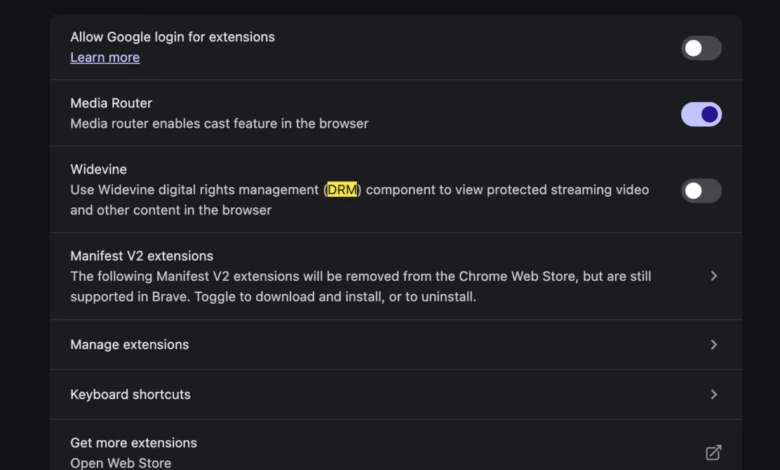
At the center of this ecosystem lies Google’s Widevine Content Decryption Module (CDM). Widevine is a widely adopted DRM mechanism that operates within a secure, sandboxed environment inside web browsers such as Google Chrome, Microsoft Edge, and Brave. When a user navigates to a live-streaming service, the platform’s servers attempt to communicate with the browser’s CDM to verify that the environment is secure and capable of handling encrypted high-definition video streams.
On a fresh computer setup, default privacy settings, enterprise policies, or missing browser flags can occasionally leave the Widevine module disabled, uninitialized, or failing to update automatically. When this handshake fails, the media player cannot decrypt the incoming stream, resulting in the generic "This video format is not supported" notification. Unlike the computing environments of a decade ago, which routinely required users to manually hunt down and install proprietary video codecs, audio packs, and plugin architectures like Adobe Flash or Microsoft Silverlight, modern streaming relies entirely on these standardized browser-level modules. Consequently, resolving the issue is no longer about adding missing software to the operating system, but rather about ensuring that the browser’s native security and decryption infrastructure is fully activated and permitted to function.
Chronology of the Modern Streaming Transition
The reliance on browser-level DRM modules like Widevine is the culmination of a decade-long industry-wide migration away from vulnerable, resource-heavy browser plugins.
In the early 2010s, streaming media platforms depended heavily on third-party browser plugins to deliver video content across diverse operating systems. However, these plugins frequently introduced severe security vulnerabilities, system instability, and high battery consumption—particularly on laptop architectures. As mobile computing and battery efficiency became paramount, technology titans and standards organizations rallied around HTML5 video specifications combined with encrypted media extensions (EME).

By the mid-2010s, major streaming services began deprecating plugin-based architectures in favor of native browser decoders supported by hardware acceleration. Google acquired Widevine in 2010, integrating its modular DRM directly into the Chromium project, which eventually served as the foundational engine not only for Google Chrome but subsequently for Microsoft Edge, Opera, Brave, and Vivaldi.
As Apple transitioned its Mac lineup away from Intel processors toward its proprietary Apple Silicon architecture (M1, M2, M3, and M4 chips) starting in late 2020, the interaction between hardware decoding blocks and browser-level DRM grew increasingly sophisticated. While these custom silicon chips offer exceptional hardware acceleration for video codecs like H.264, HEVC, and AV1, they also enforce rigorous security enclaves. If a user migrates data to a new MacBook using Apple’s Migration Assistant—a tool designed to transfer applications, settings, and files from an older Mac—certain browser configurations, preference files, or security extension flags can occasionally become corrupted or misaligned. This migration quirk frequently explains why users transitioning from an older machine to a state-of-the-art MacBook suddenly face Widevine initialization failures upon their first visit to streaming portals.
Step-by-Step Resolution: Enabling Widevine in Your Browser
For users experiencing the "This video format is not supported" error on YouTube TV or comparable live-streaming interfaces, the remediation process centers on verifying and enabling the Widevine content decryption module within the primary web browser. While specific menu paths may vary slightly depending on whether the user is utilizing Google Chrome, Microsoft Edge, or another Chromium-based browser, the fundamental procedure remains consistent.
First, users should ensure that their web browser is updated to the latest stable release. Browser developers frequently push silent security patches and component updates that address CDM initialization bugs.

If updating the browser does not automatically resolve the playback failure, users must check their internal settings or flags to verify that Widevine is permitted to run. In Google Chrome, for example, this can often be verified by inspecting the browser’s components page. Typing chrome://components into the address bar brings up a comprehensive list of internal modules, including the Widevine Content Decryption Module. Users can manually check for updates to this specific component to force the browser to download and register the latest valid version.
Furthermore, privacy-focused browser extensions, built-in ad blockers, or aggressive tracking protections can inadvertently block the background scripts required to initialize DRM modules. Temporarily disabling content blockers or adding YouTube TV to the browser’s whitelist can help isolate whether a security extension is starving the Widevine module of the network permissions it needs to verify the streaming handshake. Once Widevine is successfully enabled and updated, restarting the browser allows the decryption module to establish a secure link with YouTube TV’s servers, instantly clearing the error message and restoring high-definition live video playback.
Industry Implications and the Future of Browser-Based Media
The prevalence of configuration hurdles like the Widevine initialization error highlights a broader tension in modern computing: the delicate balance between stringent digital security and seamless user experience. As media conglomerates and streaming platforms face intensifying pressure to combat digital piracy, credential sharing, and unauthorized stream capturing, the technical requirements imposed on everyday web browsers grow increasingly complex.
For hardware manufacturers like Apple and software developers like Google, the objective is to make these security layers entirely invisible to the end user. Yet, edge cases—such as new machine onboarding, profile migrations, and strict corporate or personal privacy configurations—continue to expose the underlying plumbing of the modern web.

Industry analysts note that as video resolutions scale toward 4K and 8K, and as advanced codecs like AV1 become standard for bandwidth-efficient streaming, the reliance on secure hardware-accelerated decoding will only deepen. Future iterations of operating systems and browsers will likely feature more resilient, self-healing DRM frameworks designed to automatically detect and repair CDM corruption without requiring manual user intervention.
Until those automated safeguards are universally deployed across all Chromium and non-Chromium platforms, users setting up new hardware will occasionally encounter these legacy friction points. Nevertheless, recognizing that the root cause of the "This video format is not supported" warning is simply a deactivated Widevine module transforms a frustrating technical mystery into a straightforward, easily correctable configuration task—allowing consumers to return to their digital entertainment with minimal interruption.