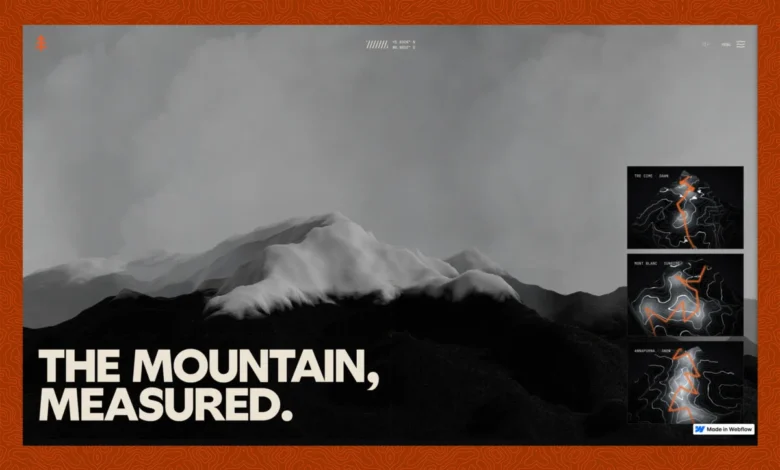
A groundbreaking project named "Ridgeline" has redefined the capabilities of web development, demonstrating how authentic real-time 3D terrain can be seamlessly integrated into a Webflow-powered website while maintaining full editability. This cinematic journey through three distinct alpine treks — Tre Cime, Mont Blanc, and Annapurna — serves as a profound technical exploration by its creator, Filip, challenging conventional boundaries between visual development platforms and complex custom code. The initiative showcases a sophisticated blend of cutting-edge web technologies, including Three.js, React, GSAP, and advanced AI assistance, culminating in a highly performant and visually stunning immersive experience.
The Vision: Real 3D in a Visual Builder
The Ridgeline project originated from a singular, ambitious question that struck at the heart of modern web development: can a Webflow site truly host live 3D terrain, incorporating actual elevation data (DEMs) as a survey-contour mesh, rendered in real-time using Three.js, without sacrificing Webflow’s inherent ease of editing? The answer, unequivocally, is yes. This undertaking diverges significantly from common practices such as pre-rendered video loops or baked sprite sheets, pushing for genuine interactivity and data fidelity derived from real-world geographical information. The project’s commitment to "seeing" the results, regardless of the underlying componentry, became its core architectural driver.
Filip’s guiding principle was simple yet profound: "I don’t care if it’s a built-in component or external JS, I want to SEE it." This rule meticulously shaped the entire architectural approach, prioritizing the visual outcome above all else. The project rapidly materialized in approximately one week, a feat largely facilitated by advanced AI agents like Claude (specifically Opus 4.8 and Fable 5), which drove the Webflow Model Context Protocol (MCP). This rapid development, meticulously documented in a daily build log, provides a transparent account of both triumphs and challenges, offering invaluable insights into the process of pushing web development frontiers.
The finished Ridgeline site presents three distinct "condition" scenes, each meticulously crafted from real geographical data. "Dawn" depicts a stormy Tre Cime, an actual trek recorded by Filip, with GPS data exported from Strava and draped onto true SRTM slopes. "Sunrise" captures Mont Blanc, transitioning from blue-hour into pink, while "Snow" portrays Annapurna under a night blue sky with falling snow. These latter two scenes utilize plausible synthesized routes, maintaining the authenticity of the terrain. All elements feature real geometry, built and maintained from code through the Webflow MCP, yet remaining a normal, human-editable Webflow project. This dual nature — highly technical yet editor-friendly — highlights a significant leap in Webflow’s potential.
Architectural Decisions and Technical Deep Dive

The integration of complex real-time 3D rendering within a platform like Webflow demanded carefully considered architectural choices. The Ridgeline project stands as a case study in navigating the trade-offs inherent in such ambitious endeavors.
Integrating React into Webflow: The Embed Advantage
A critical decision involved how to integrate React, the backbone of the 3D rendering, into Webflow. Webflow offers a native Code Component route, deployed via DevLink or a shared library, designed for first-class integration within the Designer. However, Ridgeline’s specific requirements—a single, heavy WebGL bundle, Three.js, a Blender-baked asset pipeline, and R2-hosted GLBs—posed a unique challenge. Routing such a demanding machinery through a component system proved less flexible than a self-hosted JavaScript embed.
The embed solution, while not a drag-and-drop Designer element, allowed for greater control over the complex build process and dependencies. Filip ingeniously bypassed this limitation by using attribute-driven mounting: the embed scans for designer-placed host elements (e.g., [data-terrain-scene], [data-terrain-card]) and dynamically mounts the React components into them. This approach ensured that the Webflow designer retained control over layout and placement, while the custom code managed the intricate 3D rendering. This decision underscores a key takeaway for developers: for highly specialized, performance-critical components with their own extensive build processes, a self-hosted embed can offer superior flexibility, even if it requires a custom mounting strategy.
AI-Powered Site Construction: The Webflow MCP and Claude
Perhaps the most surprising and forward-looking aspect of Ridgeline’s development was the extensive use of AI for building and maintaining the entire site. Claude (Opus 4.8 and Fable 5), acting as an agent through the Webflow Model Context Protocol (MCP) server, managed an astonishing array of tasks: creating pages, defining components, applying classes, generating CSS, managing variables, implementing custom code, optimizing SEO settings, and even handling publishing workflows. This innovative workflow ensured that the final output remained a completely normal, human-editable Webflow project.
The governing rule established was clear: "Markup and CSS live in the Webflow Designer as named components and classes. Behavior, 3D, and animation live in versioned JS on R2. The Designer holds structure; the CDN holds behavior." This division of labor streamlined the development process, allowing rapid iteration and consistent application of design principles. The ability of an AI agent to interact directly with a visual development platform’s API to construct and manage a project highlights a significant shift in the web development paradigm. It suggests a future where AI acts not just as a code generator, but as an active project manager and architectural assistant, democratizing access to complex web functionalities.
The 3D Pipeline: From Blender to Browser
The commitment to genuine 3D geometry was non-negotiable for Ridgeline. Every terrain within the site originates from real Digital Elevation Models (DEMs), specifically SRTM (Shuttle Radar Topography Mission) elevation datasets, representing actual massifs. These datasets are meticulously modeled in Blender, where they are transformed into usable meshes. The pipeline involves several crucial steps:
- DEM Acquisition and Modeling: Real SRTM data for specific alpine regions is imported and processed in Blender.
- glTF Export with Draco Compression: The modeled terrains are exported as glTF files, a highly efficient, open standard for 3D scenes and models. A critical optimization at this stage is the application of Draco compression, which can reduce static mesh sizes by 5-13x (e.g., from 11 MB to ~1 MB). This dramatically improves download times and overall performance.
- Three.js Integration: The compressed glTF models are then loaded into Three.js, a powerful JavaScript 3D library, for real-time rendering in the browser.
Notably, the integration of AI extended even to Blender, where model adjustments were made agentically, using the same agentic setup as Webflow. This eliminated manual round-trips through the UI, further accelerating the development and iteration process. The resulting terrain GLBs, averaging 540-580 KB each after Draco compression, proved small enough that network download was rarely the bottleneck; instead, performance challenges shifted to GPU and main thread processing.

Crafting the Visuals: Shader-Based Aesthetics
The distinctive survey-map aesthetic of Ridgeline’s terrain is achieved entirely through a single fragment shader, eschewing traditional textures. This shader dynamically reads the mesh’s world-space height to create contour lines. The fwidth() GLSL function is instrumental in maintaining crisp line definition at any camera distance, by deriving the anti-alias width in screen space from the rate of change of the band index. This ensures lines remain one pixel wide regardless of zoom level.
Each scene (Dawn, Sunrise, Snow) utilizes the same shader, differentiated solely by unique uniforms that control ground and contour colors, snow strength, and light direction. This uniform-driven approach allows for immense visual versatility from a single, optimized shader program. A subtle per-pixel dither (((hash(gl_FragCoord.xy) – 0.5) * 0.0045)) further refines the visuals, effectively eliminating the 8-bit banding that could otherwise appear as grainy blotches in near-black dawn gradients, significantly enhancing visual quality.
Ensuring Fluidity: Animation and Performance Optimization
The visual richness of Ridgeline is matched by its exceptional fluidity, a testament to meticulous animation and performance optimization. These aspects, often the most challenging in complex web projects, were central to delivering a seamless user experience.
Scroll-Driven Narratives and Seamless Transitions
All motion and transitions within Ridgeline are scroll-driven, adhering to a strict performance rule: React never re-renders on scroll. Instead, scroll progress is fed into a ref and read within the render loop, optimizing for fluidity. The integration of Lenis for smooth scrolling and GSAP (GreenSock Animation Platform) for robust animation orchestrates a seamless user experience, minimizing layout thrashing and maximizing visual continuity.
The project tackled common animation pitfalls with innovative solutions. A notable challenge involved a full-screen image collapsing into a smaller 4:5 plate. The trap here was that animating width and height from full-screen to the plate would constantly change the aspect ratio, forcing object-fit to re-crop each frame, resulting in a visible "jump." The fix involved making the element a fixed 4:5 box, initially sized to cover the viewport, and then animating it purely with transform: scale. This constant box with a constant aspect ratio meant the browser computed the crop only once, avoiding per-frame layout recalculations.
Page transitions between scenes are managed via a PJAX (PushState AJAX) swap under a WebGL "flood" cover—a topographic-contour reveal that sweeps in, holds, then drains. A crucial architectural decision here was maintaining a single persistent WebGL context for the terrain canvas. Navigation swaps only the scene data (setScene), avoiding the costly teardown and re-creation of the canvas, which can lead to evicted contexts and black flashes.

Even with this, a subtle problem persisted: the flood cover would drain when the new mesh was parsed, but before its material’s shader had fully compiled, causing a main thread stall during the visible reveal. The fix came with Three.js’s compileAsync function, which leverages the parallel-shader-compile extension. This allowed the heavy work of shader compilation and GLB upload to occur off the main thread, ensuring the reveal drew a scene that was already "GPU-ready." This same trick pre-warmed the summit-cairn scene before it scrolled into view, eliminating a roughly one-second freeze on its first appearance. While some synchronous work (around 110ms for innerHTML swap and JS re-wiring) remained during transitions, it was carefully timed to occur while the flood cover was fully opaque, rendering it invisible to the user.
The Pursuit of 60 FPS: Key Performance Gains
Achieving a locked 60 frames per second (FPS) was a relentless optimization effort, guided by a custom in-page FPS profiler. This tool allowed Filip to precisely identify performance bottlenecks by scroll depth and section, translating vague "jankiness" into concrete performance numbers (e.g., "min 34 @ 46% (Frames)"). This data-driven approach led to significant performance gains across the site:
- Aggressive Culling: On the homepage, terrain canvases for off-screen cards were aggressively culled (not rendered), drastically reducing GPU load. This improved homepage intro performance from 46fps (min 33) to a consistent 60fps (min 56).
- GPU Snowfall: The falling snow effect in the Annapurna scene was moved entirely to the GPU via a shader. Instead of individual particles being updated on the CPU, the shader handled the falling and wrapping logic, transforming performance from 37fps to a locked 60fps.
- Optimized Render Loop: The main render loop utilized
requestAnimationFrameand only triggered a render when necessary, avoiding redundant draws. - Selective Animation: Elements were only animated when visible in the viewport, suspending complex calculations for off-screen components.
- Avoiding Layout Thrashing: Ensuring CSS animations started from an element’s resting state (identity) prevented "jumps" that occurred when keyframes began from an offset state.
- Audio Gate: Browsers block autoplay for audio until a user gesture. The preloader’s explicit "Enter" or "Enter-muted" choice doubled as this gesture, unlocking the ambient audio bus and preventing console errors from attempted autoplay.
- First-Paint Flash Prevention: A crucial
html,bodybackground:#0a0a0c!importantandbody>*visibility:hidden!importantstyle block injected synchronously into the<head>prevented a split-second plain background flash before the dark preloader appeared. A JavaScript failsafe ensured the page wouldn’t remain blank if the main JS failed to load.
These optimizations collectively transformed performance, showcasing that the fastest frame is often the one that doesn’t do work, emphasizing removal and smart delegation over clever but inefficient computation.
Content Management and Discoverability
While visually stunning, Ridgeline does not compromise on editable content or discoverability. The site incorporates a CMS Collection for its gallery, ensuring editorial flexibility within Webflow. The strategy involves Webflow managing the HTML structure and data, while the custom JS embed mounts its components into designer-defined slots, demonstrating a harmonious coexistence between static and dynamic content.
This approach yields significant benefits for discoverability: clean semantic markup, unique per-page titles and meta descriptions, and excellent Core Web Vitals (a direct outcome of the performance work) contribute to strong SEO and accessibility for both human users and AI answer engines (AEO). Real content in real HTML, loading fast, reads well to both people and machines, ensuring the project’s innovation is widely accessible and impactful.
Developer Reflections and Future Outlook

Filip’s reflections on the project underscore the importance of practical, real-world testing over theoretical code validation. "It compiles" is not "it’s done"; the jumps, flashes, and frame drops were invisible in the code but glaringly obvious on screen. This pragmatic approach led to the discovery and resolution of most performance issues.
If undertaken again, Filip noted a potential exploration of Webflow’s native Code Components for smaller, UI-focused elements, reserving the heavy embed for the core 3D experience. Further refinement of the Webflow MCP integration for more granular control over specific elements might also be considered.
The Ridgeline project stands as a powerful testament to the evolving landscape of web development. It demonstrates that AI can act as an incredibly powerful co-pilot, visual builders like Webflow can host highly complex custom experiences, and meticulous performance optimization remains paramount for delivering truly immersive web experiences. Industry observers might note this as a significant milestone for AI-assisted development, showcasing a future where the line between "low-code" and "custom-coded" becomes increasingly blurred, empowering developers and designers to achieve previously unimaginable feats. This project offers a blueprint for combining creative ambition with technical rigor, promising a future where rich, interactive digital landscapes are both accessible to build and delightful to explore.
My Stack: The project leveraged a robust and modern technology stack, including Webflow for the visual design and content management, React for UI components, Three.js for 3D rendering, GSAP for advanced animations, Lenis for smooth scrolling, and R2 for asset hosting. The development process was significantly accelerated by the use of Claude (Opus 4.8 and Fable 5) for AI assistance, alongside Blender for 3D modeling and Visual Studio Code as the primary development environment. This combination of tools exemplifies the cutting-edge approach taken to deliver Ridgeline.