Poorly handled session timeouts are more than a technical inconvenience. They can become serious accessibility barriers that interrupt essential online tasks, especially for people with disabilities, impeding their ability to engage fully with the digital world. Thoughtful session management is not merely a best practice; it is a fundamental requirement for improving usability, reducing frustration, and fostering a more accessible and respectful web for everyone. For web professionals, session management represents a delicate balancing act between user experience, cybersecurity protocols, and efficient resource allocation. However, for the global population of individuals with disabilities, this technical mechanism often transforms into a formidable obstacle, preventing them from performing critical online activities such as purchasing digital tickets, navigating social media platforms, or completing complex applications like loan requests. The implementation of robust session timeout accessibility can fundamentally differentiate between a day of unproductive frustration and successful digital engagement for these users.
Many users, regardless of ability, have experienced the exasperating scenario of investing significant time into an important online form, only to be abruptly logged out and returned to a login screen due to an arbitrary timeout. Such incidents frequently lead to profound frustration and, in many cases, the complete abandonment of the website or task at hand. This problem is exacerbated for individuals with disabilities, for whom the effort required to interact with digital interfaces is often substantially greater. With strategic backend development and a user-centric design approach, web professionals possess the capacity to mitigate these frustrations and ensure that digital experiences remain inclusive and equitable.
The Disproportionate Impact of Session Timeouts on Users with Disabilities
A substantial segment of the global population lives with cognitive, motor, or vision impairments. Worldwide, an estimated 1.3 billion people, representing approximately 16% of the global population, experience significant disabilities, according to the World Health Organization. These diverse impairments profoundly affect individuals’ ability to interact with technology with ease and efficiency. Consequently, poorly designed session timeouts disproportionately impact these users, elevating session timeout accessibility to a critical concern for digital inclusion.
The issue extends beyond a niche subset of users. An estimated 20% of the population is neurodivergent, encompassing conditions like autism, ADHD, and dyslexia. This means that strict timeout barriers do not merely affect a small group; they significantly impact a substantial portion of any website’s potential audience. For these users, what appears as "inactivity" to an automated system might actually be active engagement in reading, processing information, or navigating with assistive technologies. Such strict timeouts, therefore, inadvertently create undue pressure and can lead to unintended exclusions.
Motor Impairments and Slower Input Speeds
Consider the scenario of an individual with cerebral palsy attempting to purchase tickets online for a concert. Due to coordination difficulties and muscle stiffness, the process of inputting personal and payment information may be considerably slower than for a non-disabled person. After carefully selecting dates, choosing seats, and meticulously filling out personal details, a timeout pop-up abruptly appears before the credit card details can be entered. The user is logged out due to "inactivity" and forced to restart the entire arduous process.
This is not a hypothetical inconvenience but a lived reality for many. Matthew Kayne, a disability rights advocate and contributor to The European magazine, has eloquently described the immense effort required to navigate websites as someone with cerebral palsy. He highlights how user interfaces are often poorly designed for adaptive devices, leading to anxieties about equipment responsiveness. After painstakingly navigating each page, the sudden logout can erase hours of work. For Kayne and others, a single failed attempt due to a timed form can have severe consequences, from delaying critical support services to causing missed appointments.
Motor impairments, including conditions that cause stiffness, hand tremors, coordination challenges, involuntary movements, or muscle weakness, inherently slow input speeds, making it appear as though the user is not actively engaging with the computer. The DWP Accessibility Manual notes that it can take multiple attempts for adaptive technology to register input, considerably slowing users down. Even if a warning is provided, users with motor impairments may lack the swiftness required to act on it and prove their continued activity. This underscores the need for flexible and extendable session durations.
Cognitive Impairments and Processing Time
Session timeouts also erect significant accessibility barriers for individuals with various cognitive differences. Strict, unyielding timeouts are built upon the flawed assumption that all users process information at the same speed. This overlooks the reality that users may appear inactive when they are, in fact, deeply engaged in reading, thinking, comprehending, or strategizing their next action.
Cognitive differences represent a broad spectrum of experiences, including neurodivergences such as autism and ADHD, developmental disabilities like Down syndrome, and learning disabilities like dyslexia. Many individuals are born with these differences; as previously noted, an estimated 20% of people are neurodivergent, constituting a substantial portion of any website’s potential audience. Others acquire cognitive disabilities later in life through conditions like dementia or traumatic brain injuries.
People with cognitive disabilities frequently require more time to complete online tasks, not due to any deficit, but because their brains process information in unique ways. Design choices optimized for neurotypical users can inadvertently create insurmountable obstacles for individuals with ADHD, dyslexia, autism, or memory-related conditions. Invisible or abrupt session timeouts are particularly problematic for those experiencing memory loss, language processing differences, or "time blindness." Kate Carruthers, a neurodivergent technology leader, has described how ADHD affects her perception of time, making it challenging to reliably track elapsed time and rendering time estimates unhelpful. Websites that rely on users accurately estimating remaining time before a session expires effectively and quietly exclude a significant portion of the population – not only those with formal ADHD diagnoses but anyone who experiences time differently or processes information at a varied pace.
Vision Impairments and Screen Reader Navigation Overhead
For users who are blind or have low vision, navigating a webpage is an inherently more time-consuming process. Unlike sighted users who can quickly scan a page for relevant links, headings, or form fields, these individuals must rely on screen readers that sequentially announce elements. This auditory navigation, while essential, is significantly slower. With over 43 million people worldwide affected by blindness and 295 million experiencing moderate to severe vision impairment, this constitutes a major accessibility concern for any globally accessible website.
As a result, the sessions of blind or low-vision users may expire even when they are actively engaged. Live timers and brief, 30-second warnings, often presented visually, do little to help, as they are rarely designed with screen reader compatibility in mind. Bogdan Cerovac, a web developer passionate about digital accessibility, recounted his firsthand experience with a countdown timer that visually worked perfectly but created a "horrible" screen reader experience. The screen reader announced the remaining time every single second, effectively spamming him with constant status messages and preventing him from navigating the page or taking any meaningful action. This illustrates how even well-intentioned features can become barriers without proper consideration for diverse user needs.
Common Timeout Patterns That Fail Accessibility Requirements

While the National Institute of Standards and Technology (NIST) rightly emphasizes that session management is preferable to perpetually preserving credentials (which could incentivize insecure authentication workarounds), several common timeout patterns consistently fall short of modern standards for session timeout accessibility.
- Silent Timeouts and Insufficient Warnings: A pervasive issue is the complete absence of warnings before a user is logged out, or the display of a fleeting, seconds-long pop-up that appears too late to be actionable. For screen reader users, these warnings often go unannounced or are announced too late to be processed. For individuals with motor impairments, a 30-second countdown provides insufficient time to react and respond. The Consular Electronic Application Center’s DS-260 page, used for U.S. nonimmigrant visa applications, exemplifies this problem. If an application remains idle for approximately 20 minutes, the user is logged off without warning, and work only saves upon page completion, leading to significant loss of progress. The ambiguity of "around 20 minutes" further compounds the issue, offering no precise guidance.
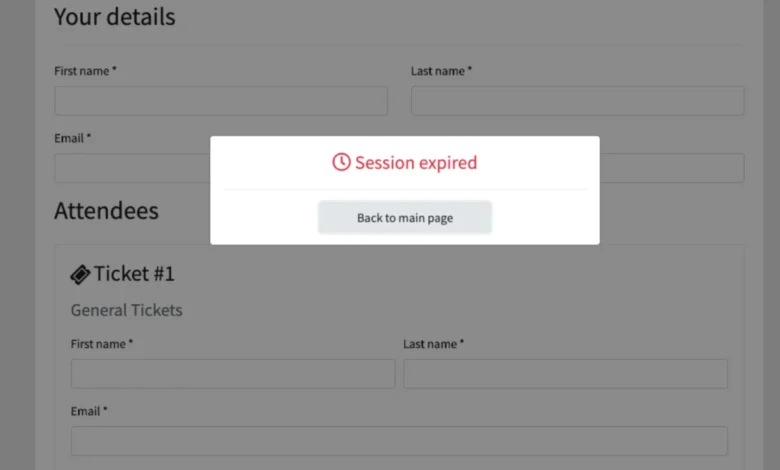
- Non-Extendable Sessions: An abrupt "session expired" message is frustrating for any user. However, when no option is provided to extend the session, users are forced to log back in and restart their work entirely, wasting invaluable time and effort. This design pattern fails to recognize the diverse pace at which individuals interact with digital interfaces.
- Form Data Loss on Expiration: Perhaps the most infuriating and detrimental outcome of poor session management is the complete loss of unsaved form data upon expiration. For individuals with disabilities, this is not merely an inconvenience; it can significantly amplify the difficulty of their day. Imagine dedicating an hour to meticulously completing a complex service request, a multi-page job application, or a detailed purchase order, only for all progress to be instantaneously erased with little to no prior warning. This not only wastes time but can deter users from ever attempting the task again, leading to lost opportunities for both the user and the service provider.
Designing for Balance: Security and Accessibility in Session Management
The stark contrast between inconsistent timeout periods and the sudden, unexpected loss of unsaved work highlights the critical need for improved design. While the DS-260 application presents a challenging user experience, the United Kingdom’s application for pension credit offers a highly accessible alternative. It provides users with a clear warning at least two minutes in advance of a session timeout and crucially allows them the option to extend the session. This design adheres to Level AA of the WCAG 2.2 success criteria, demonstrating a commitment to accessibility. People with disabilities are disproportionately affected by the unintended consequences of poor session management, but this is a solvable issue. With strategic adjustments, web professionals can significantly enhance their website’s accessibility.
Key Design Patterns for Inclusive Session Management:
- Advance Warning Systems and Extend Functionality: Websites should proactively inform users about the existence and duration of time limits before a session begins. For example, if a user is embarking on a bank form, the initial page should explicitly state that the form has a 60-minute time limit. A live, clearly visible counter that updates regularly can help users track remaining time. Crucially, users must be offered the ability to extend their session with a simple, accessible interaction, ideally through a prominent dialog box that appears well in advance of expiration, allowing them to continue with a single click. Furthermore, the option to adjust the default session timeout length, where appropriate, can empower users.
- Activity-Based vs. Absolute Timeouts: An activity-based timeout logs users out after a period of inactivity, whereas an absolute timeout logs them out after a fixed duration, regardless of their activity. While an absolute timer, such as a 24-hour limit in an office setting, might be acceptable if users are informed when their session will expire, activity-based timeouts can be more problematic for users who require more processing time or use assistive technologies. In many scenarios, clearly communicated absolute timeouts can be more accessible than ambiguous activity-based ones, provided they are sufficiently long and offer extension options.
- Auto-Save and Progress Preservation: Implementing robust auto-save mechanisms is paramount. Web developers can leverage client-side storage mechanisms like cookies, localStorage, and sessionStorage to automatically save users’ progress at frequent intervals. This ensures that even if a session accidentally expires, the user’s data is preserved and can be restored upon reauthentication. This approach prevents users from being penalized for unforeseen timeouts, allowing them to seamlessly pick up where they left off, whether completing a payment or resuming a multi-page form.
Testing and WCAG Compliance Considerations
The Web Content Accessibility Guidelines (WCAG), a collection of internationally recognized internet accessibility standards published by the W3C, serve as the authoritative benchmark for session timeout accessibility. Web developers must pay particular attention to Guideline 2.9.2, which specifically addresses best practices for providing adequate time for users to complete tasks.
The timeout adjustable mechanism outlined in WCAG 2.2 requires that users either be able to extend the time limit before the session expires or, where feasible, be able to turn off the time limit completely. For scenarios where extending is the only option, a clear dialog box must appear, asking users if they require more time and allowing them to continue with a single, accessible interaction.
WCAG acknowledges that exceptions exist. For instance, in a live ticket sale scenario, a brief time limit (e.g., 10 minutes) for holding tickets in a cart may be necessary to ensure equitable access to limited inventory. Similarly, on shared public computers in libraries, automatic sign-outs overnight are crucial for security. However, these exceptions must be carefully justified and implemented with the least restrictive means possible.
Conversely, some processes should ideally have no time limits at all. When browsing social media, reading news articles, or searching for items on an e-commerce site, there is generally no compelling security or resource reason for a session to expire within an arbitrary timeframe. In specialized contexts like timed online exams, where limits are necessary, administrators must provide mechanisms to extend time limits for students with disabilities, adhering to principles of reasonable accommodation.

Accessible session management is not a niche concern. Data from the Pew Research Center in 2021 indicates that 62% of adults with disabilities in the U.S. own a computer, and 72% have high-speed home internet. These figures are statistically comparable to those of non-disabled adults, underscoring that individuals with disabilities are active and engaged digital citizens. When web developers make session management accessible, they are not catering to a small group but embracing a significant and growing user base.
Overcoming the Session Timeout Accessibility Barrier
The WCAG provides comprehensive resources for web developers seeking to deepen their understanding of session management accessibility. These guidelines, alongside information from leading educational institutions, authorities on open web technologies, and government agencies, offer an invaluable starting point for those with intermediate web development knowledge.
Further Resources for Accessible Session Management:
- W3C Web Content Accessibility Guidelines (WCAG): The primary source for understanding standards related to time-based media, adequate time, and other accessibility principles. Specific success criteria like 2.2.1 (Timing Adjustable), 2.2.2 (Pause, Stop, Hide), and 3.2.1 (On Focus) are highly relevant.
- National Institute of Standards and Technology (NIST) Special Publication 800-63B: Provides guidelines for authentication and lifecycle management, including session management best practices, which can be adapted for accessibility.
- Government Accessibility Manuals (e.g., DWP Accessibility Manual, GDS Design System): Offer practical, government-developed examples and guidance on implementing accessible session timeouts for public services. These often demonstrate real-world applications of WCAG principles.
- Web Accessibility Initiative (WAI) Resources: The WAI, part of the W3C, provides tutorials and techniques for meeting WCAG, including specific advice on handling forms, errors, and timed responses.
Session timeout accessibility is not merely an industry best practice but an ethical web development standard. Organizations and professionals who prioritize it stand to gain significantly: they will appeal to a wider, more diverse audience, dramatically improve overall usability for all users, attract more website visitors, and foster longer, more productive sessions.
The overarching takeaway is clear: a website that features inaccessible session timeouts inadvertently conveys a message that it undervalues the user’s time and effort. This oversight creates profound and unnecessary barriers for people with disabilities, impeding their access to essential services and information. However, this is a readily solvable issue. Through the implementation of a few critical changes, such as providing clear, timely session extension warnings and integrating robust auto-save functionalities, web developers can proactively build a more considerate, accessible, and respectful internet for everyone. This commitment to inclusive design ensures that digital platforms truly serve the entirety of their potential audience.