The Rise of Vector-Based Retrieval Systems
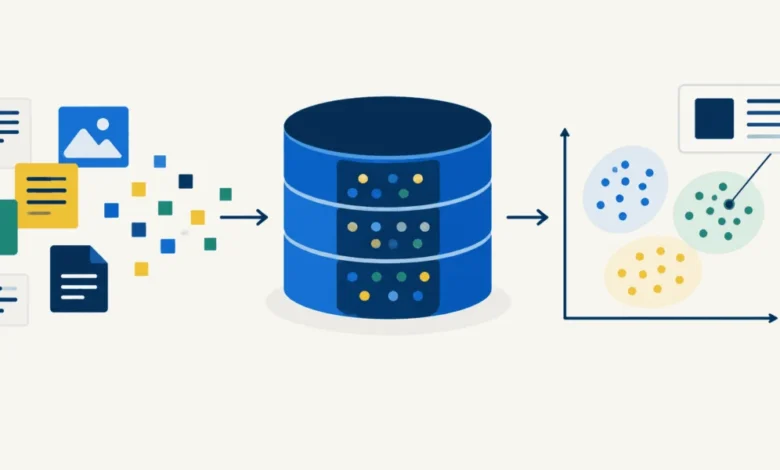
In the traditional landscape of information retrieval, search engines operated primarily through keyword matching. This approach—often powered by inverted indexes—relies on the presence of exact terms. If a user searched for "feline," a keyword-based system might fail to retrieve a document containing only the word "cat." Vector databases solve this semantic gap by representing text as dense vectors—arrays of floating-point numbers that encapsulate the underlying meaning of the content.
By utilizing pre-trained embedding models, such as those provided by the sentence-transformers library, documents are mapped into a high-dimensional vector space. In this space, the distance between two vectors corresponds to their semantic similarity. When a query is submitted, the database converts that query into the same vector space and performs a mathematical search to identify the closest document vectors. This paradigm shift has become the backbone of Retrieval-Augmented Generation (RAG) systems, which are currently fueling the enterprise AI revolution.
Establishing the Development Environment
To begin the build, developers require a structured workspace. By importing core libraries such as NumPy, the engine of the operation, users can begin to handle matrix operations with efficiency. The setup requires three primary components: the database logic itself, a corpus of sample text data, and a robust test suite to validate the integrity of the indexes.
The installation process is straightforward, requiring only numpy and sentence-transformers. Once the environment is initialized, the developer defines a VectorDB class. This class acts as a wrapper for the embedding model. During the initialization phase, the model is loaded into memory, creating a foundation where every document added to the system is transformed into a fixed-length numerical representation—typically 384 dimensions for standard models like all-MiniLM-L6-v2.
The Mathematics of Meaning: Building the Index
The efficiency of a vector database is rooted in the fact that the index size is largely independent of document length. Whether a document is a short sentence or a long-form essay, it is reduced to a uniform vector. This predictability allows developers to estimate memory requirements accurately.
When the add() function is invoked, the database performs a batch encoding of the provided corpus. The resulting vectors are stored in a NumPy array. In a production scenario, the speed of this encoding process is determined by the hardware, but the subsequent search speed is determined by the efficiency of the similarity calculation.
Semantic Search vs. Keyword Search
The fundamental advantage of this architecture is evident in its ability to handle conceptual queries. In testing, a query such as "what keeps a cell supplied with energy?" successfully retrieves documents regarding mitochondria, even if the phrasing does not match the document text. When the query is "superheroes," the system correctly identifies relevant entries about fictional characters.
Crucially, the system does not need to share a single word with the target document to identify it as the most relevant. This is the "aha!" moment for many developers: the realization that the database is not matching strings, but rather traversing a geometric space where concepts are physically clustered together.
Managing Results: Scoring and Thresholds
Vector search engines return results based on cosine similarity, a metric that quantifies how closely two vectors align. Unlike keyword search, which provides a boolean "found" or "not found" status, vector search returns a list of results ranked by their proximity scores.
This necessitates the implementation of a "score floor" in production environments. Because a vector database will always return the k most similar results—even if the documents are entirely irrelevant to the query—developers must establish a threshold. Anything falling below a specific score should be discarded to prevent the system from returning "confident nonsense."
Filtering and Metadata Management
A sophisticated vector database must handle hybrid queries. In many enterprise use cases, a user may want to search for a concept but only within a specific category, such as "bio" or "music." This is achieved through metadata filtering.
By passing a where argument during the search, the system narrows the candidate pool before performing the expensive similarity scan. This filtering is a critical optimization; it ensures that the search is not only semantically accurate but also contextually constrained. If a filter is applied that is narrower than the requested number of results (k), the database should return only the relevant documents found within that subset, rather than padding the list with irrelevant items.
Data Integrity and Guard Rails
The risk of silent data corruption is significant when dealing with large-scale vector indexing. Because the database must keep documents, metadata, and vectors in perfect alignment, developers must implement strict validation logic.
If a user provides a list of 100 documents but only 99 metadata entries, the entire index could become desynchronized. Effective guard rails—such as checking that inputs are properly formatted as lists and that the lengths of metadata and document arrays match—are essential to maintaining a reliable production system.
Persistence: Saving and Loading Indexes
For a vector database to be functional, it must persist its state to disk. This is typically managed by separating the storage concerns:
- The Vector Store: Stored as a
.npy(NumPy) file for rapid loading and memory efficiency. - The Metadata Store: Stored as a
.jsonfile for readability and ease of maintenance.
It is critical that the system prevents the loading of an index if the underlying embedding model has changed. Embeddings are relative; a vector produced by one model will be meaningless if compared against an index built by another. Implementing a versioning or model-check mechanism is a mandatory safety feature.
Scaling the Architecture
While 25 documents are sufficient for a proof-of-concept, real-world applications often involve millions of data points. Scaling these systems involves transitioning from a brute-force matrix multiplication to specialized indexing structures like Hierarchical Navigable Small Worlds (HNSW) or Inverted File Indexes (IVF).
Data shows that as the number of documents increases, the "scan" time increases linearly. However, the use of vector databases remains one of the most efficient ways to manage unstructured data at scale. The transition from 1,000 documents to 100,000 documents shows a predictable increase in latency, confirming that the fundamental design remains robust as volume grows.
Broader Implications and Future Outlook
The development of a custom vector database reveals the elegance of modern AI search. By grounding the search in the dot product—where the magnitude of the vectors is normalized to 1, effectively turning a dot product into cosine similarity—developers can build powerful tools with minimal code.
The primary takeaway is that the core design of a vector database—the logic of indexing and retrieving high-dimensional points—is essentially universal. Whether a company is using a massive cloud-hosted cluster or a local Python script, the principles of embedding, storage, and retrieval remain identical. As AI continues to integrate into mainstream software, the ability to build and maintain these structures will become a foundational skill for the modern software engineer. This bottom-up approach not only demystifies the technology but also provides the flexibility to implement custom search solutions that meet specific enterprise requirements without the overhead of heavy, opaque external services.