Unboxing and setting up a brand-new computer is traditionally regarded as a seamless experience for technology enthusiasts and casual consumers alike. Free of the accumulated digital debris, fragmented files, and background bloatware that inevitably bog down older machines, a fresh system typically offers peak performance, lightning-fast boot times, and responsive applications. However, transitioning to a new hardware environment frequently introduces a different class of frustrations, particularly compatibility hurdles tied to modern security architectures, proprietary media codecs, and browser configurations. A prominent example of this friction occurs when users attempt to stream live television on newly purchased Apple MacBooks, only to be abruptly blocked by an error message declaring: This video format is not supported.
For cord-cutters and live television subscribers, encountering this error during a major broadcast or a routine viewing session is more than a minor annoyance; it represents an immediate roadblock to essential media consumption. This specific playback failure on macOS-powered devices has perplexed a segment of new users who assume their hardware is defective or that the streaming service is experiencing a widespread outage. Fortunately, a systematic investigation into modern web browser architectures and digital rights management (DRM) protocols reveals that the issue stems from a disabled or uninitialized security component rather than a hardware limitation. Resolving the problem requires a simple configuration adjustment within the user’s web browser, completely bypassing the need for manual codec installations that defined the complex troubleshooting landscape of early web video.
Understanding the Roots of Modern Browser-Based Streaming Architecture
To contextualize why a brand-new MacBook fails to render a standard video feed, one must examine how contemporary streaming services deliver high-definition content to end users. Unlike the early days of the internet, when browsers relied on disparate third-party plugins like Adobe Flash or required users to manually download specific audio and video codecs, modern web standards rely on HTML5 and Encrypted Media Extensions (EME). These technologies allow platforms such as YouTube TV, Netflix, and Hulu to securely stream protected media directly through the browser without external software.
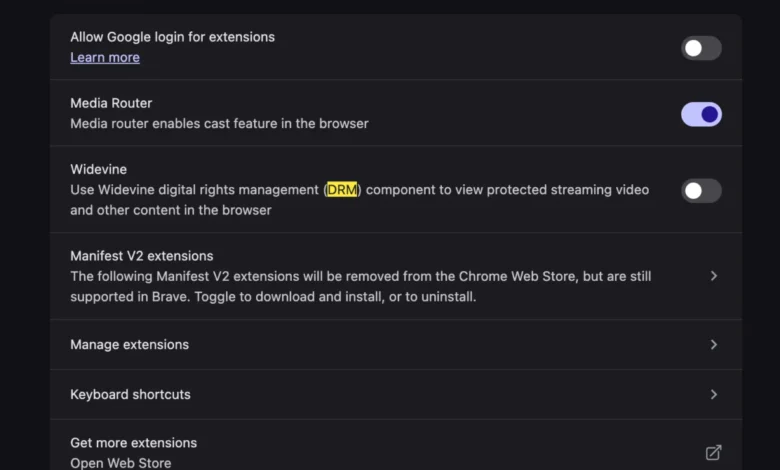
At the heart of secure HTML5 streaming lies Digital Rights Management (DRM), a suite of access control technologies used by hardware manufacturers, publishers, copyright holders, and individuals to restrict the use of proprietary hardware and copyrighted works. Google, as both the developer of the Chrome browser and the parent company of YouTube TV, utilizes Google Widevine—a widely adopted DRM module—to decrypt and securely render protected video streams. While Widevine is typically enabled by default across standard installations of Chromium-based browsers, specific privacy configurations, enterprise deployment profiles, enterprise lockdown policies, or clean system migrations can occasionally leave the module disabled or missing upon initial setup.
When a user navigates to YouTube TV on a newly configured MacBook utilizing a browser with Widevine disabled, the streaming platform attempts to negotiate a secure playback session. Upon realizing that the browser cannot execute the necessary decryption keys due to the inactive DRM module, the player halts execution and displays the ambiguous error message. This security measure protects the content provider’s copyright but leaves the consumer stranded without a clear explanation of the underlying system failure.
A Chronological Look at Browser Evolution and Media Compatibility

The friction between web browsers and media formats has a long and contentious history. Throughout the late 1990s and 2000s, watching video content on the web required an array of helper applications and browser plugins, including QuickTime, Windows Media Player, RealPlayer, and Adobe Flash. Each plugin introduced security vulnerabilities, memory leaks, and severe performance hits, particularly on early mobile devices and laptop hardware.
By the early 2010s, the World Wide Web Consortium (W3C) began pushing for a unified, plugin-free web standard centered around HTML5 video. However, major media conglomerates refused to support open video standards without robust content protection mechanisms built directly into the browser core. This led to the controversial integration of Encrypted Media Extensions into the HTML5 specification, allowing browsers to interface with Content Decryption Modules (CDMs) such as Google Widevine, Microsoft PlayReady, and Apple FairPlay.
As browsers evolved to prioritize security and user privacy, they also introduced granular controls over these proprietary modules. Modern browsers allow users to block or enable DRM components based on personal preference or corporate security policies. While this flexibility benefits privacy advocates, it inadvertently creates user support dilemmas when essential modules are turned off by default during specialized operating system deployments, leaving mainstream consumers unprepared to troubleshoot advanced browser internals.
Step-by-Step Technical Resolution and Configuration
Resolving the This video format is not supported error on a macOS system requires navigating the internal settings of the web browser being used to access the streaming service. While Safari relies on Apple’s native FairPlay streaming architecture, many macOS users prefer Chromium-based alternatives such as Google Chrome, Microsoft Edge, or Brave for their daily browsing and media consumption.
For users experiencing the error within a Chromium-based browser, the fix centers on the Widevine content decryption module. Although users no longer need to hunt down and install raw audio-video codecs as they did in the previous decade, they must ensure that protected content execution is permitted within the browser preferences.
The remediation protocol involves the following operational steps:
- Open the web browser and access the primary settings menu via the application toolbar or by typing the browser’s internal configuration URI into the address bar.
- Navigate to the privacy and security section, where permissions related to site settings, protected content, and auxiliary modules are housed.
- Locate the specific toggle governing protected media identifiers or Widevine CDM integration.
- Switch the configuration toggle to the active or enabled state, allowing the browser to download and execute the necessary decryption libraries.
- Restart the browser instance to flush cached session data and force a clean re-initialization of the media pipeline.
- Return to YouTube TV, refresh the active tab, and initiate playback of the desired live or recorded broadcast.
By completing this sequence, the browser successfully establishes a secure handshake with Google’s content servers, decoding the live video feed without further interruption.

Broader Implications for Streaming Consumers and Hardware Migrations
The occurrence of media playback errors on newly provisioned hardware highlights a broader challenge in the consumer electronics and software ecosystem: the tension between automated user experience and granular security controls. As operating systems and browsers become more sophisticated, the abstract layers separating the user from the hardware grow thicker. When an abstraction layer fails, the resulting troubleshooting steps often require users to interact with advanced configuration settings that were previously hidden from view.
Furthermore, as the streaming television market continues to absorb traditional cable subscribers, platform reliability becomes a critical metric for consumer satisfaction. Major streaming providers invest heavily in content delivery networks (CDNs) and adaptive bitrate streaming to ensure uninterrupted delivery. However, client-side compatibility issues—such as disabled DRM modules, outdated browser binaries, or conflicting operating system permissions—remain outside the direct control of the service provider.
Industry analysts note that as hardware migrations become more frequent due to trade-in programs, enterprise device refreshes, and consumer upgrade cycles, operating system developers and browser vendors must streamline initial setup routines. Minimizing the friction associated with digital rights management and media playback components will be essential for reducing technical support overhead and ensuring a frictionless transition for non-technical users.
Conclusion and Future Outlook
Encountering the This video format is not supported error on a brand-new MacBook can temporarily disrupt the transition to a high-performance computing environment. However, understanding the underlying mechanics of modern web-based media delivery reveals that the issue is easily rectifiable through standard browser configuration management. By ensuring that content decryption modules like Google Widevine are properly enabled within the browser preferences, users can bypass playback roadblocks and restore full functionality to their streaming television subscriptions. As web standards continue to mature, ongoing collaboration between hardware manufacturers, browser architects, and media streaming providers will be vital in creating a truly plug-and-play digital media ecosystem for consumers worldwide.