Mastering Presentations in the Command Line: An In-Depth Look at the Open-Source Spiel Python Framework

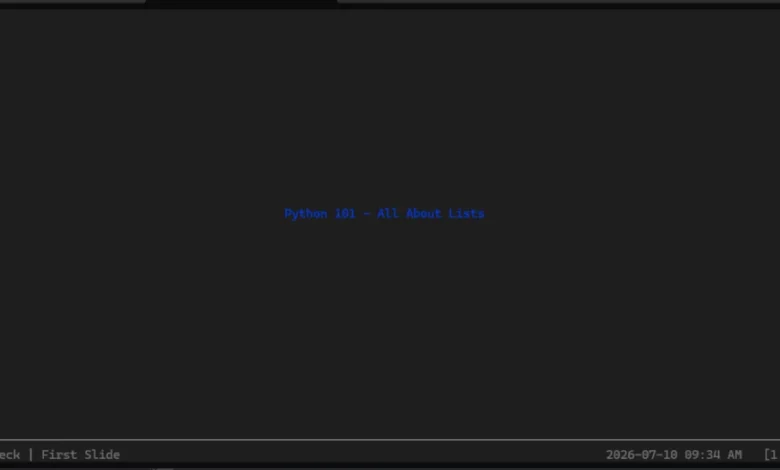
In the ever-evolving ecosystem of software development, developers continually seek innovative ways to bridge the gap between aesthetic presentation and minimalist computing environments. While graphical user interface (GUI) presentation tools such as Microsoft PowerPoint, Apple Keynote, and web-based platforms like Google Slides dominate the corporate and academic landscapes, a niche yet fascinating alternative has emerged for command-line aficionados. The open-source Python project known as Spiel offers software engineers, system administrators, and technical presenters the unique ability to build and deliver full-featured, visually appealing slide decks directly inside a computer terminal.
Although the GitHub repository for Spiel has been officially archived by its creator, Josh Karpel, the framework continues to capture the imagination of the Python community. By leveraging the powerful Rich library—a popular Python package for rendering rich text, syntax highlighting, tables, and beautiful formatting in the terminal—Spiel transforms plain text interfaces into dynamic presentation canvases. This article provides a comprehensive examination of Spiel, exploring its technical architecture, installation procedures, implementation strategies, the implications of its archived status, and its place within the broader landscape of terminal-based utilities.
Background Context and the Rise of Terminal-Centric Tooling
The command-line interface (CLI) has experienced a profound renaissance over the past decade. Driven by the widespread adoption of containerization, cloud-native infrastructure, and modern developer workflows, professionals often spend the entirety of their working hours within terminal multiplexers like Tmux, code editors like Neovim or VS Code terminals, and shell environments. Consequently, context switching—moving away from the terminal to launch a separate browser window or presentation software—can disrupt a developer’s workflow.
Terminal-based presentation tools are not entirely new, but they have historically been limited by the constraints of standard text outputs, lacking color consistency, alignment tools, and modern typography. Tools like cat, less, or basic markdown-to-terminal renderers offered rudimentary text displays, but they failed to provide the structured, slide-by-slide navigational experience required for professional talks.
Enter Spiel. Developed as a clever solution to an uncommon problem, Spiel was designed to bring the elegance of modern Python formatting libraries directly to presentation delivery. By utilizing Textual and Rich underneath the hood, Spiel bridged the gap between raw terminal output and structured visual layouts. Even though the project’s GitHub repository notes that it currently relies on an older version of the Textual framework that cannot be seamlessly upgraded—prompting its archival—the core concepts and foundational design patterns established by Spiel remain highly educational and practical for developers experimenting with terminal user interfaces (TUIs).
Technical Architecture: How Spiel Leverages Rich and Textual
At its core, Spiel relies heavily on the Rich package, an established Python library created by Will McGugan that writes rich text (with color and style) to the terminal, and displays advanced content such as tables, markdown, and syntax-highlighted code. By building upon Rich, Spiel abstracts away the complexities of coordinate positioning and text wrapping within terminal windows, allowing developers to focus purely on content generation.
The architecture of a Spiel presentation revolves around two primary abstractions: the Deck and the Slide. A Deck acts as the container for the entire presentation, managing metadata, state, and the collection of individual slides. Slides can be dynamically generated using Python functions decorated with routing logic, or constructed explicitly using Slide objects that accept custom rendering callables.
This programmatic approach to slide creation introduces significant advantages for technical presentations. Developers can embed live-evaluated Python code, dynamically fetch real-time data from APIs during a presentation, or programmatically generate hundreds of slides based on datasets without manually editing graphical layout boxes. Furthermore, because Spiel presentations are written entirely in Python code, they can be version-controlled seamlessly via Git, reviewed via standard pull requests, and executed across any operating system equipped with a Python interpreter.
Getting Started: Installation and Environment Setup
To fully understand and evaluate the capabilities of Spiel, developers can deploy the package locally. While the project’s documentation highlights that users can preview Spiel instantly via containerization tools like Docker—running $ docker run -it --rm ghcr.io/joshkarpel/spiel without touching local Python environments—a proper local installation is required for deep experimentation and slide authoring.
Best practices in Python development dictate the use of virtual environments to prevent dependency pollution across global packages. The installation and verification workflow proceeds through several clear steps:
-
Create and Activate a Virtual Environment:
python -m venv spiel-env source spiel-env/bin/activate # On Windows, use: spiel-envScriptsactivate -
Install the Spiel Package via Pip:
pip install spiel -
Verify the Installation:
To ensure that the package and its underlying dependencies (such as Rich) are functioning correctly within the terminal environment, developers can execute the built-in demonstration command:spiel demo present
If the terminal successfully renders the interactive demo presentation—allowing navigation via standard keyboard arrow keys—the installation is verified and the environment is ready for custom slide development.
Constructing Presentations: From Simple Scripts to Custom Layouts
Spiel offers flexible APIs for authoring presentations. The simplest implementation utilizes Python decorators to register functions as individual slides within a deck. Below is a foundational example demonstrating a single-slide presentation structure:
from rich.console import RenderableType
from spiel import Deck, present

deck = Deck(name="Terminal Presentation")

@deck.slide(title="Introduction")
def slide_one() -> RenderableType:
    return "Welcome to presentations inside your terminal!"

if __name__ == "__main__":
    present(__file__)
For more complex presentations requiring advanced typography, styling, and alignment, developers can instantiate explicit Slide objects alongside helper functions. The following complete example illustrates how to construct a multi-slide deck with customized text styling and centered alignment using Rich components:
from rich.align import Align
from rich.console import RenderableType
from rich.style import Style
from rich.text import Text
from spiel, Deck, Slide, present

def make_slide(title_prefix: str, text: Text) -> Slide:
    def content() -> RenderableType:
        return Align(text, align="center", vertical="middle")
    return Slide(title=f"title_prefix Slide", content=content)

deck = Deck("Advanced Technical Deck")

title_slide = make_slide(
    title_prefix="Opening",
    text=Text("Python Terminal Slides - Built with Spiel", style=Style(color="blue", bold=True))
)

intro_slide = make_slide(
    title_prefix="Core Concept",
    text=Text("Rendering rich layouts entirely in the CLI", style=Style(color="green"))
)

deck.add_slides(title_slide, intro_slide)

if __name__ == "__main__":
    present(__file__)
When executing this script in the terminal, the presentation launches in an interactive viewport. Presenters can advance to subsequent slides or return to previous ones using standard keyboard arrow keys. To exit the presentation view safely at any time, users simply press CTRL+C.
Chronology and Project Lifecycle Analysis
To understand the current state of Spiel, it is vital to examine the timeline of its development and community engagement:
- Initial Development and Release: Spiel was created by open-source developer Josh Karpel as an experimental project marrying terminal rendering libraries with presentation state management.
- Integration of Rich and Textual: The framework gained traction among Python enthusiasts for its clean API design, utilizing Rich to handle advanced console text formatting and layout alignment.
- Dependency Lock and Archival: As underlying terminal UI ecosystems evolved—specifically Textual—maintainers faced architectural constraints where older dependency trees could not be cleanly upgraded without rewriting substantial portions of Spiel’s core codebase. Consequently, the repository was archived, transitioning the project from active maintenance to a read-only educational resource.
Broader Impact, Implications, and Future Outlook
The trajectory of Spiel highlights a recurring challenge in the open-source software community: the vulnerability of derivative packages to upstream dependency shifts. When a framework relies deeply on rapidly evolving foundational libraries (such as Textual or Rich), breaking changes upstream can stall secondary projects if maintainers lack the bandwidth for continuous refactoring.
Despite its archived status, Spiel holds significant value for the Python and developer communities. It serves as an exemplary case study in API design, demonstrating how Python decorators and object-oriented abstractions can manage stateful, interactive terminal applications. Furthermore, it inspires ongoing discussions about developer tooling, proving that productivity software does not strictly require heavy graphical interfaces.
Whether Josh Karpel chooses to revisit the project, or an independent developer forks the repository to modernize its dependency tree, Spiel has permanently cemented its place as a creative milestone in terminal-based presentation design. For developers seeking to impress peers at local meetups, build internal technical briefings, or simply explore the boundaries of what Python and Rich can achieve within a shell window, Spiel remains a brilliant proof-of-concept worthy of exploration.