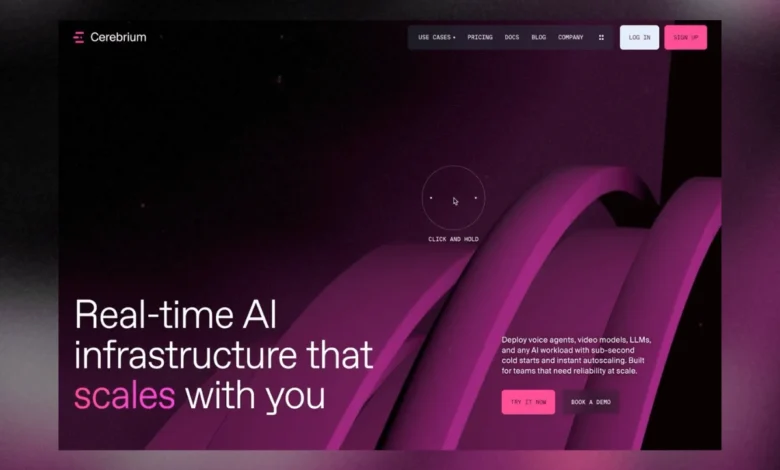
The complex and often abstract nature of serverless infrastructure for Artificial Intelligence (AI) presents a significant communication challenge for technology companies. Cerebrium, a platform designed to simplify AI deployment, recently tackled this by commissioning an innovative web-based demo that translates intricate backend processes into a visually compelling and interactive user experience. Developed by the agency KOKI-KIKO, with key contributions from developers Mathis Biabiany and Célia Lopez, the project aimed to move beyond static diagrams and dense text, allowing users to intuitively "feel" how serverless AI operates—fast, precise, modular, and scalable. This ambitious undertaking, which commenced with cutting-edge WebGPU technology, ultimately navigated a critical pivot back to WebGL to ensure optimal performance and user accessibility, highlighting the dynamic landscape of web graphics development.
The Challenge of Abstraction: Visualizing Serverless AI
Serverless computing, particularly in the realm of AI, represents a paradigm shift in how applications are built and deployed. It abstracts away the underlying infrastructure, allowing developers to focus solely on their code. While offering immense benefits in terms of scalability, cost-efficiency, and reduced operational overhead, explaining its inner workings to a broad audience can be daunting. Traditional methods, such as architectural diagrams or lengthy technical descriptions, often fail to convey the dynamic, responsive, and powerful nature of such systems.
The Cerebrium demo sought to overcome this abstraction barrier by embodying the product’s core tenets directly through its design. Every interaction, visual effect, and animated sequence was meticulously crafted to reflect the speed, precision, modularity, and scalability inherent in Cerebrium’s offering. As Louis Paquet, Creative Director at KOKI-KIKO, might articulate, the design wasn’t merely a support system for the narrative; it was the narrative, providing an immersive gateway into a sophisticated technological domain. This approach aligns with a growing trend in tech marketing, where experiential design is leveraged to demystify complex enterprise solutions and foster deeper user engagement.
A Bold Technological Leap: The WebGPU Experiment

From its inception, the project embraced an experimental spirit, particularly concerning its rendering layer. Mathis Biabiany, the lead WebGL developer, initially opted to build the entire rendering architecture using Three.js’s then-nascent WebGPURenderer in conjunction with TSL (Three.js Shading Language). This decision, made when Three.js r183.2 was the latest release, was driven by a desire to leverage the cutting-edge capabilities of WebGPU and streamline the development process.
WebGPU, a modern web graphics API, promises lower overhead, more predictable performance, and greater flexibility than its predecessor, WebGL, by providing a direct mapping to native GPU APIs like Vulkan, Metal, and Direct3D 12. TSL, designed to abstract away the complexities of shader writing, offered a composable JavaScript node-graph approach. This meant developers could define materials, GPU computations, and post-processing effects using JavaScript, with Three.js automatically generating the appropriate shaders for the chosen rendering backend. Biabiany expressed enthusiasm for this cleaner architecture, which eliminated the need to manage multiple GLSL files and offered a more modular way to build visual effects. The prospect of shipping a real client project with WebGPU, marking a significant step forward from WebGL, was a compelling motivator.
The Unforeseen Hurdle: Performance Bottlenecks and the WebGL Reversion
Despite the initial promise, the project’s ambitious scope soon revealed a critical challenge for the early-stage WebGPU implementation. The Cerebrium demo was not a singular, isolated 3D scene but a collection of multiple environments, each featuring distinct materials, particle systems, lighting configurations, and post-processing pipelines. A core design requirement was to facilitate seamless page transitions, avoiding disruptive loading screens that would detract from the fluid user experience.
While rendering performance after initialization proved satisfactory, the primary bottleneck emerged during the initial load phase. Three.js, in conjunction with TSL, had to traverse every node graph, generate corresponding shaders, and compile the GPU pipelines. On the project’s reference machine, this initialization process could extend to nearly twenty seconds—an unacceptable delay for a public-facing web experience. This represented a stark reality check on the maturity of early WebGPU tooling and its integration with Three.js at that specific point in time.
It’s important to note that the WebGPU ecosystem, particularly within Three.js, has evolved rapidly. Subsequent versions of Three.js have introduced dramatic improvements in shader compilation times, with project benchmarks indicating roughly three-fold speedups thanks to enhanced node-type caching, largely credited to the work of contributors like Renaud Rohlinger. However, these crucial optimizations were not available when the Cerebrium demo needed to ship. Faced with the imperative of delivering a responsive and immediate user experience, the development team made the difficult but pragmatic decision to migrate the entire rendering layer back to WebGLRenderer.

Rebuilding on Familiar Ground: The WebGL Renaissance
The migration from WebGPU/TSL back to WebGL was a testament to the team’s adaptability and technical proficiency. While the overarching rendering logic remained remarkably similar, the implementation demanded a more explicit and hands-on approach. TSL’s node materials were replaced with traditional Three.js materials, extended through the onBeforeCompile() function to inject custom GLSL code directly. Particle simulations, which had leveraged GPU computations via TSL, were re-engineered into a ping-pong GPGPU system built with floating-point textures. The node-based post-processing graph was meticulously rebuilt using Three.js’s EffectComposer, complemented by several custom GLSL passes.
This refactoring process underscored a subtle but significant challenge: two shaders, even when implementing the same conceptual idea, rarely produce identical visual outputs. Minor discrepancies in bloom intensity, fog density, gradient falloffs, and material colors accumulated, resulting in a noticeably different aesthetic. Consequently, extensive recalibration efforts were required to meticulously adjust these parameters and restore the original artistic vision. This phase involved a deep dive into fine-tuning every visual element to ensure consistency with the creative direction.
The decision to revert to WebGL was not a rejection of WebGPU’s potential but a production-driven choice based on the prevailing maturity of available tools. As Mathis Biabiany explained, "WebGPU and TSL gave me a much more modular way of building visual effects. WebGL gave us startup times that were predictable enough to ship." This pragmatic stance highlights the delicate balance between adopting bleeding-edge technology and meeting project deadlines and performance requirements.
Crafting the Visual Narrative: Design and 3D Pipeline
Beyond the core rendering challenges, the development of the Cerebrium demo involved intricate 3D artistry and pipeline optimization, ensuring both aesthetic quality and operational efficiency.

-
Recreating Dynamic Lighting: Many scenes within the demo featured animated objects, precluding the option of baking static lighting. Célia Lopez, the 3D artist, meticulously recreated every light directly within Three.js. To facilitate accurate positioning and orientation for the developer, simple helper cubes were exported from Cinema 4D, preserving the critical spatial data. This simple yet effective debugging tool proved invaluable in saving significant time during the intricate setup process.
-
The Illusion of Motion: Animating the Network: One of the demo’s most captivating effects is the animated network of glowing paths, which elegantly symbolizes data flow within a serverless architecture. Intriguingly, the paths themselves are static meshes. The illusion of motion is entirely generated by the shader. Each path was carefully UV-unwrapped, with the Y-axis running continuously along its length. The shader then moves a narrow opacity mask along this UV axis, creating the appearance of a pulse traveling through the network. The width and falloff of this mask were critical parameters, allowing the pulse to be perceived either as a sharp signal or a softer energy trail. To prevent a sterile, synchronized animation, each path received slightly randomized parameters for its pulse animation, imparting a more organic and natural feel to the entire system. Furthermore, paths were progressively revealed based on their distance from the camera, dynamically expanding the network as the user navigates the scene. During development, an inspector allowed for granular control over parameters like pulse speed, width, falloff, color, and density, enabling precise artistic tuning. The challenge lay in finding the optimal balance where the lines appeared luminous enough to emit light without being completely washed out by the bloom effect.
-
A Cohesive Aesthetic: The Shared Environment: To reinforce Cerebrium’s distinctive purple brand atmosphere, a custom purple HDRI (High Dynamic Range Image) from Poly Haven was utilized as the environment map. This choice served a dual purpose: it provided subtle reflections that added depth to the scenes and, crucially, unified the overall color palette across all environments. This strategic use of a shared environmental element ensured that despite differing content, every scene felt intrinsically linked to the same product identity.
Precision and Performance: Optimizing 3D Assets
Despite their seemingly lightweight appearance, many scenes within the Cerebrium demo were geometrically complex. Maintaining perfectly smooth curves throughout the network paths, particularly around rounded segments, necessitated highly subdivided geometry. This presented a classic optimization dilemma: preserve visual fidelity or reduce file size for faster loading.
Célia Lopez, in her role as a 3D artist, systematically applied optimization passes using Draco compression—a widely adopted method for compressing 3D meshes. She employed tools like David Ronai’s 3D Optimizer or the Babylon.js Sandbox optimization tool. However, a significant challenge arose during the optimization of the entire scene: automatic polygon reduction, while making files lighter, introduced visible faceting along the curved paths, compromising the website’s polished aesthetic.

The solution involved a clever strategic split of the 3D model. Instead of globally reducing geometry quality, the model was divided into two separate parts, allowing each mesh to be optimized independently. The first model contained helper objects, light paths, and a portion of the network, while the second contained the remaining path geometry. This split was meticulously placed at visually imperceptible junctions, enabling more efficient streaming and asset management without sacrificing the critical smoothness of the curves. This demonstrates a sophisticated understanding of asset pipelines and an innovative approach to balancing visual quality with performance constraints.
Seamless Cinematic Experience: Baked Camera Animations
To achieve precise control over the user’s journey through the demo, every camera movement was meticulously baked directly from Cinema 4D. This approach provided the development team with absolute authority over timing, framing, easing, and synchronization with other interactive elements. Crucially, it eliminated potential interpolation differences that can arise when camera paths are generated or interpreted dynamically across different software environments, ensuring a consistent and predictable cinematic experience.
Security Through Interaction: A Tangible Shield
One particularly inventive interaction within the website focuses on conveying the concept of security. Rather than resorting to a generic lock icon, the team aimed for users to feel the infrastructure’s protection. A central object is enveloped by an almost invisible spherical shield, whose presence is primarily articulated through a classic Fresnel effect. This optical phenomenon dictates that surfaces facing the camera remain subtle, while those at grazing angles become significantly brighter, creating a shimmering, ethereal boundary.
Mathis Biabiany elaborated on the technical implementation of this effect:

vec3 viewDir = normalize(cameraPosition - vWorldPos);
float NdotV = clamp(dot(vWorldNormal, viewDir), 0.0, 1.0);
float fresnel = pow(1.0 - NdotV, uFresnelPower);
fresnel *= uFresnelStrength;
float noise = valueNoise3D(
    vPosition * uFresnelNoiseScale +
    uTime * uFresnelNoiseSpeed
);
fresnel *= 1.0 + (noise * 2.0 - 1.0) * uFresnelNoiseAmount;
A layer of animated procedural noise subtly modulates the Fresnel intensity, preventing the shield from appearing perfectly static and lending it a dynamic, energetic quality. Overlaid on this is a hexagonal grid, projected onto the sphere and additively blended with the Fresnel effect. Combined with a bloom effect, this gives the compelling impression that the shield is generating its own protective energy field.
The interaction extends further: a raycaster continuously tracks the mouse position on the sphere, writing this data into a temporary texture. The shader then samples this texture as a dynamic mask, locally illuminating nearby hexagons before they gradually fade over time. This "subtle persistence" allows the shield to briefly "remember" every interaction, reinforcing the illusion that the force field actively absorbs, diffuses, and dissipates energy across its surface. This innovative approach elevates security from an abstract concept to a tangible, responsive element of the user experience.
Broader Implications and Future Outlook
The development journey of the Cerebrium demo offers several valuable insights for the broader web development and tech marketing communities. Firstly, it underscores the inherent risks and rewards of early adoption of cutting-edge technologies like WebGPU. While promising significant advancements, early versions often come with unforeseen performance hurdles that can necessitate strategic pivots. Secondly, it highlights the paramount importance of user experience, especially when dealing with complex B2B technologies. The Cerebrium demo proves that intuitive, engaging, and visually rich interactions can effectively demystify sophisticated products and create a memorable brand impression.
Finally, the project is a testament to the collaborative synergy between creative direction, 3D artistry, and technical development. The KOKI-KIKO team, led by Kim Levan (Strategy & PO) and Louis Paquet (Creative Direction & Design), along with developers Deven Caron, Pier-Luc Cossette, Mathis Biabiany, and 3D artist Célia Lopez, demonstrated how meticulous planning, iterative problem-solving, and a deep understanding of both artistic vision and technical constraints can yield a truly impactful digital experience. As web graphics continue to evolve, projects like Cerebrium’s demo will undoubtedly serve as benchmarks for how to effectively communicate and engage audiences with the technologies shaping our future.
Credits
Agency – KOKI-KIKO
Strategy & PO – Kim Levan
Creative Direction & Design – Louis Paquet
3D – Célia Lopez
Development – Deven Caron, Pier-Luc Cossette
WebGL – Mathis Biabiany