Toolbox App 3.8: Improves IDE Update Handling on macOS and Fixes Keyboard Navigation

The JetBrains Toolbox App, a centralized management utility used by millions of software developers to maintain their Integrated Development Environments (IDEs), has reached a new milestone with the release of version 3.8. This update introduces critical stability improvements for macOS users and restores essential keyboard-based navigation features that streamline the workflow for power users. By addressing long-standing friction points related to directory permissions and interface accessibility, JetBrains continues its effort to refine the developer experience within its ecosystem of tools, including IntelliJ IDEA, PyCharm, WebStorm, and others.
Contextualizing the Toolbox App Ecosystem
JetBrains established its reputation through high-performance IDEs that cater to various programming languages. As the company’s product catalog expanded, the need for a unified management interface became apparent. The Toolbox App was conceived as a lightweight container to handle installation, updates, and project management across multiple versions of software. By allowing developers to run "side-by-side" versions—such as stable releases alongside EAP (Early Access Program) builds—the Toolbox App became the cornerstone of modern JetBrains development workflows.
However, the complexity of modern operating systems, particularly Apple’s macOS, has occasionally created conflicts between the Toolbox App’s background processes and the operating system’s security architecture. The version 3.8 update is the result of systematic addressing of these technical hurdles, ensuring that the convenience of automated management does not come at the cost of control or accessibility.
The macOS Update Conflict: A Technical Overview
For many macOS users, the most significant change in version 3.8 concerns how the application handles IDE updates. Previously, the Toolbox App would occasionally receive erroneous signals from the macOS file system suggesting that certain IDE installation directories were non-writable or "protected." In these instances, the application would automatically disable the update button, effectively locking the user out of critical security patches or feature updates even when the actual directory permissions were sufficient.
This behavior created a "false positive" lockout, forcing power users to manually bypass the app and intervene via terminal commands or manual reinstallation. Under version 3.8, the Toolbox App’s logic has been fundamentally overhauled. If the application detects a potential conflict with a directory, it no longer defaults to a hard block. Instead, it maintains the availability of the update, providing users with the opportunity to proceed with the installation. If the macOS system genuinely prevents the write action, the app now provides clear, actionable diagnostic instructions to help the user resolve the underlying permission issue. This shift from an automated "block-all" approach to an informative "user-assisted" model represents a significant maturity in the app’s error-handling capabilities.
Enhancing Workflow Efficiency through Keyboard Navigation
Accessibility and efficiency are the twin pillars of developer productivity. For many software engineers, the ability to navigate an interface without reaching for a mouse is not merely a preference but a requirement for maintaining a "flow state." Version 3.8 restores and optimizes keyboard navigation that had seen regressions in previous iterations.
On Windows, the integration of specific hotkeys—namely Ctrl+1 to focus the "Tools" tab and Ctrl+2 to focus the "Projects" tab—has been fully restored. Beyond simple tab switching, the navigation logic within these lists has been refined. Users can now move through extensive project or tool lists using the standard Up and Down arrow keys, even after applying filters. This is particularly beneficial for developers who maintain a high number of project repositories or multiple IDE versions simultaneously.
Furthermore, the implementation of standard navigation controls such as Page Up, Page Down, Home, and End ensures that the Toolbox App behaves like a native, responsive piece of software. These improvements follow a period of user feedback indicating that the absence of these shortcuts significantly hampered the speed at which developers could switch between their daily environments.
Cleanup Operations and System Resource Management
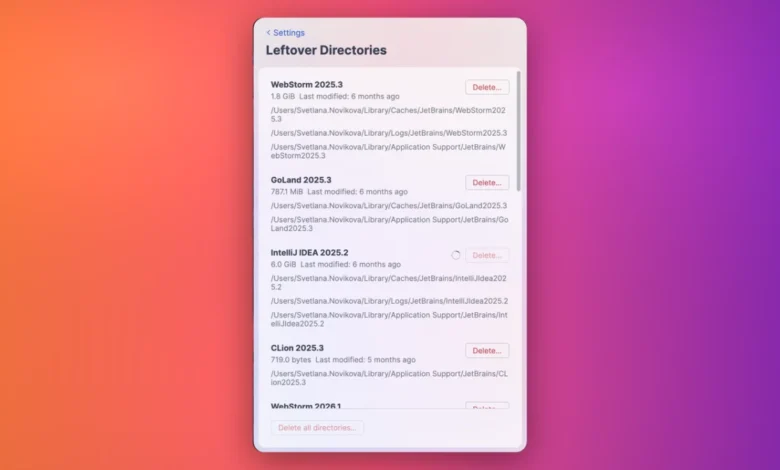
The management of IDE versions inherently involves the creation and deletion of large volumes of files. Over time, "leftover" directories from uninstalled versions or failed updates can occupy gigabytes of storage space. The Toolbox App’s cleanup feature is designed to mitigate this, and version 3.8 introduces a more transparent interface for these operations.
Previously, the cleanup process could appear as a "black box" operation, leaving users unsure if the application had hung or if it was still actively purging files. The latest update introduces a granular progress tracker for each individual tool, as well as an aggregate progress bar for the entire cleanup operation. To prevent data corruption or file system conflicts, the UI now proactively disables delete controls once a process has been initiated, preventing users from triggering multiple, overlapping cleanup commands. This ensures a safer, more predictable file management cycle, which is essential for developers working on systems with limited disk space.
Broader Implications for the JetBrains Lifecycle
The release of Toolbox App 3.8 serves as a case study in the maintenance of developer-centric infrastructure. In the broader landscape of software engineering, tools that manage other tools—often called "meta-tools"—face unique challenges. They must remain invisible when working correctly, yet be highly communicative when problems arise.

By prioritizing these fixes, JetBrains is acknowledging that the "developer experience" (DevEx) is not solely determined by the IDE’s code-completion capabilities or refactoring tools. Rather, it is determined by the entire lifecycle of the developer’s environment. When a developer cannot update their IDE due to a false permission error, or cannot quickly navigate to a project, the resulting frustration is a direct tax on their productivity.
The data-driven approach behind these fixes—evidenced by the referenced YouTrack issue numbers TBX-10297, TBX-15385, and TBX-19029—illustrates the company’s commitment to responding to community-reported bugs. YouTrack, JetBrains’ own issue-tracking software, serves as the repository for these reports, allowing for a transparent public record of the development cycle. By linking these specific issues to the version 3.8 release, the development team provides a verifiable trail of how community feedback is translated into product code.
Analysis of the Update Cycle
The release cadence of the Toolbox App reflects the rapid evolution of the underlying IDEs. As JetBrains transitions toward more frequent, smaller releases for its IDE suite, the importance of the Toolbox App as a reliable delivery vehicle increases. A failure in the Toolbox App is, by extension, a failure of the delivery mechanism for the entire IntelliJ-based platform.
The changes in version 3.8 can be analyzed as a move toward "defensive UI" design. By refusing to proactively block updates on macOS and by providing transparent feedback during cleanup operations, the app is minimizing the number of support tickets generated by "hidden" system behaviors. This approach not only aids the end-user but also reduces the burden on JetBrains’ internal support and engineering teams, allowing them to focus on feature development rather than troubleshooting environment-specific edge cases.
Looking Ahead
The modifications introduced in 3.8 are unlikely to be the end of the roadmap for the Toolbox App. As operating systems continue to tighten security models—such as the increasingly restrictive sandbox environments on macOS—the Toolbox App will likely need to continue evolving its interaction with file systems. Future iterations may include deeper integration with system-level package managers or enhanced telemetry to help diagnose permission errors even more rapidly.
For the current user base, version 3.8 provides a more stable, responsive, and predictable management experience. The return of keyboard navigation and the improved clarity of file management operations serve as a reminder that even in the world of advanced IDEs, the fundamentals of a clean, efficient, and accessible user interface remain the primary driver of developer satisfaction. Users are encouraged to update to version 3.8 immediately to leverage these stability improvements and to continue providing feedback through official channels, ensuring that the next iteration of the tool remains as responsive to the community’s needs as this one.