The Evolution of WSL Integration: How JetBrains Achieved Native Performance in IntelliJ IDEs

For many years, the integration between Windows Subsystem for Linux (WSL) and JetBrains integrated development environments (IDEs) has been a cornerstone of modern cross-platform software engineering. As developers increasingly favor Linux-based runtimes for production environments while maintaining Windows as their primary workstation, the demand for a seamless, high-performance bridge between these two operating systems has grown exponentially. Starting with the 2026.2 release, JetBrains has transitioned to a new "Native" mode for its suite of IDEs, including IntelliJ IDEA, WebStorm, and PhpStorm, marking the culmination of a decade-long engineering effort to unify the Windows-Linux development experience.
A Chronology of Integration Efforts
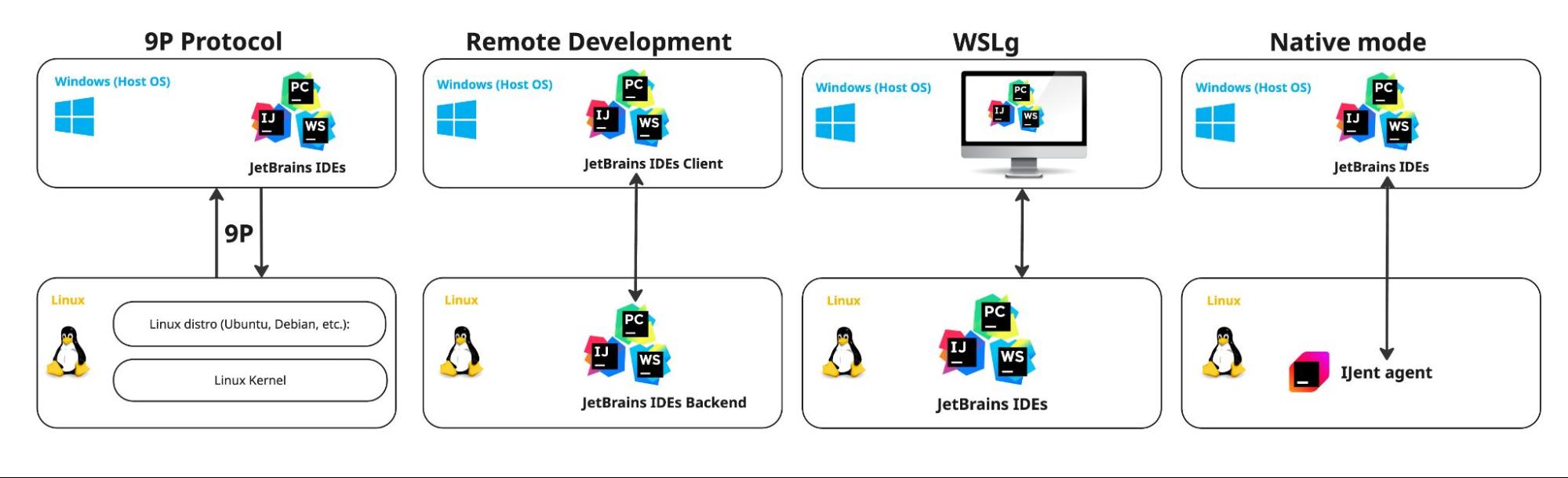
The quest for a perfect WSL-to-Windows workflow has seen four distinct phases, each reflecting the shifting priorities of developers and the underlying evolution of Microsoft’s virtualization technology.
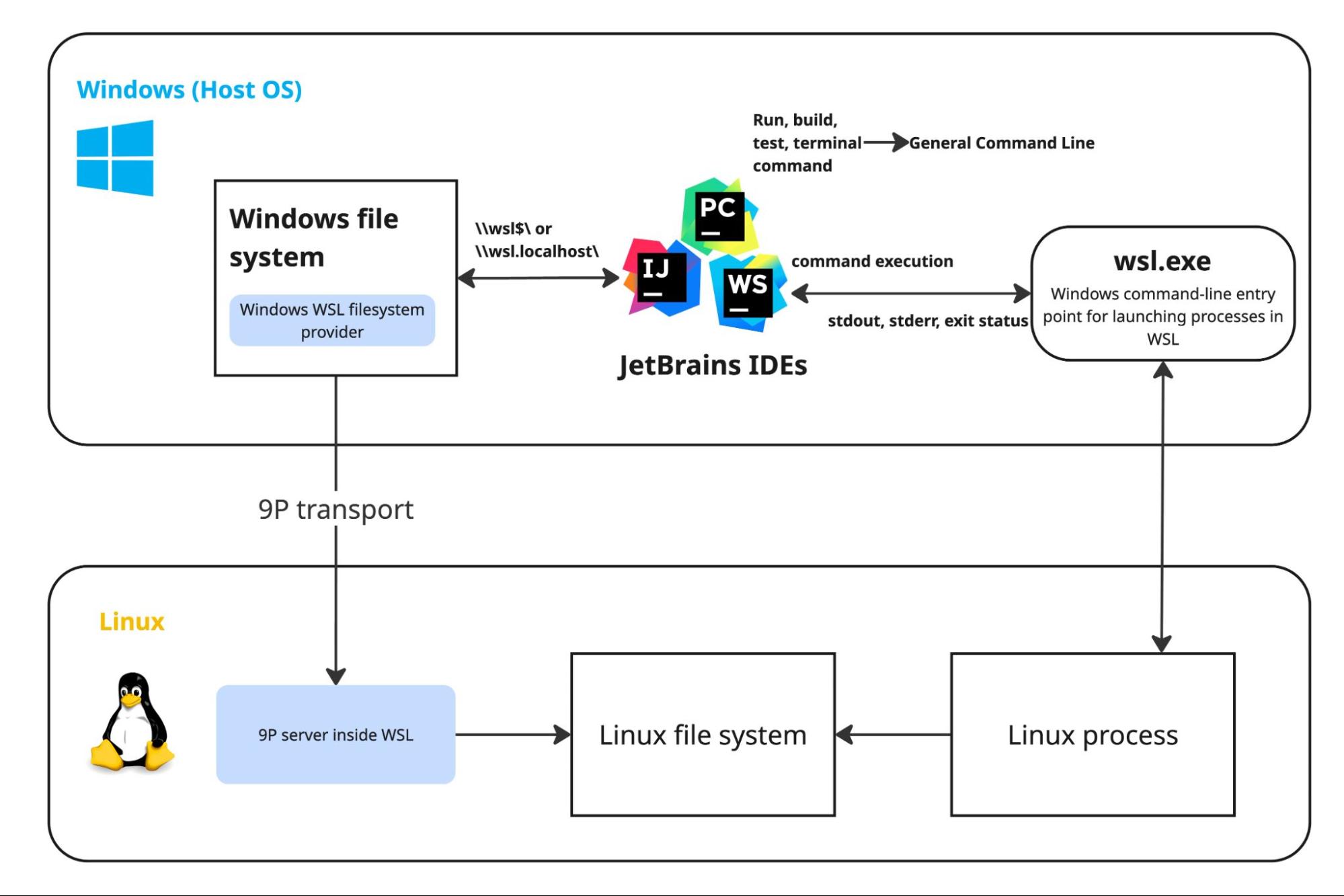
The initial phase relied on the 9P filesystem protocol. In this early implementation, the IDE resided entirely on Windows, treating the WSL file system as a remote mount point via the 9P transport layer. While this allowed developers to interact with Linux-based projects, it created significant bottlenecks. File system scanning, indexing, and I/O operations were forced through a translation layer that often struggled with the complexities of Linux permissions and symlinks. Furthermore, the GeneralCommandLine class, responsible for invoking Linux processes from the Windows host, required constant maintenance to normalize environment variables and paths, creating a brittle and performance-heavy ecosystem.
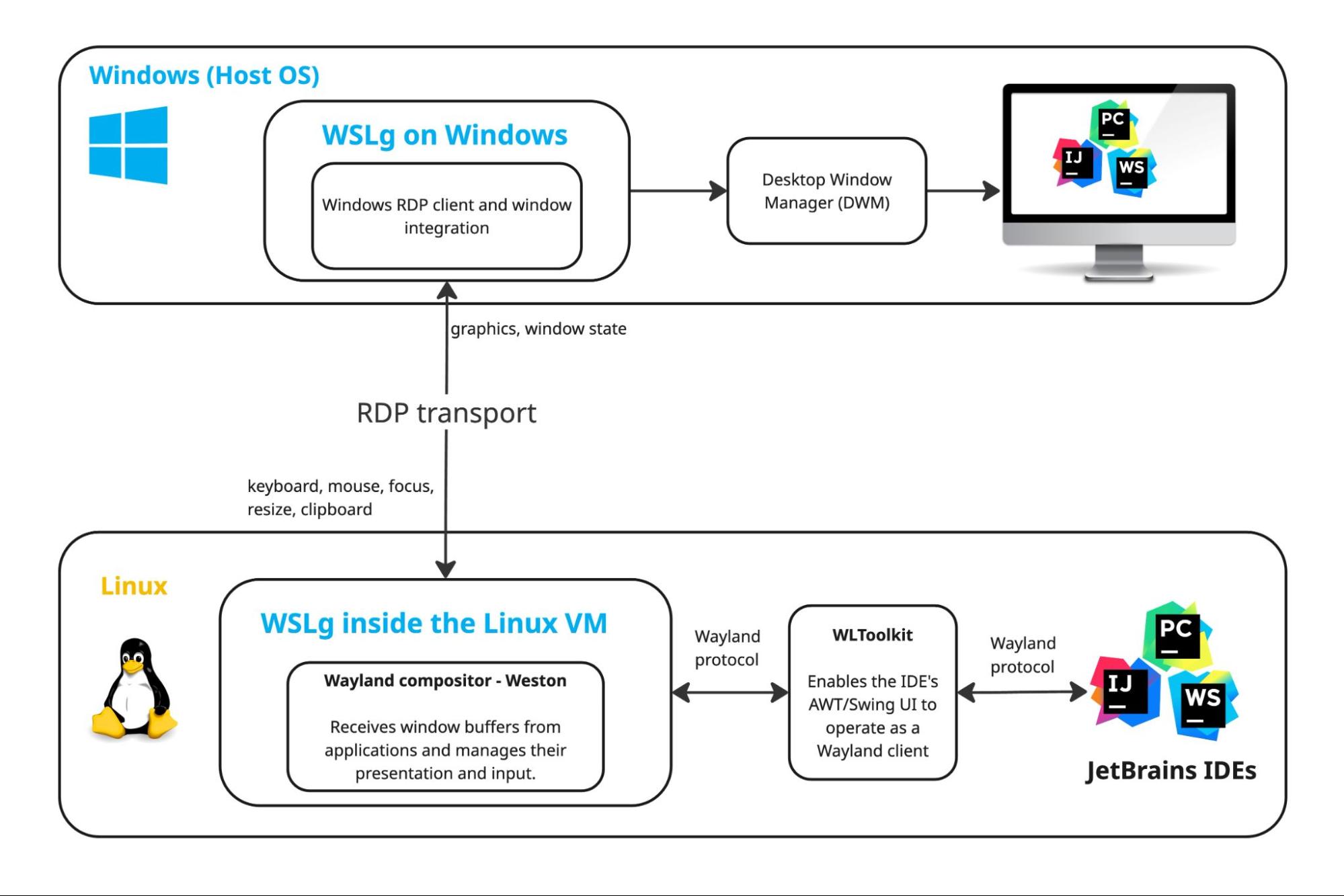
By the early 2020s, the emergence of WSLg—which allows Linux GUI applications to run seamlessly on Windows—offered a potential alternative. Some developers attempted to run the entire JetBrains IDE instance inside the WSL container, relying on WSLg to render the user interface on the Windows desktop. However, this approach lacked a formal, supported product path. It suffered from unpredictable latency, display rendering issues, and complex onboarding requirements that precluded it from being a viable solution for the average enterprise developer.
Subsequently, the introduction of the Remote Development model represented a major shift. In this configuration, the IDE was split into a "thin client" on Windows and a heavy-duty backend residing inside the WSL environment. While this solved the file system and process execution latency issues by placing the engine directly alongside the source code, it introduced a "resource tax." The backend required significant overhead, including extra disk space and memory, and relied on the JetBrains RD protocol to synchronize UI events, which could occasionally lead to perceived input lag during intense development sessions.

The Engineering Breakthrough: Native Mode and IJent
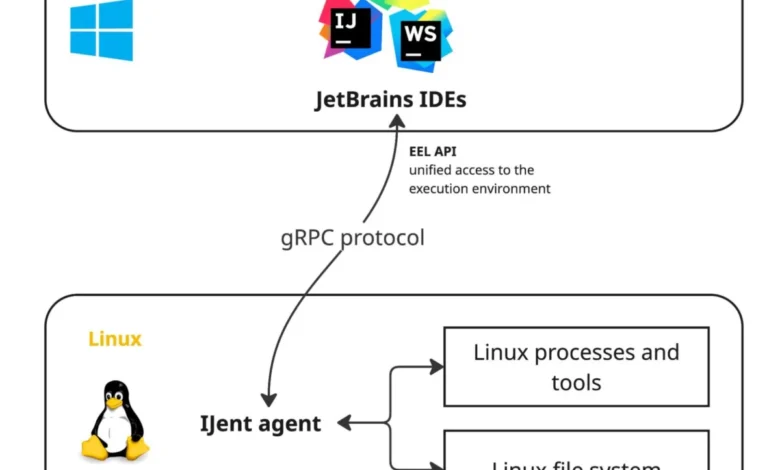
The current Native mode architecture is designed to address the shortcomings of these previous iterations. At its core is "IJent," a lightweight, purpose-built agent that operates within the WSL environment. Unlike the resource-heavy backend of the Remote Development model, IJent acts as a thin, highly efficient intermediary.
The primary advantage of this architecture is its ability to bypass the legacy 9P protocol entirely. By deploying IJent as a dedicated agent, JetBrains has gained granular control over how file I/O, process execution, and system calls are handled. When a developer opens a project in an IDE like IntelliJ IDEA, the Windows application remains the primary controller, but it delegates intensive tasks—such as file indexing and build execution—to the IJent agent. This configuration preserves the responsiveness of the Windows-based UI while providing the native execution speed of a Linux environment.
To support this shift, JetBrains introduced EelAPI. This abstraction layer is perhaps the most significant long-term development for the company’s platform ecosystem. EelAPI serves as a universal interface that hides the underlying environment from the IDE’s plugin architecture. Whether the project is running on local Windows, inside a WSL distribution, or within a Docker container, the IDE interacts with a consistent set of API calls. This standardization reduces the maintenance burden on plugin developers, who no longer need to write environment-specific code to handle file paths or process execution.
Performance Benchmarking and Empirical Data
The shift to Native mode is supported by internal performance metrics provided by JetBrains. In tests conducted on Windows 11 with WSL 2 and Ubuntu 24.04, the team measured the cold-start performance of the spring-framework project, which consists of 23 subprojects and over 8,000 source files.
The findings indicate a stark improvement over the legacy 9P implementation. While small projects with minimal file counts showed negligible differences, large-scale enterprise projects experienced significantly faster indexing and initial project setup times. This gain is attributed to the elimination of the 9P filesystem overhead, which previously acted as a massive bottleneck during the "cold start" phase when the IDE must index the entire codebase. By moving these operations to a native Linux agent (IJent), the IDE can leverage Linux-native filesystem APIs, drastically reducing the time spent in the initial project scan.
Broader Industry Implications
The transition to a unified "Native" mode signals a broader industry trend toward container-agnostic development environments. By decoupling the IDE’s logic from the host operating system via EelAPI, JetBrains is positioning its products to be more resilient to changes in infrastructure.
For the average software engineer, this means that the line between "local" and "remote" development is rapidly blurring. A project configured for WSL can, in theory, be moved to a Docker container or a cloud-based development environment with minimal friction. This modularity is essential for modern DevOps workflows, where teams are increasingly required to maintain parity between their local development environments and production environments.
Furthermore, this development reflects a maturing relationship between Microsoft’s WSL team and third-party tool vendors. The ability for Windows applications to communicate with high-performance Linux agents has transformed the Windows desktop from a legacy OS into a highly capable development hub for full-stack Linux engineers.
Conclusion and Future Outlook
The adoption of Native mode for WSL represents a calculated trade-off. By moving away from the "Remote Development" split-backend model, JetBrains has prioritized UI responsiveness and lower system resource usage. However, it also signifies an investment in the long-term maintainability of the IntelliJ platform.
While the 2026.2 release serves as the official launch point for this architecture, the real-world utility of IJent and EelAPI will be tested as more plugin developers adopt the new abstraction layers. If the transition holds, it may well define the standard for cross-OS development tools for the remainder of the decade. For now, the integration provides a clear path forward for developers who require the robustness of Linux-based tooling without sacrificing the native feel and performance of a desktop IDE on Windows. JetBrains maintains that this architecture is not just a fix for WSL, but the foundational blueprint for how its IDEs will interact with virtually all non-local development environments moving forward.