AWS Heroes Convene for Annual Global Summit to Shape the Future of Cloud Computing, Artificial Intelligence, and Serverless Infrastructure

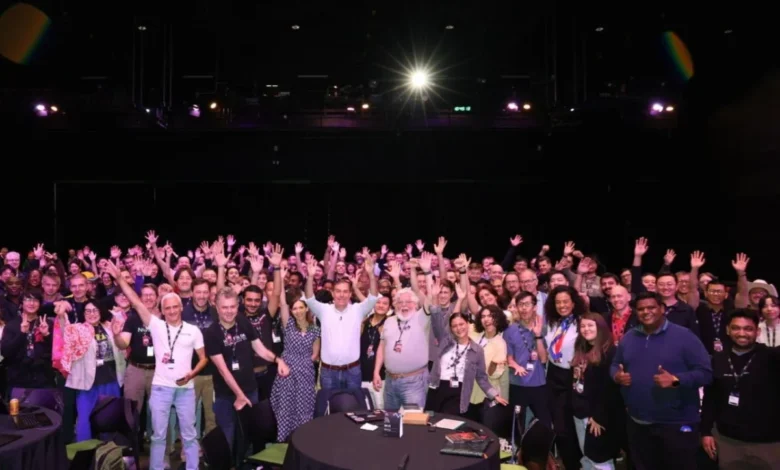
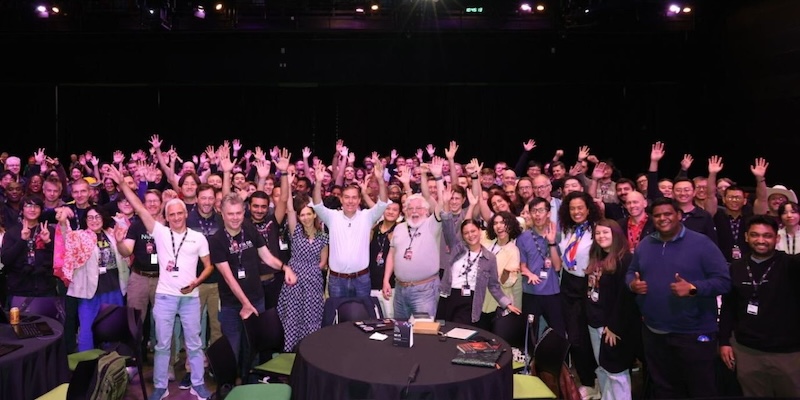
The intersection of global cloud architecture and community-driven innovation took center stage last week as Amazon Web Services (AWS) hosted its prestigious, invite-only AWS Heroes Summit. Gathering top-tier technology experts, software engineers, and cloud visionaries from across the globe, the multi-day exclusive event served as a high-level incubator for technical deep-dives, strategic roadmap evaluations, and direct feedback loops with core AWS product and engineering teams. As cloud computing continues its rapid evolution—pivoted heavily toward artificial intelligence, machine learning, serverless frameworks, and advanced containerization—the annual summit highlights the vital role that external community leaders play in guiding the trajectory of enterprise cloud infrastructure.
Main Facts and Core Objectives of the AWS Heroes Program
The AWS Heroes program is designed to recognize and elevate prominent members of the global technology community who consistently go above and beyond to share knowledge, mentor developers, and build innovative solutions on the AWS cloud platform. These individuals are not AWS employees; rather, they are independent industry leaders, enterprise architects, startup founders, and educators who possess deep, specialized expertise in complex technical domains such as generative AI, distributed systems, database management, and DevOps.
The annual AWS Heroes Summit functions as a closed-door strategic forum. Unlike massive public conferences such as AWS re:Invent, which cater to tens of thousands of attendees, the Heroes Summit is deliberately intimate. This design fosters unvarnished, transparent dialogue between elite practitioners and the senior leadership and engineering squads responsible for building AWS services. By bringing these global voices directly to Seattle and other strategic AWS hubs, Amazon ensures its product development pipelines remain closely aligned with the real-world challenges, operational friction points, and emerging requirements faced by developers and enterprise organizations worldwide.
Chronology and Highlights of the Summit Agenda
The structured itinerary of the summit was meticulously crafted to balance high-level corporate vision with granular, hands-on engineering collaboration.
Day 1 of the gathering established an ambitious tone with an inspiring fireside chat featuring AWS Chief Executive Officer Matt Garman. In his address, Garman outlined the broader macroeconomic shifts driving cloud adoption, emphasizing the transformative potential of generative AI, the continuous imperative for cloud security, and the relentless pursuit of operational efficiency at scale. The session provided attendees with a direct line of sight into executive priorities and the long-term strategic roadmap of the world’s leading cloud provider.
Day 2 transitioned from executive vision to deep technical pragmatism, highlighted by a highly anticipated Ask Me Anything (AMA) session with James Hamilton, AWS Distinguished Engineer. Hamilton, a legendary figure in the systems engineering and hyperscale datacenter community, engaged attendees in a rigorous examination of distributed systems reliability, hardware-software co-design, and the physical and logistical realities of operating massive global cloud infrastructure.
Following the plenary sessions, participants transitioned into specialized breakout tracks. These sessions were organized by technical domains—ranging from serverless computing architectures and Kubernetes container orchestration to cutting-edge machine learning pipelines and foundation model integration via Amazon Bedrock. Internal AWS product managers and lead software engineers presented early-stage roadmap features, unreleased capabilities, and experimental architectural patterns. Heroes subjected these proposals to rigorous peer review, offering critical field-tested feedback drawn from managing mission-critical workloads for global enterprises.
Supporting Data and the Economic Impact of Cloud Community Leadership
The growth of the AWS Heroes program mirrors the explosive expansion of the cloud computing market itself. Industry data from leading market research firms indicates global cloud infrastructure spending continues to scale dramatically, driven primarily by enterprise migration to cloud-native architectures and the unprecedented computational demands of artificial intelligence workloads.
Within this macro environment, developer communities and independent evangelists serve as crucial catalysts for technology adoption. Studies on enterprise software deployment show that technical decision-makers increasingly rely on peer-reviewed insights, open-source contributions, and community-led knowledge sharing—such as that provided by AWS Heroes—rather than traditional vendor marketing. By fostering a collaborative ecosystem where elite practitioners can stress-test new services before general availability, AWS significantly reduces the time-to-market for stable, enterprise-ready cloud features.
Furthermore, the geographical diversity of the AWS Heroes network underscores the global nature of modern software engineering. With representatives spanning North America, Europe, Asia-Pacific, Latin America, and Africa, the summit acts as a multicultural conduit for localized technical insights, ensuring that AWS platform development accounts for varying regulatory environments, bandwidth constraints, and regional enterprise adoption patterns.
Official Responses and Participant Feedback
While the summit proceedings are largely confidential to protect unreleased product roadmaps and strategic initiatives, public sentiment shared across professional networks reflected profound enthusiasm among attendees. Throughout the week, participants utilized industry platforms like LinkedIn under the dedicated identifier #awsheroessummit to document their experiences.

Common themes emerging from attendee reflections emphasized the unique value of cross-pollinating ideas with peers from entirely different industry verticals, spanning financial technology, healthcare, gaming, and enterprise SaaS. Heroes noted that the opportunity to influence the actual source code, API design, and feature sets of upcoming AWS services remains an unparalleled professional privilege.
Internal AWS engineering teams similarly lauded the candor and technical rigor brought by the Heroes. Product leaders frequently cite these closed-door feedback loops as instrumental in refining user experience, eliminating architectural bottlenecks, and prioritizing feature requests that yield the highest systemic value for the broader developer community.
Broader Industry Implications and Future Outlook
The successful execution of the latest AWS Heroes Summit underscores a broader paradigm shift in enterprise technology: the democratization of product development. In an era where software velocity dictates market leadership, legacy top-down product design is increasingly yielding to collaborative, community-integrated engineering models.
By institutionalizing direct feedback channels with elite external practitioners, hyperscale cloud providers like AWS can navigate the complexities of rapid technological disruption—particularly in generative AI and autonomous infrastructure—with greater precision. The insights harvested during last week’s summit are expected to directly influence upcoming releases slated for future major announcements, reinforcing the symbiotic relationship between cloud providers and the ecosystem of builders who power them.
As the technology landscape prepares for the next wave of computational evolution, forums like the AWS Heroes Summit ensure that the voices shaping the future of the internet remain firmly rooted in the practical realities of the engineers building it.
Related posts: