The transition to a new personal computer is frequently celebrated for delivering enhanced processing speeds, upgraded graphics capabilities, and an operating system free from the digital debris accumulated over years of prior use. However, hardware and software migrations are not without complications. Users setting up fresh machines—particularly those migrating to Apple Silicon hardware running macOS—frequently report sudden compatibility hurdles when attempting to stream digital media. Among the most perplexing of these modern setup anomalies is the sudden appearance of the "This video format is not supported" error message when attempting to load live broadcasts or on-demand content through mainstream web browsers on YouTube TV.
For cord-cutters and live television subscribers, encountering a playback barrier immediately after hardware deployment can disrupt critical viewing routines. While the error mimics traditional media player failures of past decades—which frequently demanded tedious manual installations of third-party codecs, audio decoders, and specialized plugins—the root cause in contemporary computing environments is tied to browser-level security and Digital Rights Management (DRM) frameworks. Isolating the issue reveals that modern web infrastructure relies heavily on standardized modules to handle encrypted high-definition streams, and a default configuration or missing browser flag can entirely halt media delivery.
Understanding the Technical Underpinnings of Browser DRM

To comprehend why a high-performance, newly unboxed computer rejects a mainstream streaming service like YouTube TV, one must examine the mechanisms governing modern digital video distribution. Premium content providers, including major television networks, sports leagues, and subscription streaming platforms, utilize robust Digital Rights Management protocols to prevent unauthorized copying, redistribution, and piracy of copyrighted material.
Central to this ecosystem is Google’s Widevine modular DRM system, which is widely integrated into modern web browsers, including Google Chrome, Microsoft Edge, Mozilla Firefox, and Brave. Widevine provides a secure end-to-end media path that encrypts video data as it travels from the content delivery network (CDN) to the user’s screen, decrypting it inside a secure hardware- or software-based sandbox. Without this module actively running and permitted to execute within the browser architecture, streaming platforms cannot verify the integrity of the playback environment. Consequently, rather than exposing vulnerable video streams or risking copyright compliance violations, the platform halts playback entirely, triggering the definitive "This video format is not supported" diagnostic notification.
When a user migrates to a new Mac, web browsers are frequently installed fresh from official repositories or restored via automated system migration tools like Apple’s Migration Assistant. During this process, specific browser components—particularly those involving proprietary binaries or security-sensitive modules like Widevine Content Decryption Module (CDM)—may fail to initialize correctly, download automatically, or obtain the necessary execution permissions from the underlying operating system. Furthermore, strict privacy extensions, corporate network policies, or default hardened browser settings can inadvertently block the background acquisition of these vital DRM components, leaving the user stranded with a functional internet connection and a high-end display, yet entirely incapable of rendering authorized media streams.
Chronology of the Modern Streaming Compatibility Dilemma

The evolution of browser-based video playback has shifted dramatically over the past two decades. In the era of Adobe Flash and early HTML5 implementations, web users routinely encountered compatibility warnings that necessitated manually downloading external codecs, installing proprietary browser plugins, or configuring system-level media frameworks like QuickTime or Windows Media Player. These historical inconveniences created a fragmented user experience where viewing a simple video required deep technical troubleshooting.
As web standards matured through the World Wide Web Consortium (W3C), the industry pivoted toward Encrypted Media Extensions (EME) and Media Source Extensions (MSE). These standardized interfaces allowed web applications to interact directly with content decryption modules without requiring legacy browser plugins. Google’s Widevine emerged as a dominant standard in this landscape, underpinning not only YouTube and YouTube TV but also Netflix, Amazon Prime Video, Disney+, and Hulu.
Despite the automation designed into modern browsers—whereby Widevine CDM is intended to download transparently upon installation—edge-case failures persist. Users setting up new macOS devices frequently encounter a mismatch between Apple’s stringent gatekeeper security policies, sandboxing constraints, and the automated background downloading routines of third-party browsers. When a browser attempts to fetch the Widevine binary immediately after a fresh OS installation, transient network timeouts, disk permission bottlenecks, or aggressive privacy configurations can block the acquisition process. The result is a persistent streaming failure that lacks intuitive error codes, leaving consumers to diagnose a complex DRM failure disguised as a generic video format incompatibility.
Detailed Troubleshooting and Resolution Procedures

Resolving the "This video format is not supported" error on a newly configured machine does not require manual codec downloads, terminal command-line scripts, or risky system modifications. Because the issue stems from disabled or uninitialized DRM components within the browser environment, the remediation process focuses on verifying and enabling the necessary digital rights management settings.
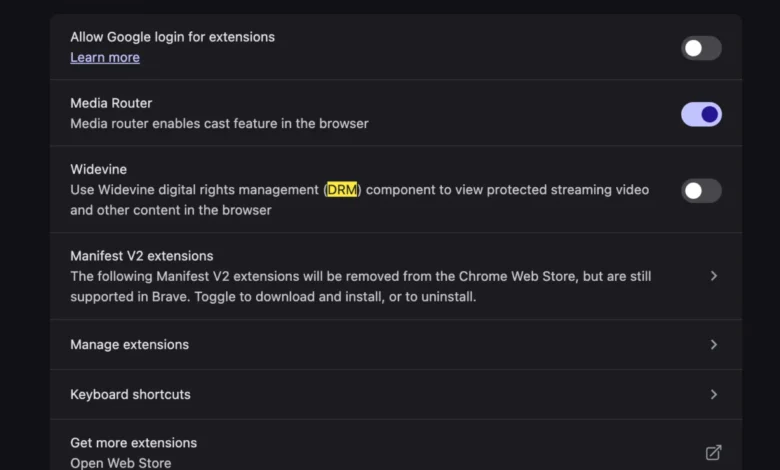
To restore full functionality to YouTube TV and related streaming platforms, users must navigate their browser’s internal settings to confirm that Widevine or protected content execution is fully enabled. While specific menu paths vary slightly depending on whether the user is operating Google Chrome, Brave, Microsoft Edge, or a derivative Chromium-based browser, the fundamental procedure remains consistent:
- Launch the web browser and access the primary settings menu by clicking the application menu icon (typically represented by three vertical dots or horizontal lines) located in the upper-right corner of the browser window.
- Navigate to the privacy, security, or site settings section. In Chromium-based browsers, this is frequently housed under "Privacy and security," followed by "Site settings."
- Scroll downward to locate advanced content permissions or protected content controls, often categorized under headings such as "Additional content settings" or "Protected content identifiers."
- Ensure that the option permitting sites to play protected content—or specifically enabling the Google Widevine CDM component—is toggled to the active or enabled state.
- In instances where the module is present but corrupted, clearing the browser cache, performing a manual check for browser updates, or restarting the application will force the browser to re-download the necessary CDM binary from official update servers.
Once these configurations are verified and the browser is restarted, the secure handshake between the streaming server and the local decryption module is re-established. Subsequent attempts to load YouTube TV will bypass the format error, granting immediate access to live broadcasts and saved media libraries.
Broader Implications for Digital Media Consumption and Hardware Migrations

The prevalence of browser-level DRM errors highlights a broader tension in modern consumer technology: the delicate balance between robust digital security, copyright protection, and seamless user experience. As media distribution shifts almost entirely away from physical media and dedicated standalone desktop applications toward browser-centric cloud services, the web browser has effectively evolved into a complex operating system within an operating system.
This centralization brings profound efficiency, allowing platforms to deploy updates instantly across millions of heterogeneous devices without requiring manual software patches from end users. However, it also introduces single points of failure where a minor discrepancy in background background tasks, security permissions, or digital certificate validation can paralyze core entertainment functions. For hardware manufacturers and software developers alike, minimizing these friction points during the device setup phase remains a critical design challenge.
Industry analysts note that as operating systems implement increasingly strict security sandboxing to protect users from malware and unauthorized data harvesting, legitimate background processes—such as the automated deployment of proprietary DRM modules—frequently get caught in the security crossfire. Operating system vendors and browser developers continue to refine onboarding workflows to ensure that essential media components are provisioned securely and reliably during initial system initialization.
Ultimately, while encountering error messages on a brand-new computer can be frustrating, understanding the underlying architecture of browser-based DRM transforms an opaque technical glitch into a manageable configuration task. By ensuring that protected content modules are properly enabled, consumers can fully realize the performance benefits of their new hardware investments without sacrificing access to their preferred digital entertainment and live broadcasting services.