Bridging Legal Tech and Web Intelligence: How Harvey Integrates SnapRender to Automate Digital Evidence Collection and Analysis

In the modern legal landscape, an overwhelming proportion of legal work originates on the open internet. Whether counsel is examining a competitor’s deceptive advertising claim, reviewing a platform’s precise terms of service on the exact day a client executed an agreement, documenting a blatant trademark infringement on an e-commerce listing, or analyzing a privacy policy that was quietly revised last month, digital artifacts form the bedrock of contemporary legal disputes. Traditionally, gathering this evidence has been a tedious, manual, and legally fraught endeavor. Paralegals and attorneys would routinely open a browser, capture screenshots by hand, print web pages to PDF, meticulously rename the resulting files, manually attach them to the correct matter management system, and only then return to an AI legal assistant like Harvey to ask analytical questions about the text.
That fragmented workflow is rapidly becoming obsolete. Following recent platform updates, Harvey—the prominent generative artificial intelligence assistant built specifically for legal professionals—can now directly invoke external tools through custom Model Context Protocol (MCP) connectors. By integrating a specialized web capture and rendering service such as SnapRender, Harvey gains the autonomous capability to open a designated URL, convert the webpage into a stable file format directly within the active conversation, and ingest the page text seamlessly for immediate legal analysis. This development represents a significant leap forward in legal technology, bridging the gap between real-time web intelligence and secure, verifiable document handling.
The Mechanics of the Integration: Streamlining Digital Discovery
The integration relies on Harvey’s newly introduced support for custom MCP connectors, which communicate securely with remote MCP servers over HTTPS utilizing OAuth authentication protocols. Designed for ease of deployment, Harvey natively handles the registration process with the remote server, entirely eliminating the need for legal IT administrators or end-users to manually generate, copy, or manage complex client IDs, cryptographic secrets, or explicit authorization scopes.
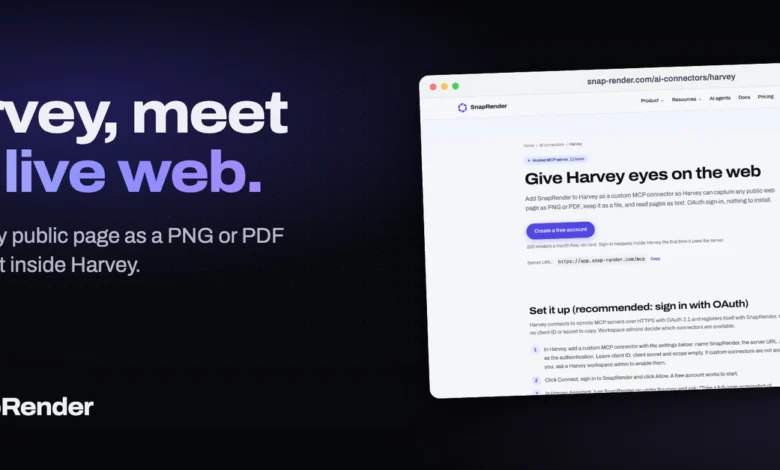
To operationalize this capability within a legal practice, a workspace administrator must first ensure that custom connectors are enabled across the firm’s Harvey environment. Once enabled, setting up the SnapRender integration requires configuring a single custom connector via the platform’s administrative dashboard using a straightforward set of parameters: designating the service name as SnapRender, pointing the server URL to the designated endpoint (https://app.snap-render.com/mcp), and selecting OAuth for authentication while leaving the client ID, client secret, and scope fields blank.
Once configured, the connector transforms Harvey from a purely text-based analytical engine into an active web-browsing investigator. When tasked with examining a webpage, SnapRender executes the capture sequence while automatically bypassing disruptive user interface elements—such as cookie consent banners and GDPR overlays—that frequently obscure critical content on modern websites. This ensures that the resulting document reflects the actual substance of the webpage rather than an interactive pop-up dialog, preserving the integrity of the captured evidence.
Mastering the Prompt: Best Practices for Legal Workflows
While the technical setup is frictionless, legal professionals utilizing the integration must adhere to specific interaction paradigms to maximize the utility of the tool. Because Harvey retains files returned by external connectors but intentionally suppresses the rendering of inline images derived from tool results, users must be precise in their prompting strategy. If an attorney simply asks Harvey to take a "screenshot," the underlying image data may be discarded or reduced to a rudimentary text description.
To retain the evidentiary value of the capture, practitioners must explicitly request the rendering as a file. For instance, prompting the assistant to "take a full-page screenshot of https://example.com/terms as a PDF file" instructs SnapRender to generate a comprehensive, high-fidelity document that is instantly attached to the conversation stream. From that point forward, the file behaves identically to any other document uploaded manually by the legal team, remaining accessible for cross-referencing throughout the lifecycle of the matter.
Legal technologists and early adopters have identified several highly effective prompt templates tailored to common legal use cases:
- Historical Terms and Policy Audits: Attorneys can instruct Harvey to capture a legacy terms-of-service page alongside a timestamp, enabling immediate comparative analysis. A representative prompt involves capturing a specific policy URL as a PDF, noting the current date, and subsequently directing the AI to summarize or isolate specific clauses, such as limitations of liability or mandatory arbitration provisions.
- Cross-Platform Advertising and IP Verification: To evaluate marketing claims across different user experiences, practitioners can capture a product page simultaneously on desktop and mobile viewports. By requesting these captures as files, the attorney can direct Harvey to exhaustively list every performance, environmental, or pricing claim appearing on the page, alongside its precise visual location.
- Text-Based Compliance Reviews: When visual rendering is secondary to textual content, users can bypass image generation entirely. By instructing Harvey to read a privacy policy as text, the assistant can instantly parse and detail corporate data retention schedules, third-party sharing practices, and compliance frameworks governing data transfers outside the European Union.
- Long-Term Monitoring and Version Control: For ongoing litigation or regulatory compliance monitoring, practitioners can establish automated workflows where SnapRender captures designated target pages on a recurring schedule—such as weekly or monthly—alerting legal teams via dashboard notifications whenever structural or textual modifications occur. These historical files can then be uploaded simultaneously to Harvey for granular diffing and version comparison.
Boundaries and Limitations in Evidentiary Work
Despite its powerful capabilities, legal practitioners must remain cognizant of the strict technical and legal boundaries governing automated web captures, particularly when preparing materials for formal judicial proceedings, regulatory filings, or arbitration.
Automated rendering tools operate within the constraints of standard web protocols and cannot bypass advanced anti-bot mechanisms, paywalls, CAPTCHAs, or authenticated user portals that require human login credentials. Furthermore, while a PDF capture generated by SnapRender provides a robust digital footprint and an accurate representation of a webpage at a precise moment in time, questions surrounding the formal admissibility of web-based electronic evidence under the Federal Rules of Evidence or international equivalents still require traditional authentication measures, such as metadata preservation, certified timestamps, or expert testimony regarding the reliability of the capture software. The tool serves as an indispensable investigative and analytical aid, but it does not completely replace comprehensive e-discovery protocols.
Economic Accessibility and Subscription Models
To accommodate legal practices of varying sizes—from solo practitioners and boutique litigation firms to enterprise corporate legal departments—the integration utilizes a tiered, consumption-based economic model.
The baseline service is offered via a free tier provided by SnapRender, which allocates up to 200 successful captures per calendar month. In alignment with professional utility, the platform operates on a success-only billing metric: every completed screenshot or parsed page read consumes a single capture credit, whereas failed attempts resulting from server timeouts, broken links, or inaccessible domains are automatically excluded from the monthly quota. For high-volume litigation practices, intellectual property watch groups, or compliance departments requiring continuous monitoring across thousands of target URLs, paid enterprise plans scale upward starting at $9 per month.
Comprehensive documentation, step-by-step deployment tutorials, and an exhaustive frequently asked questions repository are maintained by the development teams and remain publicly accessible through dedicated deployment portals, marking a major milestone in the ongoing integration of autonomous agentic workflows within the legal sector.
Related posts: