IntelliJ IDEA introduces runtime security inlays to streamline Spring MVC development and debugging


The traditional software development lifecycle often hits a major roadblock when developers attempt to debug secured Spring MVC endpoints. When a request is blocked by a 401 Unauthorized or 403 Forbidden status, the debugging process grinds to a halt. Developers have historically been forced to choose between modifying SecurityConfig files, restarting the entire application, or crafting elaborate mock authentication tokens. With the release of IntelliJ IDEA 2026.2, JetBrains has introduced a new diagnostic tool—Security Inlays—designed to visualize and override these security barriers in real-time without requiring a code rebuild.
The Problem of Authentication Bottlenecks
In modern enterprise applications, authorization logic is rarely static. It is frequently governed by complex SecurityFilterChain beans, conditional profiles, and dynamic AuthorizationManager rules. When a developer encounters a security-related failure during a debug session, the primary challenge is determining why the application rejected the credentials provided.

Previously, this required navigating through layers of configuration code to identify which specific role or authority was missing. In large-scale systems, the discrepancy between the expected security configuration and the actual runtime state of the application—often influenced by active profiles or environment variables—could lead to hours of unproductive troubleshooting. By the time a developer manually commented out a filter or bypassed a security check to reach the business logic, the original context of the bug might have been obscured or the configuration state compromised.
The Mechanism of Security Inlays
The newly implemented Security Inlays function by providing an immediate, visual indicator of an endpoint’s security requirements directly within the IDE editor. When a developer identifies an endpoint in the source code or an HTTP client file, the IDE displays the required roles or authorities, such as hasRole or hasAuthority matchers. If the authorization logic is custom-defined, the inlay indicates the restriction via a lock icon, providing a direct hyperlink to the relevant SecurityConfig file for deeper inspection.
This feature is powered by the Spring Debugger plugin, which operates by placing a non-suspending breakpoint at the AuthorizationFilter during the application’s startup phase. By monitoring the SecurityFilterChain within the live JVM, the IDE extracts the effective security rules. This ensures that the developer is viewing the exact policies currently enforced by the running instance rather than an abstraction derived from static source code analysis.

Unlocking Endpoints for Streamlined Debugging
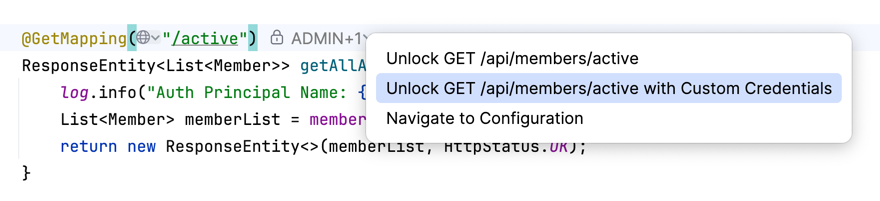
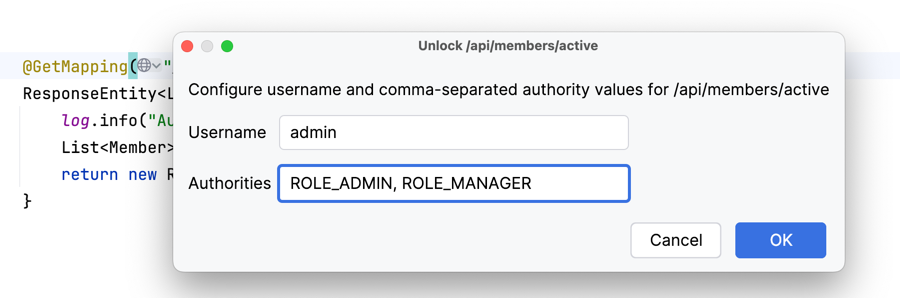
The "Unlock" feature represents a significant shift in how developers interact with secured endpoints. By clicking the unlock action in the IDE’s inlay, a developer can simulate a successful authentication for a specific URI and HTTP method. This action injects a TestingAuthenticationToken into the SecurityContext at runtime.
This mechanism is strictly a debug-time utility. It does not disable the security filters globally or bypass CSRF (Cross-Site Request Forgery) protections. If an endpoint requires a valid CSRF token, the application will still demand one, ensuring that the developer is testing the logic under realistic conditions.
The flexibility provided by this tool is twofold:
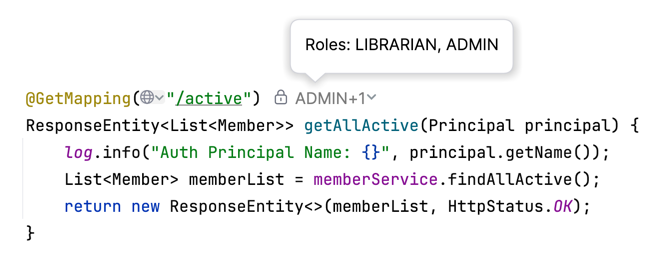
- Simple Unlock: The debugger assumes the identity required by the endpoint, allowing the developer to bypass the authentication gate entirely to reach the underlying service logic.
- Custom Authority Unlock: The developer can manually define a set of roles or a specific username. This allows for the testing of authorization-dependent logic—such as feature toggling or role-based access control—without the overhead of reconfiguring the entire security stack or managing test user credentials in a database.
Technical Implications and Limitations
While the tool offers significant efficiency, it operates under specific technical constraints. Because the debugger hooks into the AuthorizationFilter, the feature is currently limited to the Servlet-based stack. Applications utilizing Spring WebFlux, which relies on the AuthorizationWebFilter, are not supported in the 2026.2 release.
Furthermore, the tool does not currently support method-level security annotations like @PreAuthorize or @Secured directly through the inlay interface. However, because the injected Authentication object resides in the global SecurityContext, these annotations will naturally respect the artificial identity provided by the debugger, provided the method security interceptors are configured to read from that context.
A known limitation, tracked as IDEA-389767, involves the resolution of controller parameters annotated with @AuthenticationPrincipal. Because the injected principal is a simple String rather than a complex object like a UserDetails implementation, these parameters may return null. Developers are advised to use the base Principal or Authentication interfaces to ensure compatibility when working with unlocked endpoints.
Safety and Security Considerations
JetBrains has emphasized that the "Unlock" feature is a powerful utility that requires caution. When an endpoint is unlocked, the permission applies to the process level, meaning any client—including browser sessions, Postman, or curl scripts—hitting that URI will be treated as authenticated for the duration of the debug session.
This creates a potential vulnerability if the debugged application is exposed to a public network. Consequently, the feature is intended for local development or secure staging environments. There is no automated logging or external indicator that an endpoint has been unlocked, making it the responsibility of the developer to monitor the IDE’s state and re-lock or terminate the session once the task is complete.
Future Roadmap and Integration
The current iteration of the Security Inlays is manual, requiring the developer to trigger the action via the IDE interface. However, the architectural foundation is being laid for automated workflows. JetBrains has indicated that future releases, specifically targeting version 2026.3, will likely include support for Model Context Protocol (MCP) tools. This would allow AI agents or automated scripts to interact with the security inlay, potentially enabling autonomous testing cycles where an agent could query required roles and perform unlock operations without human intervention.
Industry Impact
The integration of these diagnostic tools directly into the IntelliJ IDEA environment reflects a broader industry trend toward "developer experience" (DevEx) optimization. By reducing the "friction-to-debug" time, organizations can maintain higher velocity in complex, security-sensitive environments.
For security engineers and application developers alike, this represents a shift from "trial-and-error" security configuration to a transparent, observable debugging model. By eliminating the need for hard-coded test credentials or "dev-only" security profiles—which carry the risk of being accidentally promoted to production environments—the use of runtime security inlays promotes a more robust and cleaner codebase.
As teams continue to adopt Spring Security 6.x and move away from deprecated authorization patterns, tools like these will become increasingly essential for managing the complexity of modern, reactive, and highly secured Java applications. With the Spring Debugger plugin now a standard part of the IntelliJ IDEA Ultimate ecosystem, the ability to peer into the live security state of a running application is likely to become a foundational skill for Java developers in the coming years.