Amazon Web Services (AWS) has officially launched Amazon S3 Files, a groundbreaking new service designed to revolutionize data accessibility and management within its cloud ecosystem. This innovative offering seamlessly bridges the long-standing divide between object storage, epitomized by Amazon Simple Storage Service (S3), and traditional file system interfaces. The introduction of S3 Files aims to simplify cloud architectures, eliminate data silos, and enhance performance for a wide array of workloads, from production applications and machine learning model training to the burgeoning field of agentic AI.
For over a decade, AWS has navigated the complexities of educating users on the distinct characteristics of object storage versus file systems. Historically, Amazon S3 has been lauded for its unparalleled durability, scalability, and cost-effectiveness, storing data as discrete objects within buckets. This model, while robust for many use cases like backups, archives, and static website hosting, presented a fundamental difference in data manipulation compared to file systems. In a file system, individual data blocks can be modified, allowing for granular updates and interactive applications. In contrast, S3 traditionally required entire objects to be replaced for any modification, a paradigm often likened to replacing an entire book in a library rather than editing a single page.
Amazon S3 Files fundamentally alters this landscape by presenting S3 buckets as fully-featured, high-performance file systems. This means that changes made to data through the file system are automatically synchronized back to the S3 bucket, and vice versa, with fine-grained control over the synchronization process. Crucially, S3 Files enables data sharing across multiple compute resources without the need for data duplication, a significant advancement for collaborative workloads and large-scale data processing.
Eliminating the Storage Trade-off

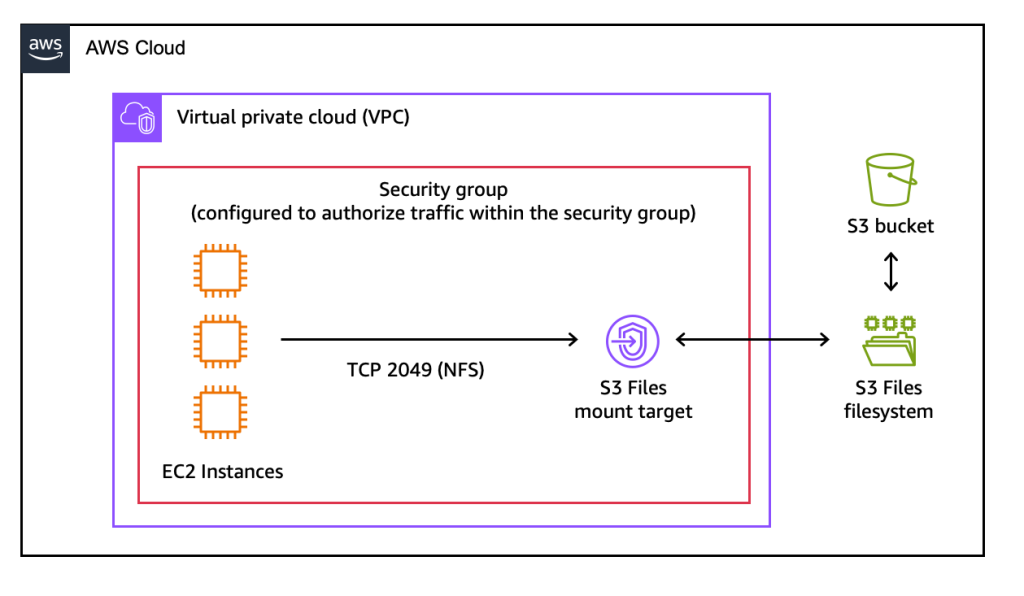
The introduction of S3 Files addresses a critical decision point for cloud architects: the trade-off between the cost, durability, and broad service compatibility of Amazon S3 versus the interactive capabilities and familiar interface of a file system. Previously, organizations had to choose which set of benefits best suited their application, often leading to complex data pipelines or compromises in performance or accessibility. S3 Files effectively removes this dichotomy, positioning Amazon S3 as a central data repository accessible directly from any AWS compute resource, including Amazon Elastic Compute Cloud (EC2) instances, containers orchestrated by Amazon Elastic Container Service (ECS) or Amazon Elastic Kubernetes Service (EKS), and serverless functions powered by AWS Lambda.
Unlocking File System Functionality for S3 Data
Any general-purpose S3 bucket can now be accessed as a native file system. This access supports all standard Network File System (NFS) v4.1+ operations, including file creation, reading, updating, and deletion. When data is accessed or modified through the S3 Files interface, relevant file metadata and contents are intelligently cached and managed on a high-performance storage layer. For data that benefits from low-latency access, S3 Files serves it directly from this optimized storage. For workloads requiring large sequential reads, such as processing massive datasets for machine learning, S3 Files can automatically serve data directly from Amazon S3, maximizing throughput. Furthermore, for byte-range reads, only the specific bytes requested are transferred, significantly minimizing data movement and associated costs.
The system incorporates intelligent pre-fetching capabilities to anticipate data access patterns, enhancing performance proactively. Users retain granular control over what data is stored on the file system’s high-performance tier, with options to load full file data or just metadata, allowing for precise optimization based on specific access requirements.
Technical Underpinnings and Performance

Under the hood, Amazon S3 Files leverages Amazon Elastic File System (EFS) technology, delivering impressive latencies as low as approximately 1 millisecond for actively accessed data. This architecture supports concurrent access from multiple compute resources, providing NFS close-to-open consistency. This makes it an ideal solution for interactive, shared workloads that involve data mutation. Examples include agentic AI systems that collaborate through file-based tools or machine learning training pipelines that continuously process and update datasets.
Getting Started: A Seamless Integration
The process of setting up and utilizing Amazon S3 Files is designed to be straightforward. Users can begin by creating an S3 file system through the AWS Management Console, the AWS Command Line Interface (AWS CLI), or through infrastructure as code (IaC) tools.
A typical workflow involves:
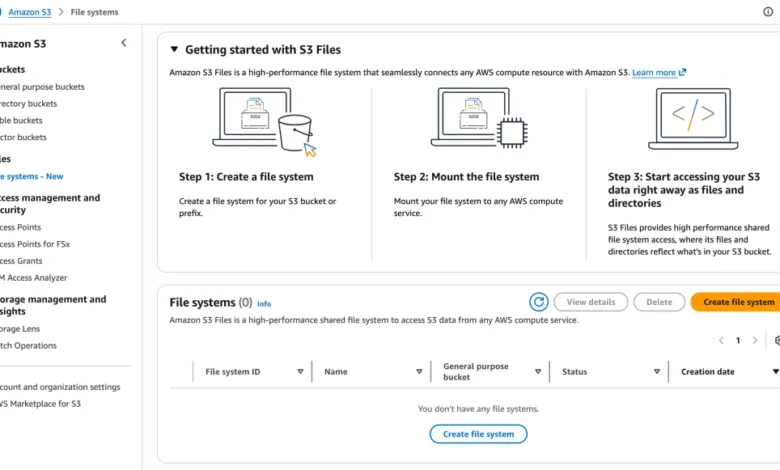
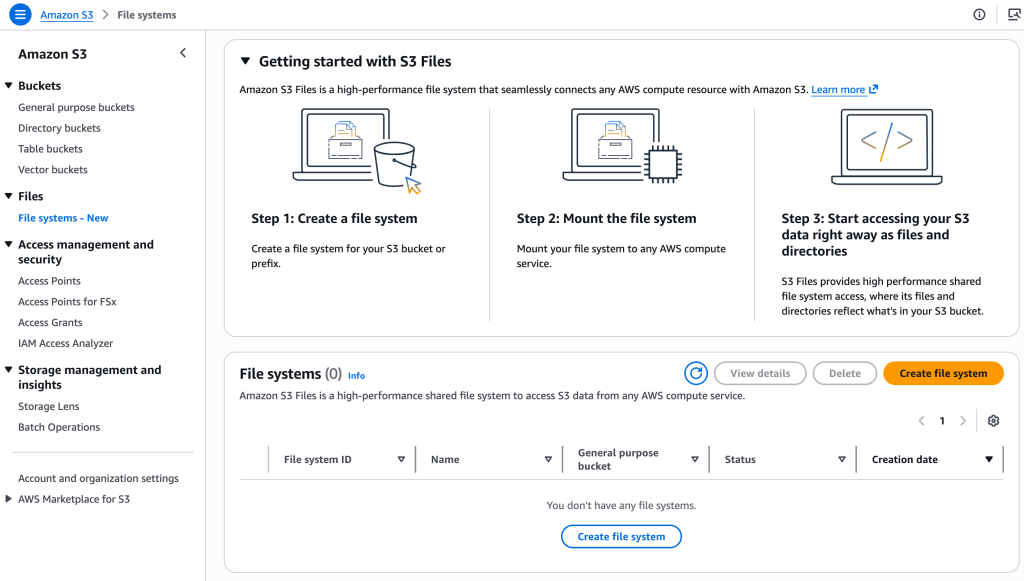
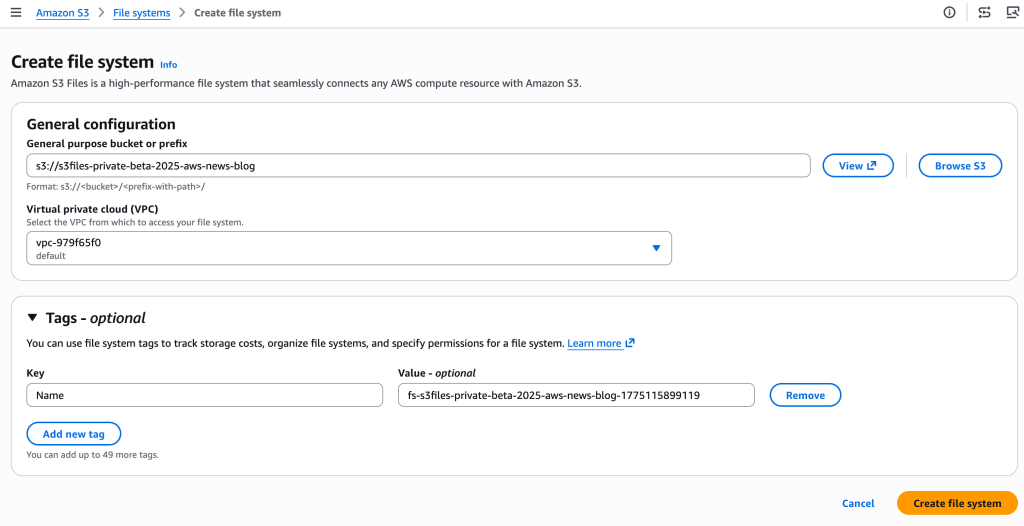
- Creating an S3 File System: Within the Amazon S3 section of the AWS Management Console, users navigate to "File systems" and select "Create file system." They then specify the S3 bucket they wish to expose as a file system.
- Discovering the Mount Target: The service automatically provisions mount targets, which are network endpoints residing within the user’s Virtual Private Cloud (VPC). These targets facilitate access from EC2 instances. The "Mount targets" tab provides the necessary identifiers. For CLI users, creating the file system and its mount targets requires separate commands:
create-file-systemfollowed bycreate-mount-target. - Mounting the File System on an EC2 Instance: Once an EC2 instance is configured, the file system can be mounted using standard commands. For example,
sudo mkdir /home/ec2-user/s3filesfollowed bysudo mount -t s3files fs-0aa860d05df9afdfe:/ /home/ec2-user/s3files.
After mounting, users can interact with their S3 data directly within the mounted directory using familiar file system commands. Updates made to files within the mounted file system are automatically propagated back to the S3 bucket as new objects or new versions of existing objects, typically within minutes. Conversely, changes made directly to objects in the S3 bucket become visible in the mounted file system within seconds, though occasionally this synchronization may take up to a minute.
A practical demonstration illustrates this functionality:
# Create a file on the EC2 file system
echo "Hello S3 Files" > s3files/hello.txt

# Verify the file's presence and details
ls -al s3files/hello.txt
# Expected output: -rw-r--r--. 1 ec2-user ec2-user 15 Oct 22 13:03 s3files/hello.txt

# Confirm the file's existence in the S3 bucket
aws s3 ls s3://s3files-aws-news-blog/hello.txt
# Expected output: 2025-10-22 13:04:04 15 hello.txt

# Download the file from S3 and verify content
aws s3 cp s3://s3files-aws-news-blog/hello.txt . && cat hello.txt
# Expected output: Hello S3 Files
This simple example showcases the bidirectional synchronization and the seamless transition between file system operations and S3 object management.
Distinguishing S3 Files from Other AWS File Services
AWS offers a suite of storage services, and understanding their distinctions is crucial for optimal architecture design. The company acknowledges the potential for confusion among its diverse offerings and seeks to clarify the positioning of S3 Files.
-
Amazon S3 Files: This service is optimized for workloads that require interactive, shared access to data residing in Amazon S3 through a high-performance file system interface. It is particularly well-suited for scenarios where multiple compute resources need to read, write, and mutate data collaboratively. This includes production applications, agentic AI agents leveraging Python libraries and CLI tools, and machine learning training pipelines. The key benefits are shared access across compute clusters without data duplication, sub-millisecond latency for active data, and automatic synchronization with S3.
-
Amazon FSx: For organizations migrating from on-premises Network Attached Storage (NAS) environments, Amazon FSx provides familiar features and compatibility. It is also the preferred choice for high-performance computing (HPC) and GPU cluster storage, with specialized offerings such as Amazon FSx for Lustre. FSx also caters to specific enterprise requirements with Amazon FSx for NetApp ONTAP, Amazon FSx for OpenZFS, and Amazon FSx for Windows File Server, offering tailored file system capabilities for these platforms.
S3 Files is positioned to complement these services by offering a direct, high-performance file system interface to the vast, durable, and cost-effective storage of Amazon S3, without the need to move data into a separate file storage service for interactive workloads.
Pricing and Availability
Amazon S3 Files is available starting today in all commercial AWS Regions. The pricing model for S3 Files involves charges for the portion of data stored in the S3 file system, for small file read and all write operations performed on the file system, and for S3 requests associated with data synchronization between the file system and the S3 bucket. Detailed pricing information is available on the Amazon S3 pricing page.
Implications and Future Outlook
The introduction of Amazon S3 Files represents a significant step forward in cloud data management. By breaking down traditional storage silos, it empowers organizations to leverage Amazon S3 as a unified data lake accessible via familiar file system paradigms. This is particularly impactful for emerging technologies like agentic AI, which often rely on complex, inter-agent communication and data sharing mechanisms that can be simplified through a shared file system interface. For ML practitioners, it streamlines the process of accessing and preparing large datasets for training without the overhead of complex data movement or duplication.
The ability to access data directly from any AWS compute resource without compromising on the durability and cost-efficiency of S3 is a powerful proposition. It promises to reduce architectural complexity, lower operational costs, and accelerate development cycles. As the adoption of agentic AI and sophisticated ML models continues to grow, services like Amazon S3 Files will become increasingly critical in enabling these advanced workloads.
AWS continues to demonstrate its commitment to innovation by evolving its storage offerings to meet the dynamic needs of its customer base. The successful integration of object storage and file system access in S3 Files is a testament to this ongoing effort, offering a glimpse into a future where data accessibility and management are more seamless and powerful than ever before.
For those eager to explore this new capability further, comprehensive documentation is available on the AWS website, guiding users through setup, configuration, and best practices for leveraging Amazon S3 Files. The company encourages feedback from users on how this new functionality will be integrated into their existing and future cloud strategies.