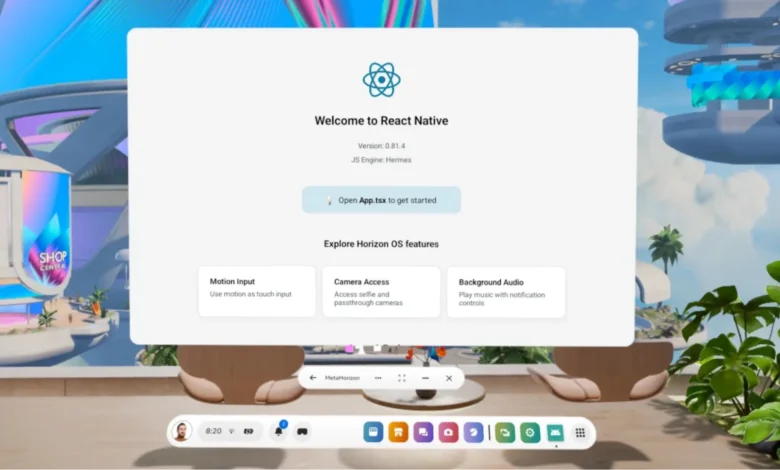
The commitment to unifying development across diverse platforms has been a cornerstone of React Native since its inception. What began as a bridge between Android and iOS has systematically broadened its reach, encompassing platforms like Apple TV, Windows, macOS, and even the web through projects like react-strict-dom. This ambitious trajectory was further solidified at React Conf 2025 with the groundbreaking announcement of official React Native support for Meta Quest devices, marking a significant leap towards realizing the "Many Platform Vision" initially outlined in August 2021. This expansion allows developers to leverage their existing React Native expertise to build immersive virtual reality applications, blurring the lines between traditional mobile development and the burgeoning VR ecosystem.
The journey to Meta Quest integration builds upon React Native’s core philosophy of knowledge reuse. Meta Quest devices operate on Meta Horizon OS, an Android-based operating system. This foundational similarity means that the extensive Android tooling, build systems, and debugging workflows familiar to React Native developers can be applied with minimal adaptation. For those already engaged in React Native Android development, the transition to building for Meta Quest is remarkably smooth, preserving much of their established development model. This approach is consistent with React Native’s historical expansion into other Android-based environments, where it integrates with existing abstractions rather than introducing entirely new runtimes or development paradigms. This strategy is crucial for maintaining a cohesive ecosystem, enabling the addition of platform-specific capabilities without fragmenting the framework or necessitating a completely separate development methodology.
The React Conf 2025 event, held in early 2025, served as the stage for this pivotal announcement. The conference, a key gathering for the React and React Native communities, typically showcases the latest advancements and future directions of the JavaScript ecosystem. The inclusion of Meta Quest support was presented not as an isolated feature but as a natural evolution of React Native’s multi-platform strategy. The official announcement, made during a keynote presentation, highlighted the accessibility of VR development for a wider audience of React Native engineers. The presentation, accessible via a YouTube link, underscored the potential for creators to build interactive VR experiences using familiar tools and patterns.
Unlocking VR Development: The Meta Quest Integration
The integration of React Native with Meta Quest devices opens up a new frontier for application development. Meta Horizon OS, being Android-based, ensures that the existing React Native Android tooling, build systems, and debugging workflows are largely compatible. This means developers can transition to VR development with a significantly reduced learning curve. The core principle of building on existing abstractions, rather than creating entirely new ones, ensures that platform-specific features can be integrated without compromising the overall integrity or extensibility of the React Native framework. This approach is vital for fostering a robust and unified ecosystem.
The development workflow for Meta Quest with React Native is designed to be as intuitive as possible, beginning with the widely adopted Expo Go and extending to more advanced development builds and platform-specific configurations. For initial prototyping and UI development, Expo Go provides a seamless experience. Developers can launch a standard Expo project, start the development server, and then access the application directly through Expo Go on the Meta Quest headset. This process mirrors the familiar workflow for developing Android applications with Expo, with only minor adjustments for Meta Horizon OS-specific requirements.
When deeper platform integration or access to native modules becomes necessary, the development build process comes into play. These development builds leverage the standard Expo development build workflow and are deployed directly to the Quest device, offering more granular control and access to native functionalities. This tiered approach ensures that developers can choose the level of complexity that best suits their project’s needs, from rapid prototyping to full-fledged application development.
Navigating Meta Quest Development: Key Considerations
The transition to developing for Meta Quest necessitates understanding certain platform-specific nuances. While the overall development paradigm remains consistent with React Native’s cross-platform capabilities, some adjustments are required to ensure optimal performance and compatibility within the Meta Horizon OS environment.
Project Configuration for Meta Horizon OS
To ensure applications function correctly and meet the criteria for store submission on Meta Quest, specific configuration adjustments are essential. These include platform-specific Android configurations, the implementation of product flavors, and the meticulous management of application metadata. Expo simplifies this process through a dedicated plugin for Meta Horizon OS, named expo-horizon-core. This plugin automates the application of these critical requirements during the build process, ensuring that project configurations align with Meta Quest expectations without the need for manual modification of native files.
Developers are instructed to install expo-horizon-core and integrate it into their app.json or app.config.js file. This involves specifying parameters such as horizonAppId, defaultHeight, defaultWidth, supportedDevices, disableVrHeadtracking, and allowBackup. Additionally, the orientation value in the project configuration needs to be set to default.
To streamline the build process, it is also recommended to update the package.json file with Quest-specific scripts. This allows for easy execution of commands like expo run:android --variant questDebug for debugging and expo run:android --variant questRelease for building release versions tailored for the Quest platform.
Beyond Expo: Native Development for Meta Quest
While Expo offers the most accessible entry point for React Native development on Meta Quest, developers also have the option to build without the framework. In such cases, the necessary Meta Horizon OS configurations must be applied directly within their Android project. This typically involves ensuring the project is set up to build a universal APK, configuring the AndroidManifest.xml with specific intents and features required by Meta Horizon OS, and setting up the correct product flavors for VR builds. A comprehensive understanding of the expo-horizon-core plugin’s implementation can provide a detailed roadmap for manually replicating these configurations.
Operating Without Google Play Services
A crucial distinction of Meta Horizon OS is its foundation on the Android Open Source Project (AOSP) without direct integration of Google Mobile Services (GMS). This means that applications built for Meta Quest will function on standard Android APIs but will not have access to services like Google Play Services or the Play Store. Developers targeting Meta Quest must therefore design their applications to either avoid direct dependencies on Google services or to implement platform-specific alternatives where necessary. The Meta Horizon OS developer documentation provides a list of unsupported dependencies, which is an invaluable resource for developers to consult.
Permissions and Device Capabilities

The nature of VR headsets means that certain Android permissions and hardware assumptions common to mobile devices are either unavailable or prohibited on Meta Quest. Features such as cellular connectivity (e.g., SMS capabilities), specific sensors like GPS, and certain restricted permissions do not apply in the VR context. Developers must proactively account for these differences during the project setup and in their application logic to ensure smooth operation and compliance.
Evaluating Library Compatibility
The vast majority of React Native libraries are expected to function on Meta Quest, but compatibility hinges on the assumptions a library makes about the underlying platform. Libraries that rely on mobile-specific hardware, touch-only input, or services not present on Horizon OS may require adjustments. As a general guideline, libraries that abstract platform differences, avoid hardware-specific assumptions, and do not depend on mobile-only services are more likely to be compatible out-of-the-box. For common functionalities like location services or push notifications, Expo offers drop-in replacements specifically designed for Meta Horizon OS. Other libraries might work without modification or necessitate platform-specific handling depending on their internal dependencies.
Implementing Platform-Aware Code
For applications designed to run on both Meta Quest and other platforms, implementing platform-aware code paths is essential. Meta Horizon OS provides runtime utilities, accessible through the expo-horizon-core library, that allow developers to detect whether the application is currently running on a Quest device. This capability enables developers to gracefully disable or replace unsupported features, ensuring a consistent and error-free user experience across different form factors. For instance, developers can use ExpoHorizon.isHorizonDevice to conditionally execute code or ExpoHorizon.isHorizonBuild to identify specific build variants. The horizonAppId can also be accessed for further customization.
Designing for Immersion: VR UX Considerations
Developing for a head-mounted display introduces a unique set of design and user experience (UX) challenges distinct from those of touch-based mobile devices. Interfaces are viewed at a distance, exist within a 3D space, and are navigated using a broader spectrum of input methods.
UI Adaptations for VR
UI elements in VR typically need to be larger, with increased spacing, and employ typography that remains legible at varying distances. These considerations are not entirely novel, as they echo the challenges faced when designing for larger screens like desktops and tablets, where applications must adapt to resizable windows and dynamic layouts. The primary difference lies in the immersive nature of VR and the spatial rendering of interface elements.
Input and Interaction in VR
A significant divergence between Meta Quest and mobile Android is the input paradigm. Instead of relying predominantly on touch gestures, Meta Quest applications commonly utilize controllers, hand tracking, and potentially mouse and keyboard input. Controllers often function as pointer devices, leading to interaction patterns more akin to web and desktop UIs, which include concepts like hover states and focus-based navigation.
React Native’s event system and component model are capable of supporting these interaction patterns. However, applications must actively avoid touch-only assumptions. Providing clear focus states and predictable navigation is paramount when users interact via pointing devices. This emphasis on responsive layouts and input-agnostic interactions ensures a more universally accessible and user-friendly VR experience. The React Native layout system and component model provide a robust foundation for constructing comfortable and effective VR interfaces.
Future Outlook and Broader Impact
The integration of React Native with Meta Quest represents a significant step in the evolution of cross-platform development. By extending the reach of a familiar framework into the immersive world of virtual reality, Meta and the React Native community are democratizing VR application development. This move is likely to spur innovation, enabling a new wave of developers to create engaging VR experiences without the steep learning curve typically associated with native VR development.
The "Many Platform Vision" continues to manifest, demonstrating React Native’s adaptability and its potential to become a universal development tool. As VR technology matures and becomes more mainstream, the demand for skilled developers capable of creating compelling VR content will undoubtedly rise. React Native’s presence in this burgeoning market positions it as a critical enabler for the metaverse and other immersive digital experiences.
Acknowledgements
The successful integration of React Native with Meta Quest is a testament to collaborative effort. The developers express gratitude to all individuals and teams who contributed their expertise, feedback, and support throughout the development process. This endeavor underscores the power of community-driven innovation in expanding the capabilities of open-source technologies.
Learn More
For developers eager to dive into Meta Quest development with React Native, a wealth of resources is available. The official Meta Quest developer documentation provides in-depth guides on building Android apps for their platform. Additionally, the Expo documentation offers specific instructions and best practices for utilizing their tools with Meta Quest. Exploring reference projects and examples is also highly recommended to gain practical insights into implementing VR features. The ongoing development of this integration promises further enhancements and expanded capabilities, making it an exciting area for developers to explore.