The ability to efficiently locate and manipulate individual components within a graphical user interface is fundamental to developing robust and dynamic applications. Textual, a powerful Python framework for building rich terminal user interfaces (TUIs), provides developers with sophisticated tools to interact with its underlying Document Object Model (DOM). This article delves into Textual’s DOM querying capabilities, exploring how developers can precisely target and update widgets, thereby enhancing application interactivity and maintainability. Understanding these mechanisms is crucial for anyone looking to build complex and responsive TUIs with Textual.
At its core, the Textual DOM acts as a hierarchical registry, meticulously tracking every widget instantiated within an application. This centralized management allows for swift retrieval and modification of UI elements. By employing specific query methods against the DOM, developers can pinpoint desired widgets based on various criteria, from their type to their unique identifiers or CSS-like selectors. This capability is not merely about finding elements; it’s about gaining granular control over the application’s presentation and behavior.
This exploration will cover the primary methods Textual offers for DOM querying: query_one() for retrieving a single, specific widget, and query() for fetching collections of widgets that match defined criteria. We will examine the parameters these methods accept, the potential exceptions they can raise, and illustrate their practical application through code examples.
The Precision of query_one()
The query_one() method is a cornerstone of Textual’s DOM interaction. It is designed to return a single widget that precisely matches the provided criteria. This method is frequently encountered in Textual documentation and open-source projects hosted on platforms like GitHub, underscoring its importance and widespread adoption among developers.
The query_one() method can accept up to two arguments:
- CSS Selector or Widget Type: This is the primary identifier used to locate the target widget. It can be a CSS selector string (e.g.,
"#my-id",".my-class","Button") or a widget class (e.g.,Input,Button). - Widget Type (Optional): If a CSS selector is provided as the first argument, a widget type can be supplied as the second argument to further refine the search. This ensures that the returned widget not only matches the selector but also is of the specified type.
When both a CSS selector and a widget type are provided, the CSS selector is always passed as the first argument, and the widget type as the second. This ordering is critical for the method to interpret the query correctly.
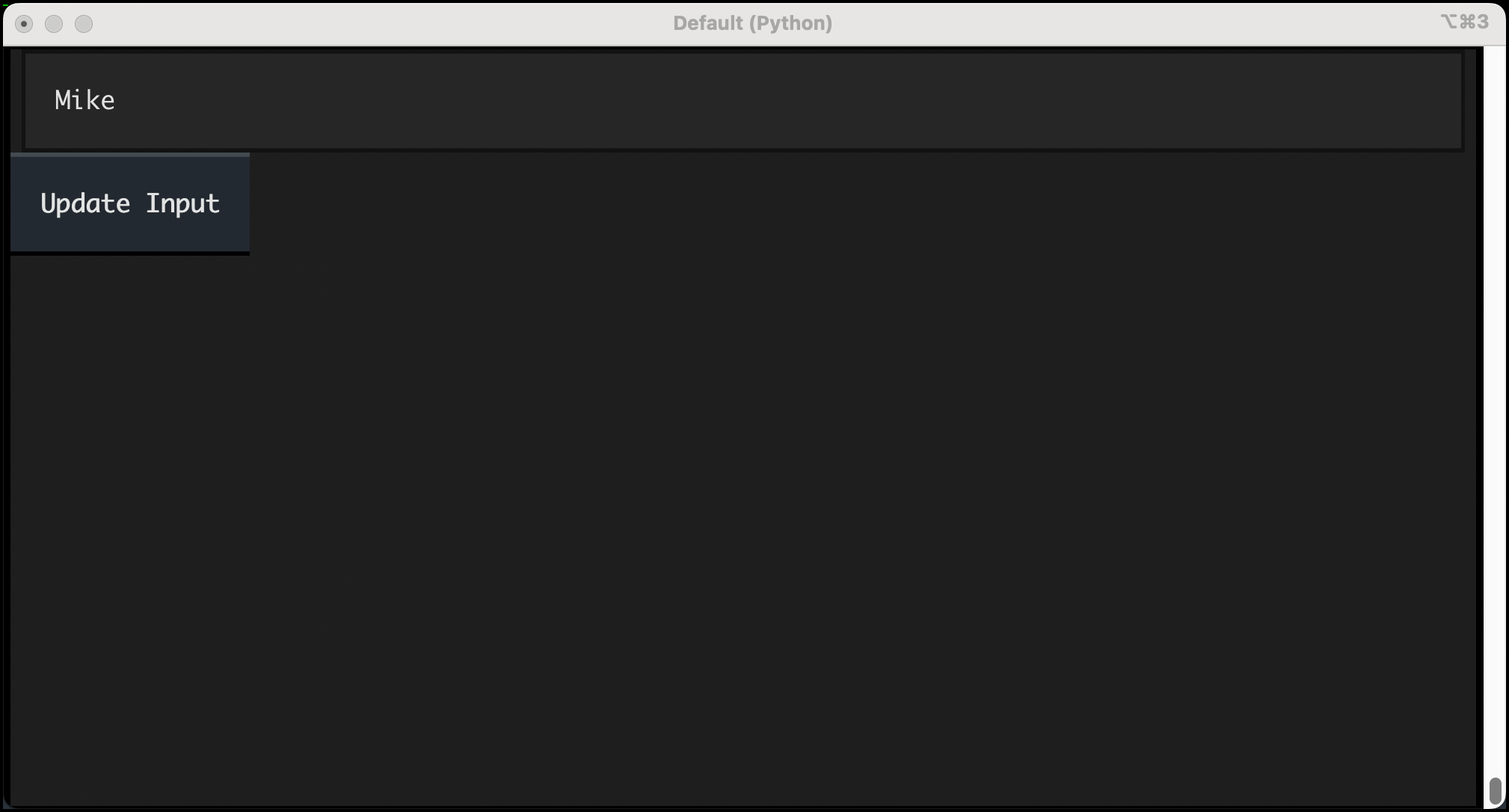
To illustrate the practical application of query_one(), consider a simple Textual application that features an input field and a button. The goal is to update the input field with a message confirming the button press.
# query_input.py

from textual.app import App, ComposeResult
from textual.widgets import Button, Input

class QueryInput(App):

    def compose(self) -> ComposeResult:
        """Composes the application's UI."""
        yield Input(placeholder="Enter text here...")
        yield Button("Update Input", id="update-button")

    def on_button_pressed(self) -> None:
        """Handles button press events."""
        # Use query_one to find the Input widget by its type
        input_widget = self.query_one(Input)
        # Construct the new string to update the input field
        new_string = f"You entered: input_widget.value"
        # Update the value of the retrieved Input widget
        input_widget.value = new_string

if __name__ == "__main__":
    app = QueryInput()
    app.run()
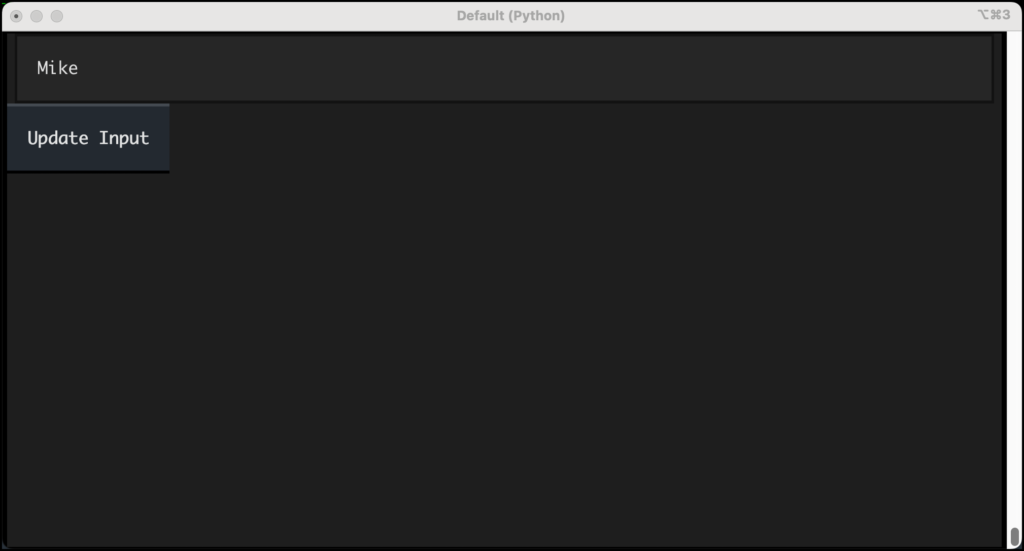
In this QueryInput application, the compose method yields an Input widget and a Button widget, the latter being assigned an ID for potential future targeting. When the "Update Input" button is pressed, the on_button_pressed method is triggered. Inside this handler, self.query_one(Input) is called. This effectively searches the application’s DOM for the first widget that is an instance of the Input class. Once found, the value attribute of this input_widget is updated with a dynamically generated string that includes the text previously entered by the user. This demonstrates how query_one() facilitates direct access to a specific UI element for modification.
The user experience with this application would involve typing some text into the input field and then clicking the button. Upon clicking, the input field would transform to display a confirmation message, such as "You entered: [the text the user typed]". This immediate feedback loop showcases the power of DOM querying in creating interactive applications.
Advanced Targeting with CSS Selectors
Beyond simply querying by widget type, query_one() offers the flexibility to use CSS selectors, mirroring the familiar syntax used in web development. This allows for more precise targeting, especially when multiple widgets of the same type exist.
Consider a scenario where you need to update a specific Label widget based on a button press. This requires uniquely identifying the Label within the DOM.
# query_one_same_ids.py

from textual.app import App, ComposeResult
from textual.widgets import Button, Label

class QueryApp(App):

    def compose(self) -> ComposeResult:
        """Composes the application's UI with labeled widgets."""
        yield Label("Press a button", id="status-label")
        yield Button("Click Me", id="action-button")

    def on_button_pressed(self) -> None:
        """Updates the status label when a button is pressed."""
        # Use query_one with a CSS selector to find the label by its ID
        widget = self.query_one("#status-label")
        widget.update("You pressed the button!")

if __name__ == "__main__":
    app = QueryApp()
    app.run()
In query_one_same_ids.py, two widgets are created: a Label with the ID "status-label" and a Button with the ID "action-button". When the button is pressed, the on_button_pressed method is invoked. Here, self.query_one("#status-label") is used. The #status-label is a CSS selector that specifically targets the widget with the ID status-label. This ensures that the correct Label widget is selected, even if other Label widgets were present in the application. The update() method is then called on the retrieved widget to change its displayed text.
This method of targeting by ID is highly effective for ensuring that operations are applied to the intended UI element, preventing unintended side effects.
Error Handling in query_one()
It is crucial to understand the potential exceptions that query_one() can raise, as this informs robust error handling strategies within Textual applications.
-
NoMatchesException: Ifquery_one()is called with a selector or widget type for which no matching widget exists in the DOM, Textual will raise aNoMatchesexception. This typically occurs when the application’s structure changes, or the query is misspelled, leading to a failed search. -
WrongTypeException: This exception is raised whenquery_one()is called with both a CSS selector and a widget type, and a widget matches the CSS selector but is not an instance of the specified widget type. For instance, if you queried for"#my-label"and specifiedButtonas the widget type, but"#my-label"actually referred to aLabelwidget, aWrongTypeexception would be raised.
Consider the following hypothetical query within the context of the QueryApp example:
# This line, if executed, would likely raise an exception
self.query_one("#status-label", Button)
If you were to execute this line within the on_button_pressed method of QueryApp, Textual would attempt to find a widget matching the CSS selector "#status-label". It would then check if this widget is an instance of the Button class. Since the widget with the ID "#status-label" is actually a Label, and not a Button, a WrongType exception would be raised. Developers must anticipate these scenarios and implement appropriate error handling, such as try-except blocks, to gracefully manage situations where queries might fail or return unexpected types. This ensures the application remains stable and provides informative feedback to the user if an issue arises.
The Broad Reach of query()
While query_one() is ideal for targeting a single, specific widget, Textual’s query() method offers a more comprehensive approach to exploring the DOM. The query() method is designed to retrieve multiple widgets that satisfy the given criteria, returning them as a DOMQuery object. This object behaves much like a Python list, providing an iterable container of widgets.
The query() method can also accept CSS selectors or widget types as arguments, allowing developers to filter the results. When no arguments are provided, query() will return all widgets currently present in the DOM.
Let’s explore how query() can be used to gather and display information about all widgets within an application.
# query_all.py

from textual.app import App, ComposeResult
from textual.widgets import Button, Label

class QueryApp(App):

    def compose(self) -> ComposeResult:
        """Composes the application's UI."""
        yield Label("Press a button", id="status-label")
        yield Button("Action Button", id="action-button")

    def on_button_pressed(self) -> None:
        """Collects and displays all widgets in the DOM."""
        # Query for all widgets in the DOM
        widgets = self.query()
        widget_list_string = ""
        # Iterate through the DOMQuery object and build a string representation
        for widget in widgets:
            widget_list_string += f"widgetn"
        # Update the status label with the collected widget information
        label = self.query_one("#status-label")
        label.update(widget_list_string)

if __name__ == "__main__":
    app = QueryApp()
    app.run()
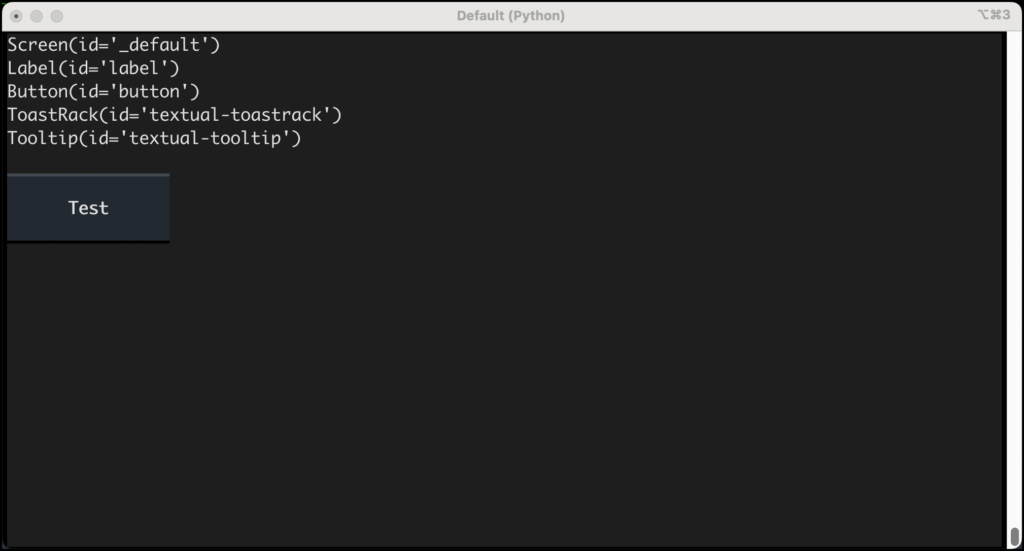
In this query_all.py example, when the "Action Button" is pressed, the on_button_pressed method is executed. self.query() is called without any arguments, which instructs Textual to return every widget currently managed by the application’s DOM. The returned DOMQuery object, assigned to the widgets variable, is then iterated over. For each widget in the collection, its string representation is appended to widget_list_string. Finally, the "#status-label" widget is queried and updated with this compiled string, effectively displaying a list of all widgets present in the application.
The output of this application might be surprising to developers new to Textual. Beyond the explicitly defined Label and Button, the list will also include system-level widgets such as Screen, ToastRack, and Tooltip. The Screen widget is the foundational element of every Textual application’s visual hierarchy. ToastRack is responsible for managing and displaying transient notification messages (toasts), while Tooltip widgets are designed to appear when a user hovers their mouse over another widget. The presence of these background widgets highlights the comprehensive nature of the DOM and the fact that even seemingly hidden UI elements are part of the managed structure.
Utilizing Selectors with query()
Just as with query_one(), the query() method can be empowered with CSS selectors to retrieve a more specific subset of widgets. This is particularly useful when you need to perform an action on all widgets of a certain type or with particular attributes.
Imagine you want to identify and list all the Button widgets within your application.
# query_buttons.py

from textual.app import App, ComposeResult
from textual.widgets import Button, Label

class QueryApp(App):

    def compose(self) -> ComposeResult:
        """Composes the application's UI with multiple buttons."""
        yield Label("Press a button", id="status-label")
        yield Button("Button One", id="one")
        yield Button("Button Two", id="two")
        yield Button("Button Three") # No explicit ID

    def on_button_pressed(self) -> None:
        """Queries and displays all Button widgets."""
        s = ""
        # Query specifically for all widgets of type 'Button'
        for widget in self.query("Button"):
            s += f"widgetn"
        label = self.query_one("#status-label")
        label.update(s)

if __name__ == "__main__":
    app = QueryApp()
    app.run()
In this query_buttons.py script, the compose method instantiates three Button widgets, two with explicit IDs and one without. When any button is pressed, the on_button_pressed method is triggered. The line self.query("Button") is key here. It searches the DOM for any widget that is an instance of the Button class. The resulting DOMQuery object is then iterated over, and a string representation of each found Button widget is concatenated. This string is subsequently used to update the "#status-label" widget. The output clearly shows only the Button widgets, demonstrating the power of filtering with type selectors.
Targeting Widgets with Specific States
The power of CSS selectors extends to targeting widgets based on their state or applied styles. For instance, if you need to find all buttons that have been explicitly disabled, you can leverage the .disabled selector.
To query for all disabled buttons, you would modify the query as follows:
widgets = self.query("Button.disabled")
This query would return a DOMQuery object containing only those Button widgets that have the disabled class applied to them, either through direct style manipulation or CSS rules. This capability is invaluable for managing application states and ensuring that operations are only performed on widgets that are in the appropriate condition.
Advanced Iteration with results()
Textual’s DOMQuery objects, returned by the query() method, offer an additional utility: the results() method. This method provides an alternative and often more type-safe way to iterate over the queried widgets, especially when you have filtered your query by a specific widget type or selector.
The results() method can take a widget type as an argument. It then returns an iterator that yields only widgets of that specified type from the DOMQuery collection. This is particularly beneficial for static analysis tools like Mypy, as it allows them to correctly infer the type of widgets within the loop.
Consider the previous example of querying for disabled buttons. Using results(), you could rewrite the iteration like this:
# Example using results()
widgets = self.query(".disabled").results(Button)
s = ""
for widget in widgets:
    s += f"widgetn"
This code first queries for elements with the .disabled class. Then, .results(Button) is chained to ensure that the iteration only yields Button widgets from that subset. While this approach might appear slightly more verbose than a direct query using self.query("Button.disabled"), it offers a significant advantage in terms of type safety. When results() is used with a specific type, Python type checkers can accurately determine that widget within the loop is indeed a Button object, enabling better code completion and static error detection. Without results(), a type checker might only infer that widget is a generic Widget object, limiting its ability to catch type-related errors.
Conclusion: Mastering Textual’s DOM for Enhanced UI Development
This in-depth exploration has illuminated the fundamental mechanisms Textual provides for interacting with its Document Object Model. Developers now possess a clear understanding of how to leverage query_one() for precise targeting of single widgets and query() for retrieving collections of UI elements. We have examined the nuances of using CSS selectors and widget types for filtering, the potential exceptions to anticipate, and the utility of the results() method for enhancing type safety.
The ability to efficiently query and manipulate widgets is paramount to building dynamic, responsive, and maintainable Textual applications. By mastering these DOM querying techniques, developers can unlock new levels of control over their terminal user interfaces, creating richer and more engaging user experiences. Textual continues to be a leading framework for Python-based TUI development, and its robust DOM querying capabilities are a testament to its power and flexibility. Developers are encouraged to explore these features further to craft sophisticated and efficient terminal applications.