React Native 0.86 Ushers in a New Era with Comprehensive Android Edge-to-Edge Support and a Significant Repository Relocation

The latest iteration of the popular cross-platform development framework, React Native 0.86, has been officially released, bringing a suite of enhancements designed to streamline development and improve the user experience. This release marks a significant milestone, not only for its technical advancements but also for the foundational shift in how the React Native ecosystem is managed. Key among the new features are robust support for Android’s edge-to-edge display mode across Android 15 and newer versions, alongside notable improvements to the React Native Developer Tools. Importantly, this release continues the trend of prioritizing stability, offering zero user-facing breaking changes for the second consecutive release, a testament to the ongoing commitment to making upgrades more predictable and seamless for developers.
A New Home for the React Native Ecosystem: Transition to the React Foundation
A pivotal development accompanying React Native 0.86 is the relocation of its core repository. In a move that signifies a broader organizational shift, the React Native repository, along with its associated projects including React, Metro, Yoga, and the React Native Website, has transitioned from the facebook GitHub organization to the new react organization. This relocation is a direct reflection of the ongoing transition of React and React Native under the stewardship of the React Foundation, an independent entity established to ensure the long-term health and evolution of the React ecosystem.
This transition to an independent foundation aims to foster greater community involvement and decentralized governance, moving away from a singular corporate influence. The React Foundation’s mission is to provide dedicated resources and oversight for the continued development and maintenance of the React family of technologies. While this organizational change might seem significant, users are assured that GitHub’s automatic redirection mechanisms will ensure all existing URLs, issues, and pull requests seamlessly point to the new repository location. Consequently, no immediate action is required from developers regarding the repository’s physical location on GitHub.
Unlocking the Full Screen: Enhanced Edge-to-Edge Support on Android
React Native 0.86 introduces comprehensive fixes and enhancements for Android’s edge-to-edge display mode, a feature that allows applications to extend their content behind system bars (like the status bar and navigation bar), providing a more immersive user experience. This update is particularly impactful for apps targeting Android 15 and later operating system versions. The improvements extend to scenarios where the edge-to-edge mode is enforced by the operating system itself, even if it has not been explicitly enabled through the edgeToEdgeEnabled Gradle property.
This detailed support ensures that developers can leverage the full screen real estate on modern Android devices with greater confidence. Previously, achieving consistent edge-to-edge behavior across different Android versions and device configurations could present challenges. The fixes in React Native 0.86 address these complexities, enabling developers to more readily implement visually appealing and uninterrupted user interfaces. This is a critical step towards modern mobile app design, where immersive displays are increasingly becoming a standard expectation. The implications are significant for user engagement, as apps that effectively utilize screen space can offer richer, more engaging interfaces.
Streamlining Development Workflows: React Native DevTools Improvements
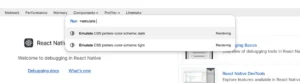
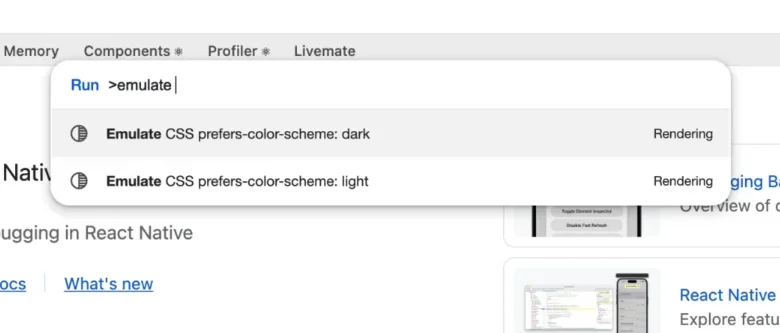
The developer experience has also received a significant boost with enhancements to React Native Developer Tools. A particularly noteworthy addition is the support for light/dark mode emulation. Developers can now simulate their app’s appearance mode handling directly within the DevTools, utilizing the Emulation.setEmulatedMedia function. This capability allows for real-time testing of how an application adapts to different color schemes without the need to manually change device settings. Accessing this feature is intuitive, available through the Command Palette by pressing cmd + shift + P (or ctrl + shift + P on Windows/Linux).
This new emulation feature offers a temporary switch, meaning the simulated mode will revert to the device’s default setting once the DevTools session is disconnected. This provides a safe and efficient way to iterate on UI elements and ensure a consistent brand experience across both light and dark themes, a crucial aspect of modern app design and user preference. The ability to test these crucial visual aspects directly within the development environment reduces friction and accelerates the design and implementation cycles.
Commitment to Stability: No User-Facing Breaking Changes
In line with its recent release history, React Native 0.86 proudly announces the absence of any user-facing breaking changes. This marks the second consecutive major release to achieve this milestone, reinforcing the project’s dedication to making the upgrade process for existing applications as smooth and predictable as possible. For developers currently on React Native 0.85, upgrading to version 0.86 should theoretically require no modifications to their application code. This focus on backward compatibility is a significant factor for businesses and developers who rely on React Native for their mobile app development, as it minimizes the risk of introducing regressions and reduces the time and resources spent on maintenance during upgrades. The project’s versioning policy, which defines what constitutes a breaking change, is publicly available, providing transparency to the community.
Deprecations and Future Considerations
While React Native 0.86 prioritizes stability, it also signals upcoming changes through the deprecation of certain APIs. The release notes indicate that specific APIs have been marked for deprecation and are slated for removal in future versions. This proactive approach allows developers ample time to adapt their codebases and migrate to alternative solutions before these deprecated functions are entirely removed. While the specific APIs deprecated in this release are not detailed in the provided text, this practice is essential for the long-term evolution and modernization of the framework, ensuring it remains performant and aligned with current best practices.
Broader Ecosystem Alignment and Technical Advancements

Beyond the headline features, React Native 0.86 incorporates a range of under-the-hood improvements across various domains. These include advancements in runtime and web spec alignment, aiming to bring React Native’s behavior closer to web standards for a more unified development experience across platforms.
Rendering, Layout, and Animation have also seen refinements, suggesting optimizations in how components are rendered, how layouts are calculated, and how animations are executed. These subtle yet important improvements can contribute to a smoother and more responsive user interface.
Accessibility remains a key focus, with ongoing efforts to enhance the framework’s ability to create inclusive applications. This often involves improvements to how screen readers interact with elements, how focus management is handled, and how developers can leverage native accessibility APIs.
Infrastructure and Dependencies have been updated, ensuring that React Native is built upon the latest stable versions of its underlying technologies. This includes updates to build tools, compilers, and other critical dependencies, which can lead to performance gains, security patches, and access to new language features.
JSI (JavaScript Interface) Native Interface has seen new APIs introduced. The JSI is a critical component that enables high-performance communication between JavaScript and native code. The addition of new JSI APIs suggests efforts to make this interface even more powerful and flexible, allowing for more sophisticated native module development and tighter integration between the JavaScript engine and native platform capabilities. This is particularly relevant for performance-critical operations and complex native integrations.
Android Input, Navigation, and Images have also been addressed. Improvements in these areas can lead to more intuitive user interactions, better handling of navigation gestures, and more efficient image loading and display. For example, enhanced input handling could mean more responsive text fields or improved keyboard management, while better image processing can lead to faster loading times and reduced memory consumption.
Android Networking components have also been refined. These updates could involve performance optimizations, improved error handling, or better support for modern network protocols, all contributing to a more robust and reliable network experience for applications.
A Collaborative Effort: Acknowledgements
React Native 0.86 is the product of extensive collaboration, featuring over 596 commits from 97 contributors. This significant number underscores the vibrant and active community surrounding React Native. The release acknowledges the hard work and dedication of these individuals, with special thanks extended to community members who made substantial contributions. This collaborative model is a cornerstone of open-source development, ensuring that the framework continues to evolve based on the collective needs and expertise of its users.
Seamless Upgrades and New Project Initiation
React Native 0.86 is now the latest stable version, with version 0.83.x transitioning to an unsupported status, aligning with React Native’s established support policy. Developers are encouraged to upgrade to benefit from the latest features and ongoing maintenance.
For those looking to upgrade existing projects, the React Native Upgrade Helper tool remains an invaluable resource. This online utility allows developers to visualize the code changes required to move between different React Native versions, facilitating a smoother migration process. Complementary to this is the official Upgrading documentation, which provides comprehensive guidance on the upgrade procedure.
For developers starting new projects, creating an application with React Native 0.86 is straightforward. The command npx @react-native-community/cli@latest init MyProject --version latest will initialize a new project with the most recent stable version of React Native.
For users of the Expo managed workflow, React Native 0.86 will be made available through expo@canary releases, allowing Expo developers to access the latest features and test them within their managed environments. This phased rollout ensures that new versions are thoroughly tested before wider adoption within the Expo ecosystem.
The release of React Native 0.86 signifies a period of robust development and strategic organizational maturation. With enhanced Android capabilities, improved developer tools, and a steadfast commitment to upgrade stability, this version lays a strong foundation for the future of cross-platform mobile application development. The transition to the React Foundation further solidifies the community-driven ethos of React Native, promising continued innovation and a sustainable ecosystem for years to come.