GNOME Security Management to Undergo Major Leadership Transition and Policy Revision as Michael Catanzaro Announces Departure

Michael Catanzaro, a pivotal figure in the GNOME project’s security infrastructure, has officially announced his intention to step down from his role managing the project’s security issue tracking. This transition marks the end of an era for the desktop environment’s security oversight, which Catanzaro has spearheaded largely as a solo effort since November 2020. Supported by Red Hat, his tenure has been defined by a rigorous, albeit manual, approach to vulnerability management during a period of significant growth and technical evolution for the GNOME ecosystem. His departure comes alongside a series of fundamental shifts in how the project will handle security disclosures, particularly in response to the burgeoning influence of artificial intelligence in software development and bug hunting.
The role of a security manager within a project as sprawling as GNOME is as much about administrative precision as it is about technical acumen. Since taking the helm, Catanzaro has been responsible for the end-to-end lifecycle of security reports. This process involves monitoring incoming reports via the official GNOME security portal, vetting their validity, coordinating with specific project maintainers, and ensuring that fixes are developed and deployed within established disclosure windows. Once a vulnerability is resolved, or if the disclosure deadline is reached, Catanzaro has been the primary individual responsible for requesting and managing Common Vulnerabilities and Exposures (CVE) identifiers. This administrative burden is substantial, given that GNOME serves as the default desktop environment for several major Linux distributions, including Fedora, Red Hat Enterprise Linux (RHEL), and Ubuntu.
A Phased Departure: The Transition Timeline
To ensure the continued stability of GNOME’s security posture, Catanzaro has outlined a phased departure strategy designed to prevent a vacuum in oversight. The transition is scheduled to begin in earnest toward the end of 2026. According to the announced timeline, Catanzaro will cease the tracking of newly reported security issues effective November 1, 2026. From that point forward, his focus will shift exclusively to the "pipeline" of issues—those vulnerabilities reported before the November cutoff that remain in various stages of resolution or disclosure.
By December 1, 2026, Catanzaro anticipates that the disclosure deadlines for this final batch of issues will have lapsed, allowing him to conclude his formal involvement in the project’s security tracking. This structured exit provides a clear window for the GNOME Foundation and the wider community to identify, train, and integrate a successor. The two-year lead time is uncommonly generous in the open-source world, reflecting the high stakes involved in maintaining the security of a desktop environment used by millions of people globally.
Responding to the AI Surge: A Drastic Shift in Disclosure Deadlines
Perhaps the most significant policy change accompanying Catanzaro’s departure is the drastic reduction in the security disclosure window. Traditionally, GNOME has adhered to a 90-day disclosure policy, a standard popularized by Google’s Project Zero and widely adopted across the tech industry. This 90-day buffer is intended to give developers sufficient time to investigate, patch, and test fixes before the details of a vulnerability are made public, thereby reducing the risk of "zero-day" exploits.
However, starting August 1, 2026, GNOME will move to a 30-day disclosure deadline for all newly reported security issues. Catanzaro explicitly cited the rise of AI-generated security submissions as the primary driver for this 60-day reduction. The emergence of Large Language Models (LLMs) has enabled a surge in automated bug hunting. While this can occasionally identify legitimate flaws, it has also led to an influx of low-quality, speculative, or entirely hallucinated security reports.
The administrative overhead required to vet these AI-generated submissions is taxing. By shortening the disclosure window, GNOME aims to prioritize high-quality, human-verified reports while acknowledging that the current volume of automated submissions makes a protracted 90-day coordination period unsustainable for a volunteer-driven or thinly staffed security team. This move signals a broader trend in the cybersecurity world where the speed of automated discovery is forcing a reevaluation of traditional "responsible disclosure" timelines.
The AI Contribution Conflict and Cross-Project Collaboration
In addition to the shortened deadlines, GNOME is introducing a nuanced policy regarding the forwarding of security reports to downstream or related projects. This change targets projects that have instituted a ban on AI-generated contributions. In the current landscape, a significant portion of incoming security reports carries some level of AI involvement, whether in the initial discovery phase or the drafting of the report itself.
Under the new guidelines, any security issues submitted to GNOME Security that appear to be AI-influenced will not be forwarded to projects that prohibit AI-generated content. Instead, Catanzaro or his successor will close the report within GNOME’s internal tracker and notify the project maintainers directly that a potential issue exists. This approach respects the policy autonomy of individual projects while ensuring that GNOME does not become a conduit for content that violates those projects’ governance rules. It highlights a growing friction within the open-source community: the tension between leveraging AI for efficiency and maintaining the integrity of human-authored codebases.

The Administrative Reality: Manual Tracking and Legacy Infrastructure
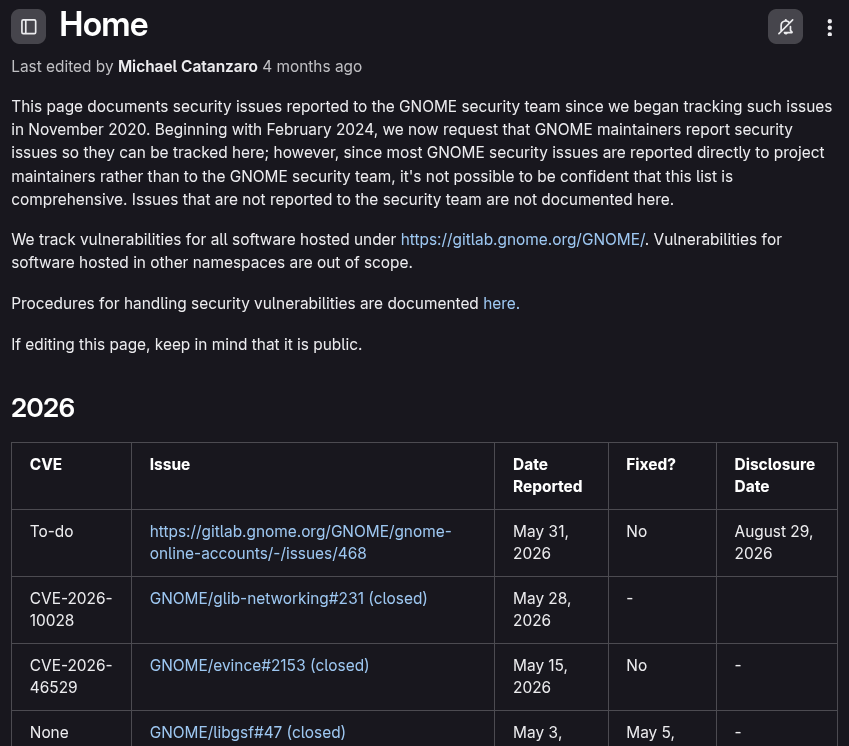
A critical aspect of the role Catanzaro is vacating involves the management of GNOME’s security infrastructure, which he described as "archaic." Unlike other major Linux entities that have modernized their security tracking, GNOME continues to rely on a basic wiki page hosted on its GitLab instance. This system requires manual updates for every new report, fix, and public disclosure. The data is organized into separate tables categorized by year and project, a method that is prone to human error and lacks the scalability of more modern databases.
In contrast, other major players in the Linux ecosystem utilize more sophisticated tools:
- Ubuntu: Employs a system that publishes searchable and filterable security notices directly linked to CVE IDs, allowing users and administrators to easily track the status of vulnerabilities.
- Fedora and Red Hat: Utilize Bugzilla for security tracking. Their workflow involves a "parent bug" that logs the core flaw, with secondary "tracking bugs" filed against every affected package across different versions of the operating system.
The successor to Catanzaro will inherit this manual workflow. Currently, submissions are funneled through a form on security.gnome.org, which alerts a security team that aims to acknowledge reports within two business days. From there, a confidential issue is opened on GitLab and assigned to the relevant maintainer. The manual nature of this process is one of the primary reasons Catanzaro is seeking an experienced community member rather than a newcomer; the role requires an intimate knowledge of GNOME’s internal structure and the social capital to coordinate across disparate project teams.
The Search for a Successor: Requirements and Expectations
The search for a new security lead is already underway, but the requirements are stringent. Catanzaro has emphasized that the position is not suitable for someone looking to break into the community. Instead, it requires a veteran who is already familiar with GNOME’s development culture, technical architecture, and the specific maintainers who oversee its various components.
The responsibilities of the role include:
- Initial Triage: Evaluating the severity and validity of incoming reports.
- Coordination: Acting as a bridge between the reporter and the software maintainers.
- CVE Management: Interfacing with the CVE Program to assign identifiers to confirmed vulnerabilities.
- Public Communication: Drafting and releasing security advisories once fixes are ready.
- Infrastructure Maintenance: Manually updating the GitLab security wiki to maintain an accurate historical record.
While Catanzaro has offered to mentor his successor during the transition period, the goal is to find an individual—or perhaps a small team—capable of maintaining the high standards of security oversight that Red Hat and the GNOME Foundation expect.
Broader Implications for the Open Source Ecosystem
The changes at GNOME reflect a broader set of challenges facing the open-source software (OSS) ecosystem. As software complexity increases, the burden of security management often falls on a small number of individuals. The "bus factor"—the number of people who can be hit by a bus before a project stalls—is a perennial concern in OSS, and Catanzaro’s solo management of GNOME security tracking for four years underscores this vulnerability.
Furthermore, the decision to reduce disclosure timelines in response to AI-generated reports may set a precedent for other projects. If the volume of automated reports continues to climb, the 90-day window may soon become a relic of a pre-AI era. This shift places more pressure on maintainers to develop and deploy patches rapidly, which could, paradoxically, lead to less thoroughly tested code and further security regressions.
As GNOME moves toward this new chapter, the community will be watching closely to see if a successor emerges and how the 30-day disclosure policy impacts the overall security of the desktop environment. The transition represents a critical moment for GNOME, as it balances the need for robust security with the realities of modern, AI-augmented software development. For now, Catanzaro remains at the helm, steering the project through its final years of legacy tracking while laying the groundwork for a more rapid, AI-aware future.
Related posts: