The Evolution of the GNOME Desktop Environment as a Hub for Professional Productivity and Workflow Optimization

The GNOME desktop environment, a cornerstone of the Linux ecosystem, has undergone a significant transformation from a minimalist user interface into a highly extensible platform capable of rivaling proprietary operating systems in professional productivity. As the modern workforce increasingly grapples with the cognitive load of digital multitasking, the role of the desktop environment has shifted from a mere file-launcher to a critical component of "flow state" management. The current landscape of GNOME extensions represents a decentralized development effort to bridge the gap between GNOME’s core philosophy of simplicity and the complex, high-friction demands of modern professional workflows. By integrating specialized tools directly into the Shell, users can mitigate the "context-switching" costs that studies suggest can consume up to 40% of an individual’s productive time.
The Historical Context of GNOME Extensibility
The architecture of GNOME Shell, particularly since the transition to version 3.0 and more recently the move to GTK4 and libadwaita in the GNOME 40 series, was designed with a specific vision: a distraction-free environment. However, the diverse needs of developers, researchers, and creative professionals necessitated a middle ground. This led to the creation of the GNOME Shell Extensions ecosystem. Unlike traditional third-party software that runs as isolated applications, extensions are injected directly into the Shell’s process, allowing for deep integration with the top bar, the activities overview, and window management logic.
Over the last decade, the timeline of GNOME’s development has seen a shift in how extensions are managed. The introduction of the "Extensions" app and the "Extension Manager" tool has stabilized what was once a volatile user experience. Today, as of GNOME 47 and the upcoming GNOME 48, the API has matured to the point where extensions can provide features that feel native, reducing the reliance on heavy, cross-platform electron applications that often drain system resources.

Seamless Connectivity: The Integration of Mobile and Desktop Workspaces
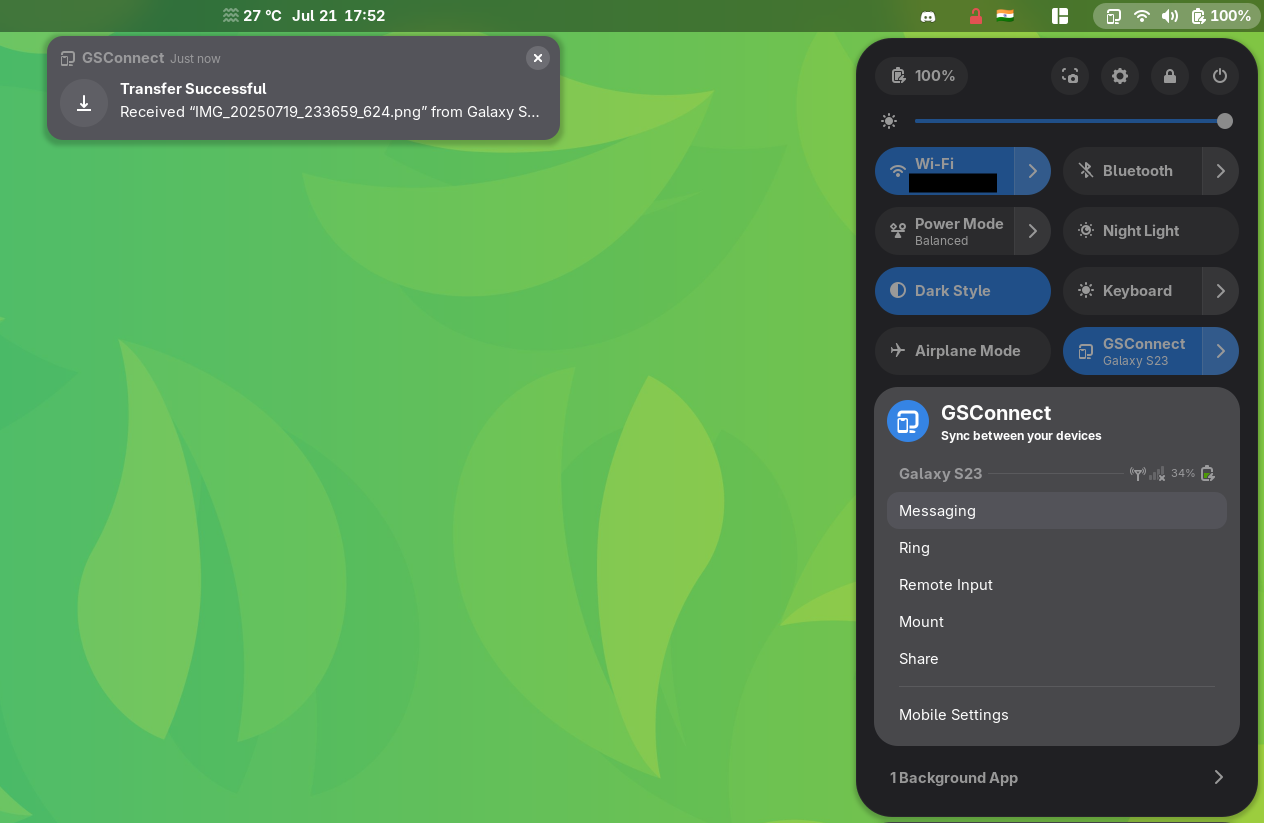
One of the primary sources of friction in a modern workflow is the "notification gap" between mobile devices and desktop workstations. GSConnect, a complete implementation of the KDE Connect protocol tailored specifically for GNOME Shell, serves as a vital bridge in this regard. In a professional setting, the requirement to physically check a mobile device for two-factor authentication codes, client messages, or calendar alerts represents a significant cognitive interruption.
GSConnect addresses this by synchronizing notifications, clipboard content, and battery status. Furthermore, it allows for remote filesystem mounting and SMS integration directly from the Linux desktop. This level of integration is often cited by industry analysts as a key factor in user retention for ecosystems like Apple’s macOS; however, the open-source implementation via GSConnect offers this functionality without the "vendor lock-in" associated with proprietary hardware. The ability to share files bi-directionally between an Android device and a Linux workstation via a local network remains a benchmark for efficient data handling in a multi-device environment.
Advanced Window Management and Tiling Paradigms
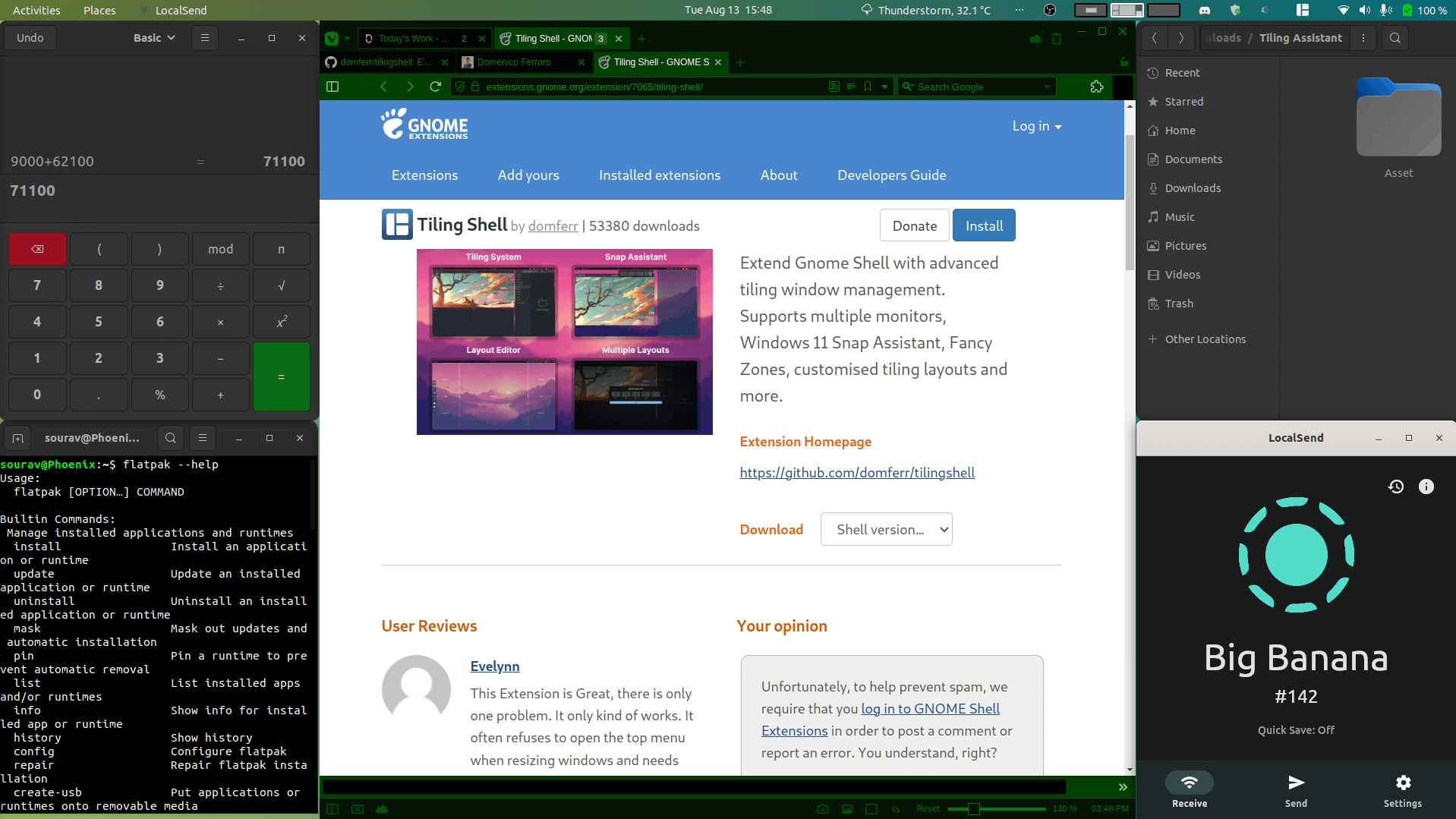
While GNOME provides basic window snapping, it has traditionally lagged behind "tiling window managers" (TWMs) such as i3 or Sway in terms of automated layout management. The emergence of the Tiling Shell extension has significantly altered this dynamic. Tiling Shell introduces a sophisticated snap assistant and a layout editor that allows users to define custom grids for their applications.
For professionals handling data-heavy tasks—such as financial analysts monitoring multiple streams or software engineers managing several terminal windows—the ability to maintain a rigid, non-overlapping window structure is paramount. Tiling Shell allows for these layouts to be workspace-specific, ensuring that a "Development" workspace can have a different structural logic than a "Communications" workspace.

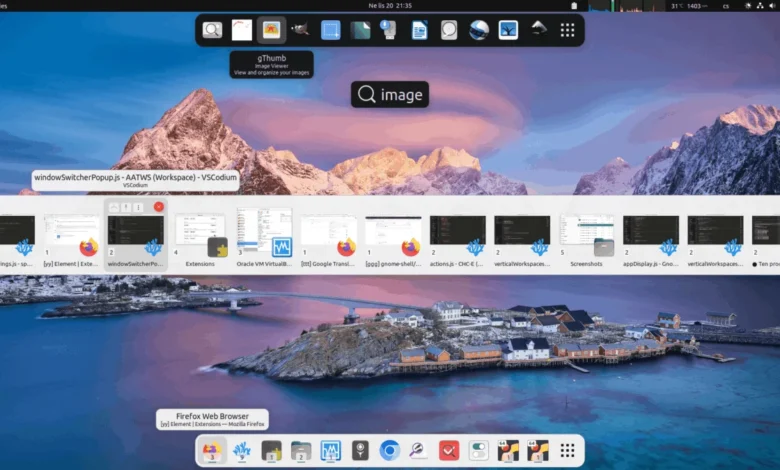
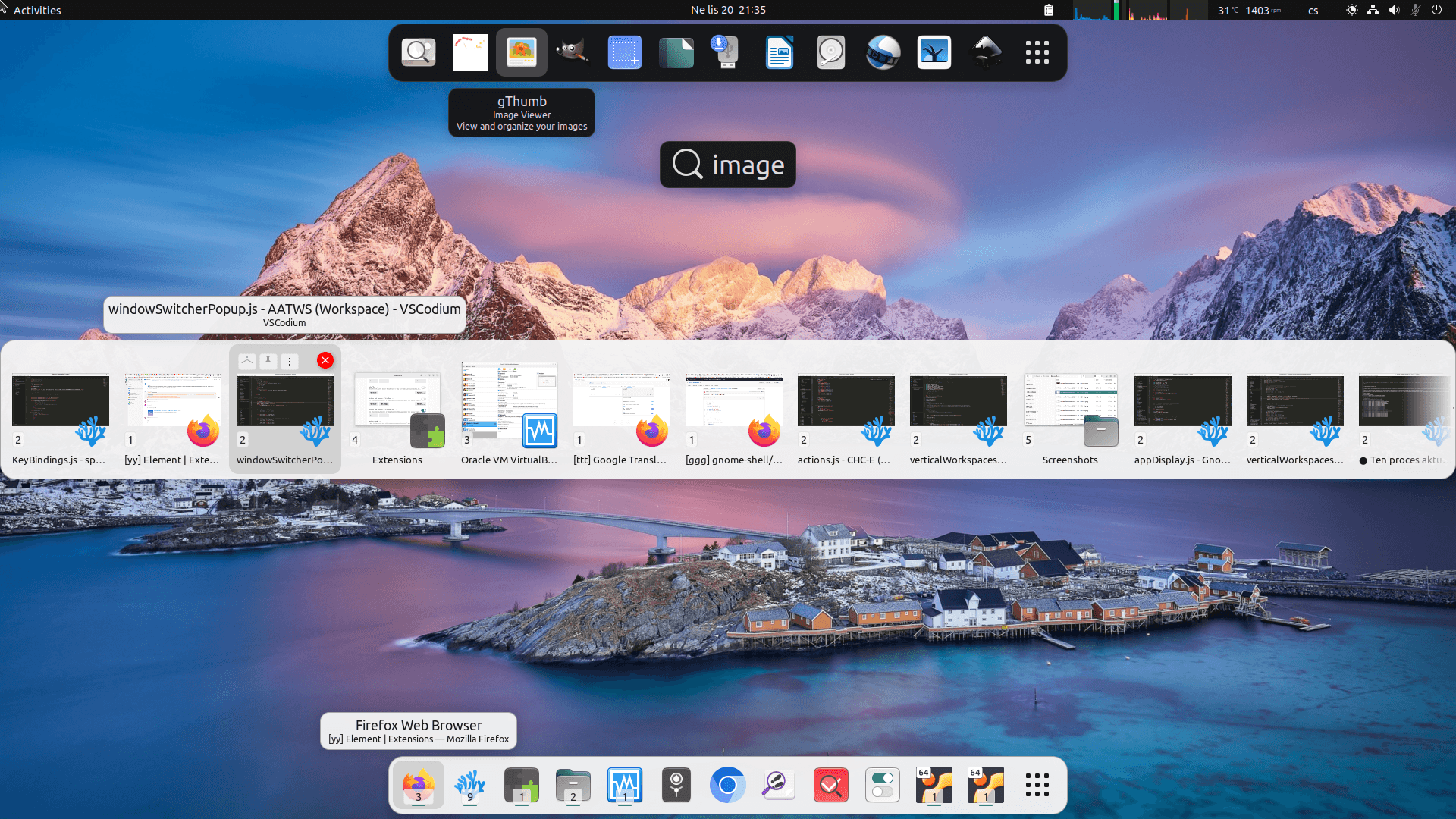
Complementing this structural control is the Advanced Alt-Tab Window Switcher (AATWS). As the number of open windows increases, the standard linear switcher becomes inefficient. AATWS introduces filtering, sorting, and search-based switching. This allows a user to type the name of a specific document or executable to jump directly to it, bypassing the need to cycle through a dozen open applications. Data on user interface design suggests that "search-based navigation" is consistently faster than "visual scanning" once the number of active elements exceeds seven.
Terminal Accessibility and the Developer Workflow
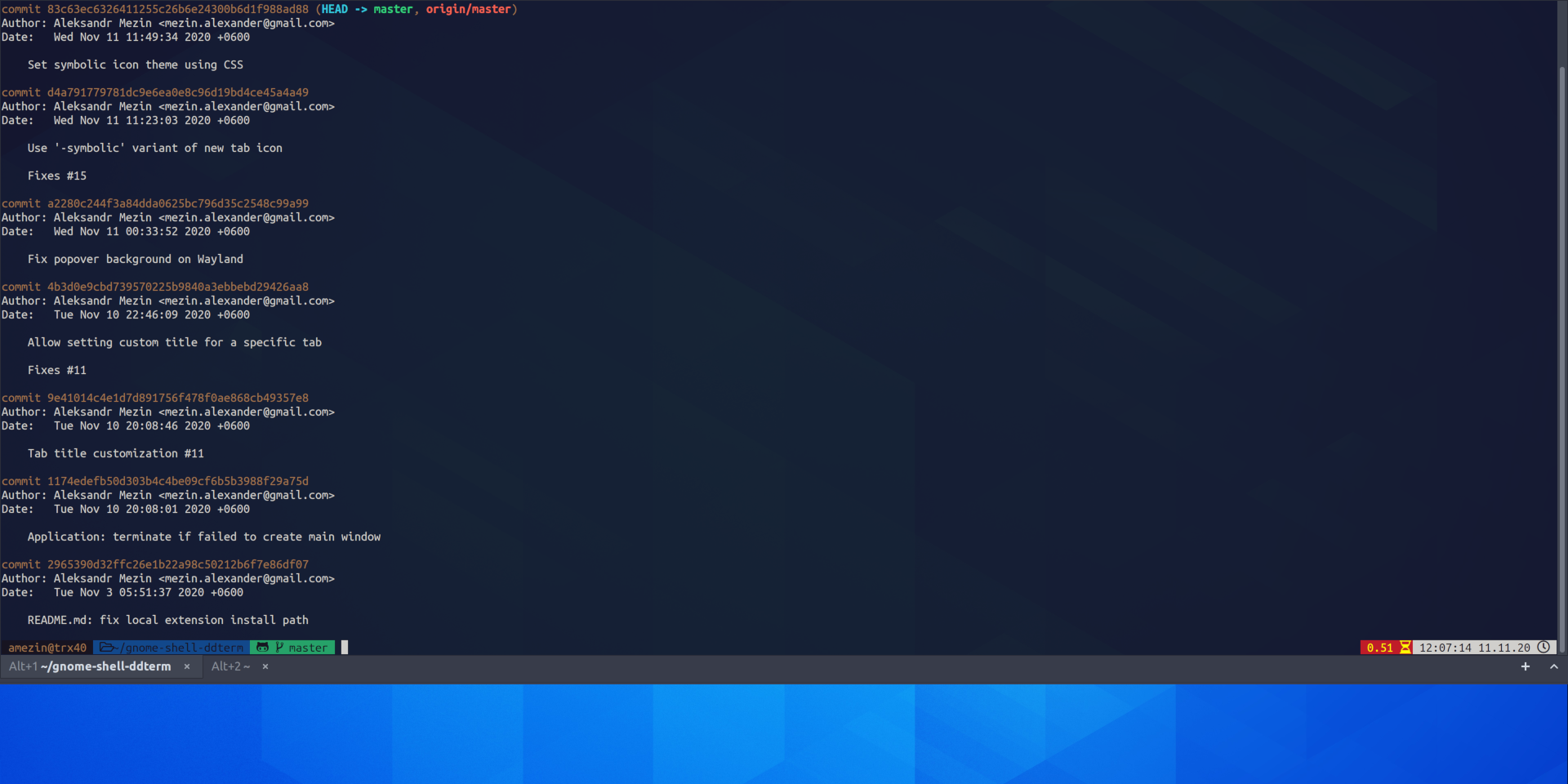
For the technical segment of the Linux user base, the terminal is the primary interface for productivity. The extension ddterm (Drop Down Terminal) adopts the "Quake-style" paradigm, where a terminal can be toggled via a global hotkey, sliding down from the top of the screen. This minimizes the need for workspace switching and ensures that the command line is always a single keystroke away.
The technical significance of ddterm lies in its native support for Wayland, the modern display protocol that has largely replaced X11 in the Linux world. Maintaining performance and window focus in a Wayland environment has been a challenge for many legacy terminal emulators, but ddterm’s integration as a Shell extension allows it to bypass many of these hurdles, providing a low-latency, high-reliability tool for system administrators and developers.
Information Persistence: Clipboard and Note Management
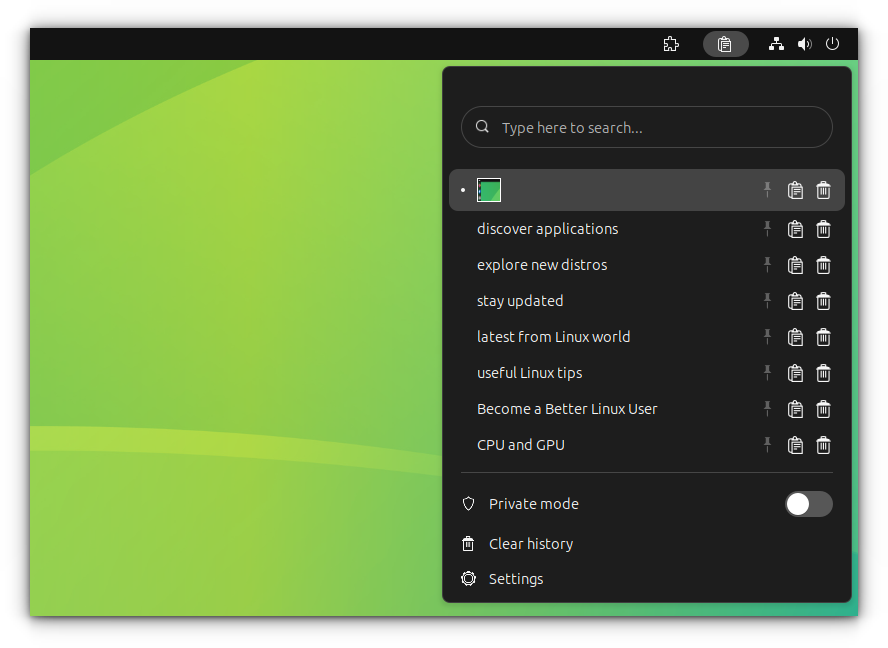
The loss of copied data due to a single subsequent "copy" command is a common point of failure in digital workflows. Clipboard Indicator provides a persistent, searchable history of both text and image data. In a journalistic or research-oriented workflow, where multiple snippets of information must be collated from various sources, a clipboard manager is an essential safeguard.
This persistence is mirrored in the utility of Notes With History. By moving note-taking from a separate application to a panel-integrated menu, the extension reduces the "activation energy" required to record a thought or a task. The inclusion of version history within the notes provides a layer of data security, allowing users to revert changes—a feature typically reserved for full-scale document editors but highly valuable for quick-entry sticky notes.
System Monitoring and Hardware Awareness
Productivity is often tethered to hardware performance. A system slowdown during a resource-intensive task, such as video rendering or compiling large codebases, can be detrimental if the cause is not immediately apparent. Freon provides real-time telemetry of CPU, GPU, and disk temperatures, along with fan speeds and voltages, directly in the GNOME top bar.
This information is not merely for enthusiasts; it serves as an early warning system for hardware throttling. In a professional environment, knowing that a system is overheating allows a user to pause intensive tasks or adjust workloads before a system crash occurs. This proactive approach to system health is a critical component of maintaining a reliable professional workstation.
Time Management and the Pomodoro Technique
The cognitive science of productivity emphasizes the importance of structured breaks. Cronomix is a multi-functional extension that integrates timers, stopwatches, and Pomodoro tools into the GNOME interface. The Pomodoro technique, which involves 25-minute bursts of focused work followed by 5-minute breaks, has been widely adopted in the tech industry to prevent burnout and maintain mental clarity.
Cronomix differentiates itself by bundling these time-tracking features with a to-do list and a basic flashcard system. This consolidation is a response to "extension fatigue," where users find their top bars cluttered with numerous single-purpose icons. By providing a unified interface for time management, Cronomix allows users to track their billable hours and manage their task lists without leaving their primary workspace.
The Shift Toward Native Digital Wellbeing in GNOME 48
Perhaps the most significant development in the GNOME productivity story is the introduction of the Digital Wellbeing section in the native Settings app, starting with GNOME 48. This move signals an official recognition by the GNOME Foundation that productivity is as much about "stepping away" as it is about "locking in."
The native Digital Wellbeing features include screen time tracking, break reminders, and a "grayscale" mode that can be triggered when daily limits are reached. This mirrors similar features found in mobile operating systems like Android and iOS but is a relatively new frontier for desktop environments. By integrating these features natively, GNOME provides a baseline of productivity support that does not require the installation of third-party extensions, ensuring stability and privacy for the average user.
Analysis of Implications: The Future of the Linux Workstation
The enrichment of the GNOME ecosystem through both community extensions and native features has profound implications for the broader adoption of Linux. Historically, Linux was viewed as an operating system for those willing to sacrifice convenience for control. However, the current state of GNOME productivity tools suggests that Linux can now offer a more streamlined, "frictionless" experience than its proprietary counterparts.
The lack of a subscription model for these high-level productivity enhancements is a significant economic factor. While macOS and Windows users are increasingly pushed toward "SaaS" (Software as a Service) models for basic utility features, the GNOME ecosystem remains a bastion of free, high-quality, and privacy-respecting tools.
Furthermore, the modularity of GNOME allows organizations to deploy customized desktop environments tailored to specific roles. A data science team can be provided with a GNOME configuration pre-loaded with Tiling Shell and Freon, while a creative team might focus on GSConnect and Clipboard Indicator. This flexibility, combined with the underlying stability of modern Linux distributions like Fedora, Ubuntu, and Debian, positions GNOME as a formidable contender in the enterprise desktop market.

In conclusion, the GNOME productivity ecosystem has evolved into a sophisticated suite of tools that address the physiological and cognitive realities of modern work. By reducing friction, enhancing connectivity, and prioritizing user wellbeing, these extensions and native features transform the desktop into a proactive partner in the user’s professional life. As GNOME continues to iterate on its core design, the synergy between the Foundation’s vision and the community’s innovation will likely remain the driving force behind the most efficient desktop experience available today.
Related posts: